
Compliance
Geotab Personal Conveyance: How to Set It Up and Stay Compliant
Personal conveyance lets a driver move a commercial vehicle off duty, for personal reasons, without it counting against hours of service. Here is what the US and Canadian rules allow, how to enable it in MyGeotab and Geotab Drive, and the mistakes that turn it into a violation.
What Personal Conveyance Is, and What It Is Not
Personal conveyance is the movement of a commercial motor vehicle for personal use while the driver is off duty. The rule exists because a driver who has finished a shift still has to eat, sleep somewhere, and sometimes get home, and the truck may be the only vehicle available. Logged correctly, that movement is off-duty time: it does not count against the driving limit or the on-duty window, and the driver does not have to be back on the clock to make it.
What it is not is a way to extend the workday. The test in both countries comes down to one question: is the vehicle being moved to advance the load or the business? Driving from a delivery site to a motel is personal conveyance. Driving from that motel toward the next delivery, even to a truck stop ten minutes closer to it, is work, and logging it as PC is the single most common way fleets turn a legitimate provision into a violation.
On an ELD, personal conveyance is one of two special driving categories the device supports alongside yard moves. The device still records that the vehicle moved, so the data is there for the carrier and the inspector; what changes is the duty status it is recorded under and, in the United States, the precision of the location stored in the log.
The US Rule: FMCSA's Personal Conveyance Guidance
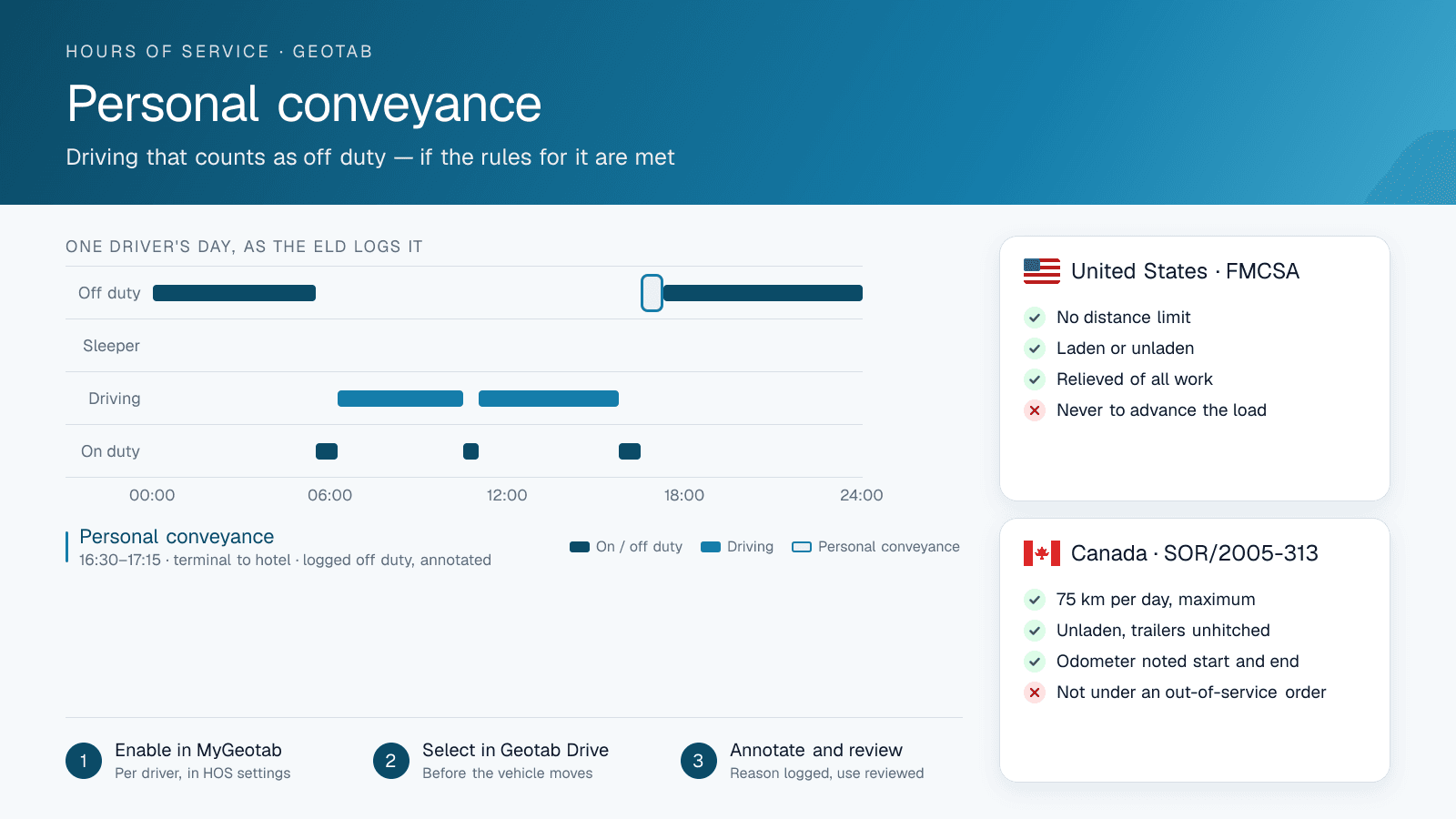
The FMCSA's 2018 guidance sets the US framework. Personal conveyance is off-duty time, the driver must be relieved of all work responsibility, and the vehicle may be laden or unladen — the 2018 change was to drop the earlier requirement that the truck be empty. There is no federal distance limit. Instead the guidance lists the kinds of movement that qualify, and the movement has to be reasonable for the personal purpose it serves.
The examples FMCSA gives as acceptable include travelling between lodging and restaurants or entertainment, commuting between a terminal and home, moving the vehicle at a safety official's request during off-duty time, and moving to the nearest reasonable safe location to rest after loading or unloading once the on-duty window is exhausted. That last one is deliberately narrow: nearest reasonable, not the rest area two hours down the road in the direction of the next stop.
The examples it lists as not personal conveyance are the ones that get carriers into trouble. Moving the vehicle to enhance the operational readiness of the carrier, driving to a customer or a fuel stop because it is closer to tomorrow's work, bypassing available rest to get farther along the route, and any movement after a driver has been placed out of service, other than as directed by the officer, are all on-duty driving regardless of what the driver selects on the screen.
One technical detail matters for anyone reading a US log: while personal conveyance is active, the ELD records vehicle position at reduced precision, to roughly a ten-mile radius rather than the usual one mile. That is by design in the ELD technical specification, to give the driver some privacy while off duty. It also means the ELD output file will not show an inspector the street address a driver stopped at, though the fleet's own telematics map still does.
The Canadian Rule: 75 km, Unladen, Trailers Unhitched
Canada's Commercial Vehicle Drivers Hours of Service Regulations take a different approach and are stricter on every axis. Personal use of a commercial vehicle counts as off-duty time only if the vehicle is unladen, any trailers are unhitched, the total distance driven for personal use is 75 kilometres or less in a day, the driver records the odometer at the start and end of the personal use, and the driver is not subject to an out-of-service declaration.
The 75 km cap is a hard limit, not a guideline. A driver who logs 80 km of personal use in a day has not made a partial mistake; the personal-use provision no longer applies, and the time becomes driving time under the daily and cycle limits. The unladen condition is equally absolute: a loaded truck cannot be on personal conveyance in Canada at all, which surprises drivers used to the US rule.
For a fleet operating on both sides of the border, this is the practical trap. A driver who crosses into Canada with US habits — laden, no distance cap, no odometer note — is non-compliant from the first kilometre of personal use. The ruleset assigned to the driver in Geotab is what enforces the difference, which is why confirming it is a step in the setup rather than an afterthought.
US vs Canada at a Glance
The two rule sets are easiest to hold side by side. Everything in the Canadian column is a hard condition: fail any one of them and the time is driving, not personal use. The US column is a judgement standard with no numbers in it, which is more flexible for the driver and harder for the carrier to police.
| United States (FMCSA) | Canada (SOR/2005-313) | |
|---|---|---|
| Duty status while in PC | Off duty | Off duty |
| Distance limit | None; movement must be reasonable for the personal purpose | 75 km per day, total |
| Loaded vehicle allowed | Yes, laden or unladen | No, must be unladen |
| Trailers | May stay attached | Must be unhitched |
| Record required | Annotation of the reason | Odometer at start and end, plus annotation |
| After running out of hours | To the nearest reasonable safe place to rest, after loading or unloading only | No equivalent allowance |
| Under an out-of-service order | Not permitted, except as directed by the officer | Not permitted |
| What Geotab enforces | Nothing beyond logging; no cap exists to enforce | The 75 km daily limit under Canadian rulesets |
How to Enable It in MyGeotab
Personal conveyance is off for every driver until an administrator turns it on. In MyGeotab, open Administration, then Users, and select the driver. In the user's HOS settings there is a Personal Conveyance option; enabling it makes the special driving condition available in Geotab Drive for that driver only. Yard Move is a separate option on the same screen and is worth deciding at the same time, since the two are often confused.
The HOS ruleset on the same user record decides which rules the app enforces. Under the Canadian rulesets, Geotab applies the 75 km daily limit to personal use; under the US rulesets there is no distance enforcement, because the regulation has none. A carrier that wants a stricter internal policy than the regulation, say a 30 km cap for its US drivers, has to enforce it through review and reporting rather than through a device setting.
Because the setting is per user, it is also a permission you can grant selectively. A fleet that lets its long-haul drivers use PC to reach lodging but sees no reason for local drivers to have it can enable it for the first group only, and the second group simply never sees the option.
How a Driver Logs It in Geotab Drive
In Geotab Drive, the driver changes status to Off Duty and then selects Personal Conveyance from the special driving conditions. The order matters and so does the timing: the selection has to be made before the vehicle moves. If the truck is already rolling when the driver taps the option, the ELD has already recorded the start of that movement as driving, and the driver will be editing a log rather than annotating one.
The app asks for an annotation, and the driver should give a real one: 'terminal to hotel', 'hotel to restaurant', 'home for the night'. FMCSA's guidance expects the reason to be documented, the Canadian regulation requires the odometer readings, and in practice the annotation is the first thing an officer reads when a PC segment appears in a log. A blank or generic note invites the question a specific one answers.
When the personal movement is over, the driver ends personal conveyance. If the vehicle is switched off, Geotab Drive will prompt about the special driving condition on the next ignition, which prevents the common mistake of starting the next morning's first work trip still in PC.
Reviewing Personal Conveyance Use as a Carrier
The carrier's exposure is not the driver's intent but the pattern in the data. MyGeotab's HOS logs show each PC segment with its distance and its annotation, and the personal conveyance reporting lets a safety manager see, per driver, how much PC is being logged and where those segments begin and end. The pattern that should trigger a conversation is easy to describe: PC segments that are long, that run in the direction of the next job, or that consistently end at a customer, a shipper or a fuel stop.
Reviewing this regularly is what makes the provision defensible. A carrier that can show it enabled PC deliberately, documented its policy, and reviewed its use is in a very different position at a DOT audit or a Canadian facility audit from one whose drivers discovered the button on their own. Personal conveyance abuse is a recognized audit finding and, in the United States, a false log entry, which carries consequences well beyond the hours involved.
Frequently asked questions
Is there a distance limit for personal conveyance?
In Canada, yes: 75 kilometres of personal use per day, with the vehicle unladen and trailers unhitched. In the United States, FMCSA sets no distance limit, but the movement must be reasonable for its personal purpose and must not advance the load or the carrier's business.
Can a loaded truck be on personal conveyance?
In the United States, yes — FMCSA's 2018 guidance allows personal conveyance whether the vehicle is laden or unladen, provided the movement is genuinely personal. In Canada, no: the vehicle must be unladen and any trailer unhitched for the time to count as personal use.
Does Geotab still track the truck during personal conveyance?
Yes. The GO device keeps recording position and movement, and the fleet sees the vehicle on the MyGeotab map as usual. What changes is the ELD log: the time is recorded as off duty under the personal conveyance category, and in the United States the location stored in the ELD record is reduced to roughly ten-mile precision.
Why can't my driver see the Personal Conveyance option in Geotab Drive?
It is off by default. An administrator has to enable Personal Conveyance on that driver's user record in MyGeotab, under the user's HOS settings. Until then the special driving condition does not appear in the app for that driver.
Can personal conveyance be used to get to a rest stop after running out of hours?
In the United States, only to the nearest reasonable safe location to rest, and only after loading or unloading, when the on-duty window is exhausted. Driving past available rest to a stop closer to the next delivery is not personal conveyance. Canada's rule has no equivalent allowance, and the 75 km unladen conditions still apply.
Sources
Related solutions & products
Get a free quote
What are you looking for?