
Fleet Operations
Dispatch & Routing
Dispatch and routing for fleets: plan multi-stop routes, assign jobs to the right vehicle and give customers accurate ETAs from live GPS tracking data.
Updated September 19, 2026
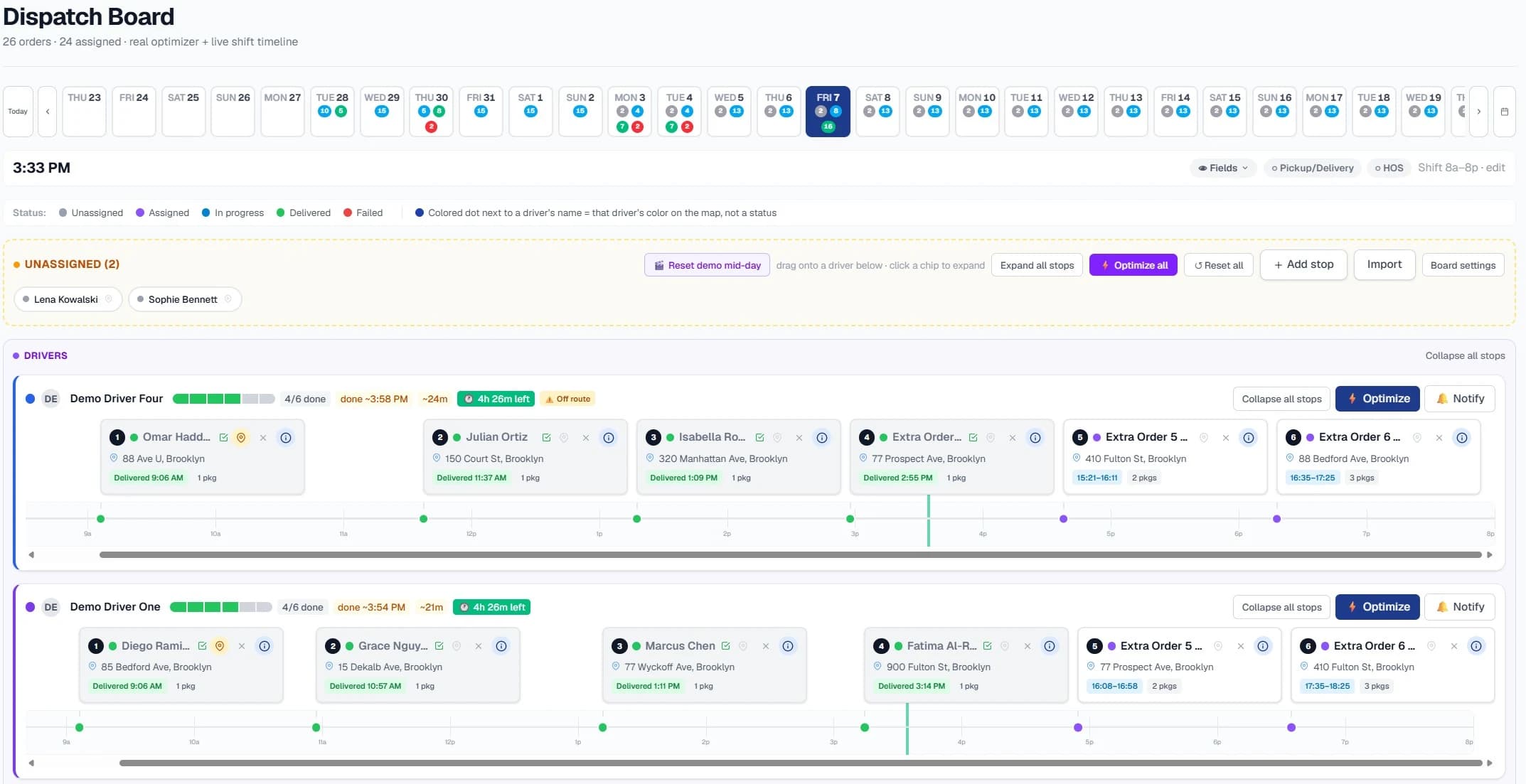
Dispatch & Routing is for fleets that plan daily routes and assign jobs, and want to do it from the tracking data they already collect. High Point GPS sets up route planning, live job assignment and customer ETAs on top of the platform, so a dispatcher works from one map that shows where every vehicle is, what it is doing and how much driving time each driver has left. Routes are built from real historical trip times instead of map estimates, and stop orders are optimized across vehicles and time windows. A job sent to a driver lands in the same driver app they use for their logs. Nobody keys addresses into a second system, and no extra login competes with the High Point GPS platform for the team's attention.
What's included
- Multi-stop route optimization across vehicles, time windows and vehicle capacity
- Live dispatch: assign or reassign a job to the nearest available vehicle from the same map
- Customer ETAs based on live position and the fleet's own historical trip times
- Jobs and stop sequences sent to the driver app, with a handoff to turn-by-turn navigation
- Hours of service remaining built into assignments, to help keep each run within driving limits
- Planned-versus-actual route reports that show where time and distance are lost
- Runs on your existing GPS tracking devices and High Point GPS platform login, plus a dispatch add-in we configure
What is the difference between route optimization and navigation?
Navigation guides a driver along a route that has already been chosen. Route optimization chooses the route and the stop order in the first place, across every stop and vehicle in the day, while respecting delivery windows, vehicle capacity and each driver's remaining hours of service. A dispatcher normally solves that problem by hand with a spreadsheet and a wall map, and this solution takes it over. The optimizer produces a stop sequence for each vehicle, and the driver's navigation handles the turns.
The difference shows up in numbers your fleet already tracks. A hand-planned day for two vans and twelve stops can run longer and farther than the optimized version of the same day, and the gap grows as you add stops and vehicles. The plan is built from your fleet's own trip history instead of generic map speeds, so the ETAs it produces are ones a customer can hold you to.
Why does dispatch run on your existing tracking data?
A good dispatch tool needs live vehicle position, historical trip times and remaining hours of service, and your GPS tracking devices already produce all three through GPS Fleet Tracking and Compliance. Building dispatch on that data, instead of on a disconnected system, means no duplicate address entry, no re-keying of driver assignments and no second application for the dispatcher to keep open.
The dispatcher also sees compliance in the same view as the work. A job that would push a driver past their driving limit shows up before it is assigned, not at a roadside inspection. As part of setup, High Point GPS configures the dispatch add-in, imports your customer sites as zones and trains your dispatch team on the workflow.
What do drivers and customers see?
The driver gets the day's stops, in order, in the driver app that already holds their logs and inspections. Tapping a stop opens navigation, and completing it updates the board. When dispatch changes something mid-day, such as a reassigned pickup or a new stop slotted in, the change reaches the driver without a phone call.
Customers get an ETA based on where the vehicle is and how long that leg has taken in the past, shared through a link or your own customer portal. When a truck is running late, the office knows before the customer calls, and that is usually when a dispatch tool proves its worth.
Frequently asked questions
Does dispatch and routing require separate hardware or a second login?
No. It runs on the fleet data your existing GPS tracking devices already collect, and the dispatcher works inside the High Point GPS platform with a dispatch add-in that we configure. Drivers see their stops in the driver app, the same app they use for logs and inspections.
Will it replace our ELD or compliance tools?
No. Dispatch sits alongside your tracking and compliance data, and ELD, DVIR and IFTA reporting stay part of the same High Point GPS platform. Hours of service remaining is one of the inputs the dispatcher sees when assigning work, so compliance informs each job before it goes to a driver.
How are ETAs calculated?
From the vehicle's live position and your fleet's own historical trip times for that leg, instead of generic map speeds. That is why the ETAs hold up on routes your fleet runs regularly: the traffic patterns and dwell times for those routes are already in the data.
What does dispatch and routing cost?
High Point GPS doesn't publish fixed pricing, because the cost depends on fleet size, the add-in configuration and the integrations involved. For a quote based on your fleet, use the form on this page or call 1-800-613-6323, and we will scope the dispatch and routing setup with you.
Related hardware
Related guides
- Dispatch Software for Small Businesses: Do You Need One? →
- AI Dispatch Software: How AI Dispatching and Automated Routing Change Fleet Dispatch →
- Construction and Concrete Dispatch Software: Sites, Equipment, Loads →
- Towing Dispatch Software: Real-Time Routing and Driver Assignment for Towing Companies →
Get a free quote
- Over 500 fleets
- Since 2013
- 4.9 on Google (19 reviews)
What are you looking for?
Prefer to talk?Call 1-800-613-6323[email protected]