
Compliance
Geotab IFTA Reporting: How Automated Fuel Tax Reports Save Fleets Hours
The hard part of an IFTA return is not the form, it is proving how many miles each truck drove in each jurisdiction. Geotab produces that from GPS data as a report. Here is how the report is built, what it does and does not cover, and how to run it every quarter.
Why Distance by Jurisdiction Is the Hard Part
An IFTA return asks for two numbers per jurisdiction: how far your qualified vehicles travelled there, and how much fuel you bought there. Fuel comes from receipts and fuel-card statements, which fleets already keep. Distance is the problem. Before telematics it came from trip sheets, drivers' notes and a map, reconstructed a quarter later, and it was the number auditors disallowed most often, because a reconstruction is an estimate however carefully it is made.
That is the whole of what automated IFTA reporting fixes. A device on the vehicle records position continuously, the platform matches those positions to jurisdiction boundaries, and the total distance in each one is a measurement rather than a memory. The return still has to be filed, the fuel still has to be reconciled, and the fleet still has to keep records — but the number that used to take an afternoon per truck now takes a report.
How Geotab Builds the Report
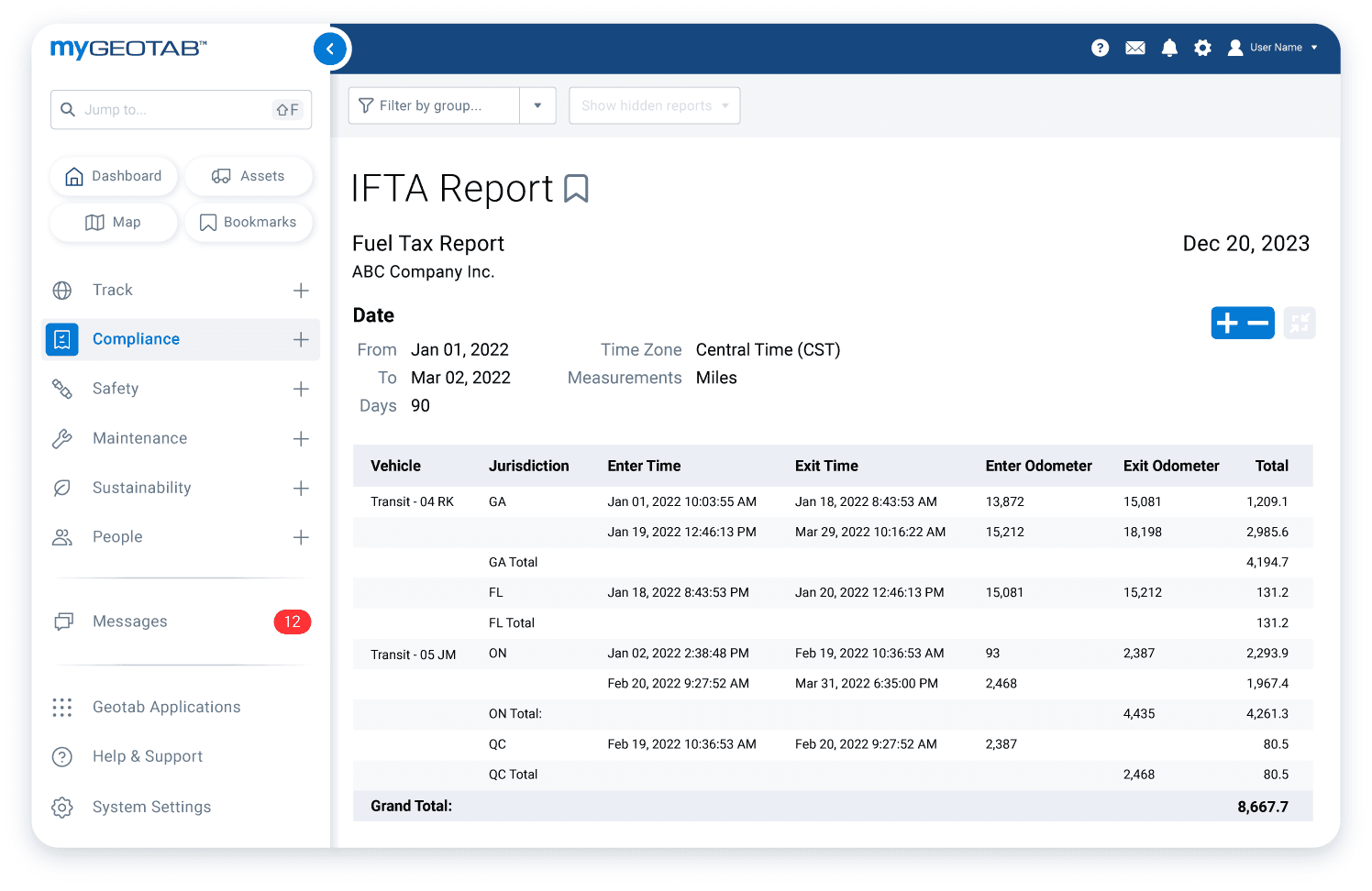
The GO device logs GPS positions and odometer throughout every trip. MyGeotab's IFTA report takes those logs for a date range and a set of vehicles, assigns each stretch of travel to the state or province it occurred in using boundary data, and totals the distance per jurisdiction per vehicle. Because the input is the same trip data used for everything else — dispatch, maintenance, the ELD — there is nothing separate to switch on or maintain; a fleet that is tracked is a fleet whose IFTA distance is being recorded.
Two things determine whether the output is audit-grade. The first is coverage: every qualified vehicle needs a working device for the whole quarter, because a gap in the log is a gap in the distance, and the report cannot invent what the device did not see. The second is grouping: the report should be run on the vehicles that are actually IFTA-qualified — generally power units over 26,000 pounds or with three or more axles — so that a pickup in the same fleet does not add its kilometres to the return.
The report gives you distance. It does not give you fuel purchases, which come from your fuel cards or receipts, and it does not file the return. Some fleets pair the export with a fuel-card integration so both inputs land in one spreadsheet; either way, the reconciliation of distance against fuel per jurisdiction is the last manual step, and it is a short one.
What Changes at Audit
IFTA audits are conducted by the base jurisdiction, and what an auditor asks for is the distance records behind the return. A system-generated report tied to GPS data, with the trip logs behind it, is a fundamentally different thing to hand over than a folder of reconstructed trip sheets. The distances can be traced to individual trips, the trips to individual positions, and the auditor's sampling comes back matching the return because both came from the same data.
It also changes the conversation about gaps. Every fleet has them — a device unplugged during a repair, a truck that sat with a dead battery. With telematics the gap is visible and bounded, and the fleet can document it, rather than being unable to say which weeks of a truck's quarter are estimates.
The Quarterly Routine
Run the report once a quarter, before the filing deadline at the end of the following month: April 30, July 31, October 31 and January 31. Review the per-vehicle distances for anything that looks wrong — a jurisdiction you do not operate in, a vehicle with too few kilometres against its odometer, a border crossing nobody mentioned — and resolve those before filing rather than after. Export the report, set it beside the fuel purchases per jurisdiction, and file through the base jurisdiction's portal.
Then keep the export with the fuel records for the audit period, which is commonly four years. The value of the report is not only the hours it saves each quarter; it is that four years from now the number can still be explained.
Frequently asked questions
Does Geotab file my IFTA return?
No. Geotab produces the distance-by-jurisdiction figures the return needs, from GPS data. You still pair those with fuel purchased per jurisdiction and file through your base jurisdiction's portal each quarter.
How accurate is the Geotab IFTA report?
It is a measurement from continuous GPS positions matched to jurisdiction boundaries, not an estimate, and it is traceable to individual trips. Its accuracy depends on coverage: every qualified vehicle needs a working device for the whole quarter, because a gap in the log is a gap in the distance.
Which vehicles should be in the IFTA report?
Only IFTA-qualified motor vehicles — generally power units over 26,000 pounds gross weight, or with three or more axles, or over 26,000 pounds in combination. Run the report on a vehicle group containing just those, so light vehicles in the same fleet do not inflate the distances.
What do I show an IFTA auditor?
The distance records behind the return. With Geotab that is the exported IFTA report and the trip logs it was built from, kept with the fuel receipts or fuel-card records for the audit period, commonly four years.
Related solutions & products
Related terms
Get a free quote
What are you looking for?