
GPS Fleet Tracking & Telematics
How Does the Geotab GO Device Work? From the Diagnostic Port to the Dashboard
The Geotab GO is a small device that plugs into a vehicle's diagnostic port and reports where the vehicle is, how it is being driven and what the engine is saying, over a cellular connection, to MyGeotab. Here's what happens inside it, step by step, and what the data becomes once it arrives.
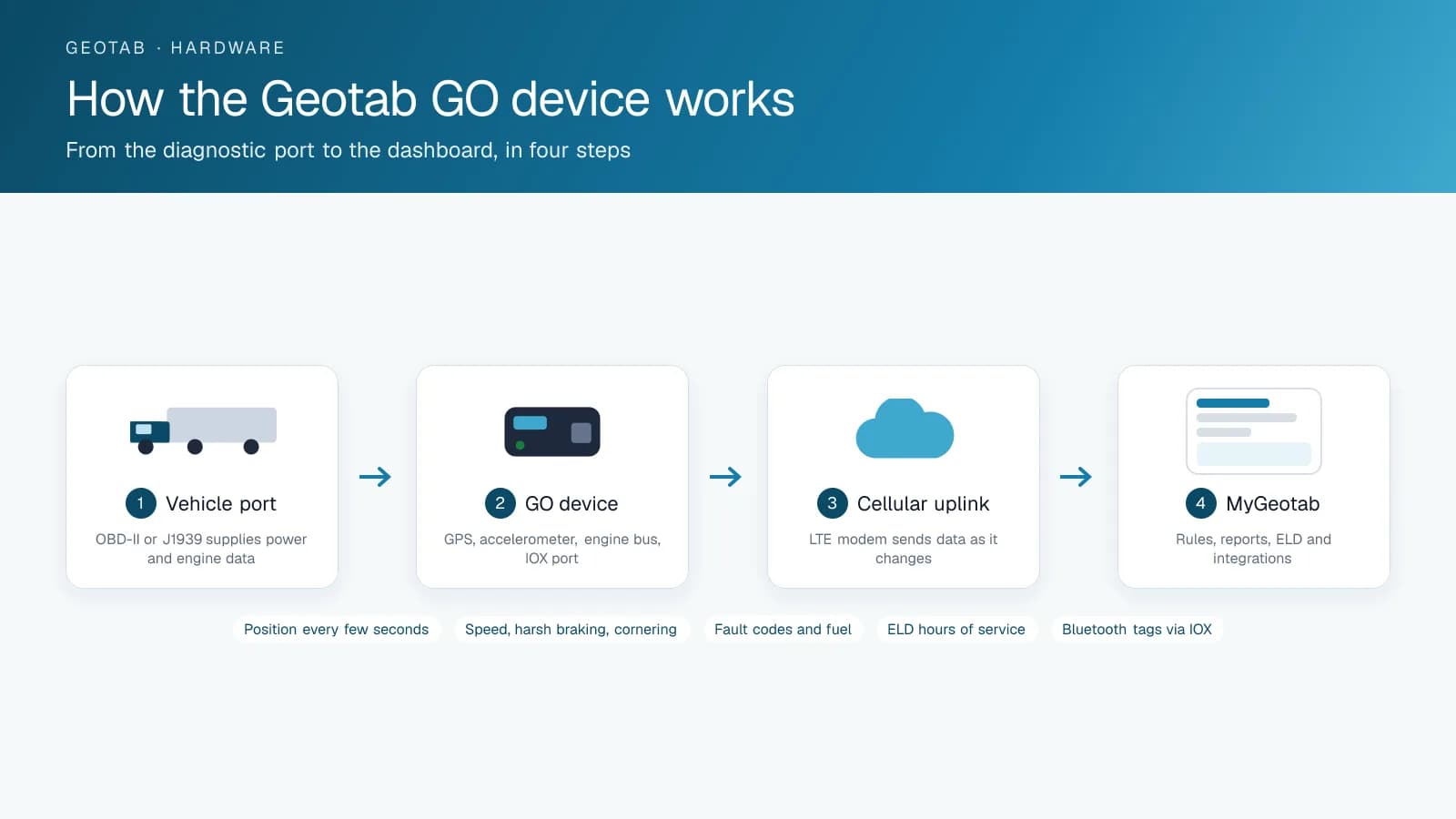
Step One: Power and Engine Data From the Port
The GO device plugs into the vehicle's diagnostic connector: the OBD-II port under the dash on cars, vans and light trucks, or the J1939 nine-pin connector on heavy trucks, with a harness where the port is used by something else. The port gives the device two things at once: power from the vehicle's battery, and a connection to the engine's data bus. On that bus the vehicle broadcasts speed, RPM, odometer, fuel level, coolant temperature, seat belt status, fault codes and, on electric vehicles, state of charge. The device listens rather than asking, so it does not interfere with the vehicle.
Step Two: What the Device Measures Itself
Inside the housing is a GNSS receiver that fixes the vehicle's position using GPS and, on the GO9, other satellite constellations, plus a three-axis accelerometer that senses acceleration, braking and cornering force and detects a collision. A processor combines the two with the engine data and decides what is worth sending: the device logs continuously but transmits on change, using a curve-based algorithm that keeps the shape of the trip while discarding redundant points, which is why the platform's trip lines are accurate without the data plan being enormous. The IOX expansion port on the side accepts add-ons such as Bluetooth readers, driver ID, temperature sensors and cameras, whose data rides along.
Step Three: The Cellular Uplink
An LTE modem in the device sends the data to Geotab's servers over the cellular network, using a SIM built into the device and a plan bundled with the subscription. When the vehicle is out of coverage, the device stores the data and uploads it when the signal returns, so a trip through a dead zone still appears in full. The data is encrypted in transit and authenticated to the device, and the device's firmware updates itself over the same link.
Step Four: MyGeotab
On arrival the data becomes what the fleet actually uses: a live map, trip history, exception rules that fire on speeding or idling or a geofence, driver scorecards, engine fault alerts, maintenance reminders on engine hours, IFTA distance by jurisdiction, and, with the Drive app, the ELD hours-of-service record. Marketplace add-ins and the API take the same data into dispatch, maintenance and camera systems. Installation is a few minutes per vehicle; a reseller such as High Point GPS does the install, configures the rules and reports, and supports the device after.
Frequently asked questions
How does the Geotab GO device work?
It plugs into the vehicle's diagnostic port for power and engine data, adds its own GPS position and accelerometer readings, and sends the combined data over an LTE connection to MyGeotab, where it becomes maps, reports, rules and ELD records.
How does Geotab GPS work?
A GNSS receiver in the device fixes position from GPS and other satellite constellations every few seconds. The device logs the points, keeps the ones that define the trip's shape, and transmits them with the engine data.
Does the GO device need Wi-Fi?
No. It has its own LTE modem and SIM, included in the plan. It stores data when out of coverage and uploads when the signal returns.
What vehicles does it work with?
Anything with an OBD-II or J1939 port: cars, vans, light and heavy trucks, buses and many electric vehicles, plus heavy equipment through a harness.
How long does installation take?
A few minutes per vehicle for a plug-in install; longer where a harness or add-ons such as cameras are fitted.
Related solutions & products
Continue reading
- GPS Fleet Tracking & Management Software overview →
- What Does the Geotab GO Device Actually Track? →
- What Is a Telematics Control Unit (TCU) in a Commercial Vehicle? →
- Telematics vs GPS Tracking: What's the Difference? →
- Geotab Keyless and Keyless Lite: Phone-as-Key for Shared Fleet Vehicles →
- More in GPS Fleet Tracking & Telematics →
Get a free quote
What are you looking for?