
Video Safety & Dash Cams
Dash Cam Footage for Insurance Claims: What to Send the Insurer
Insurers settle claims faster when footage comes with speed, location and time. What to send the adjuster and how to save clips before they loop over.

Why Do Insurers Want Dash Cam Footage for Claims?
Insurers want dash cam footage because it settles insurance claims faster and more predictably than two drivers' competing stories. Commercial auto claims have become more expensive and more contested over the past several years, and insurers have responded by leaning harder on objective evidence. Footage tied to speed and location data at the exact moment of an event tends to close a claim sooner than witness statements alone.
You see the shift most in disputed liability claims, where two drivers give conflicting accounts of who did what. Without footage, these often come down to which insurer pushes harder or whose driver sounds more consistent under questioning. Neither has anything to do with what happened on the road.
What Makes Dash Cam Footage Useful in an Insurance Claim?
Footage is only as useful as the context around it. A clip that shows the vehicle's speed, its precise location and a clean timestamp, all linked automatically by the platform, holds up far better in a dispute than a video file with no metadata. That is the practical case for running your dash cam on the same platform as your GPS tracking, instead of as a standalone system: the telematics data around the video is what makes it persuasive.
Adjusters and insurance investigators are also used to this kind of combined package by now, so a clip with telematics attached is no longer a novelty to them. When your fleet hands over a well-organized package in place of a raw video file and a verbal account, you tend to get a faster response, because there is less back-and-forth to establish the basic facts.
How Fast Do You Need to Preserve Footage?
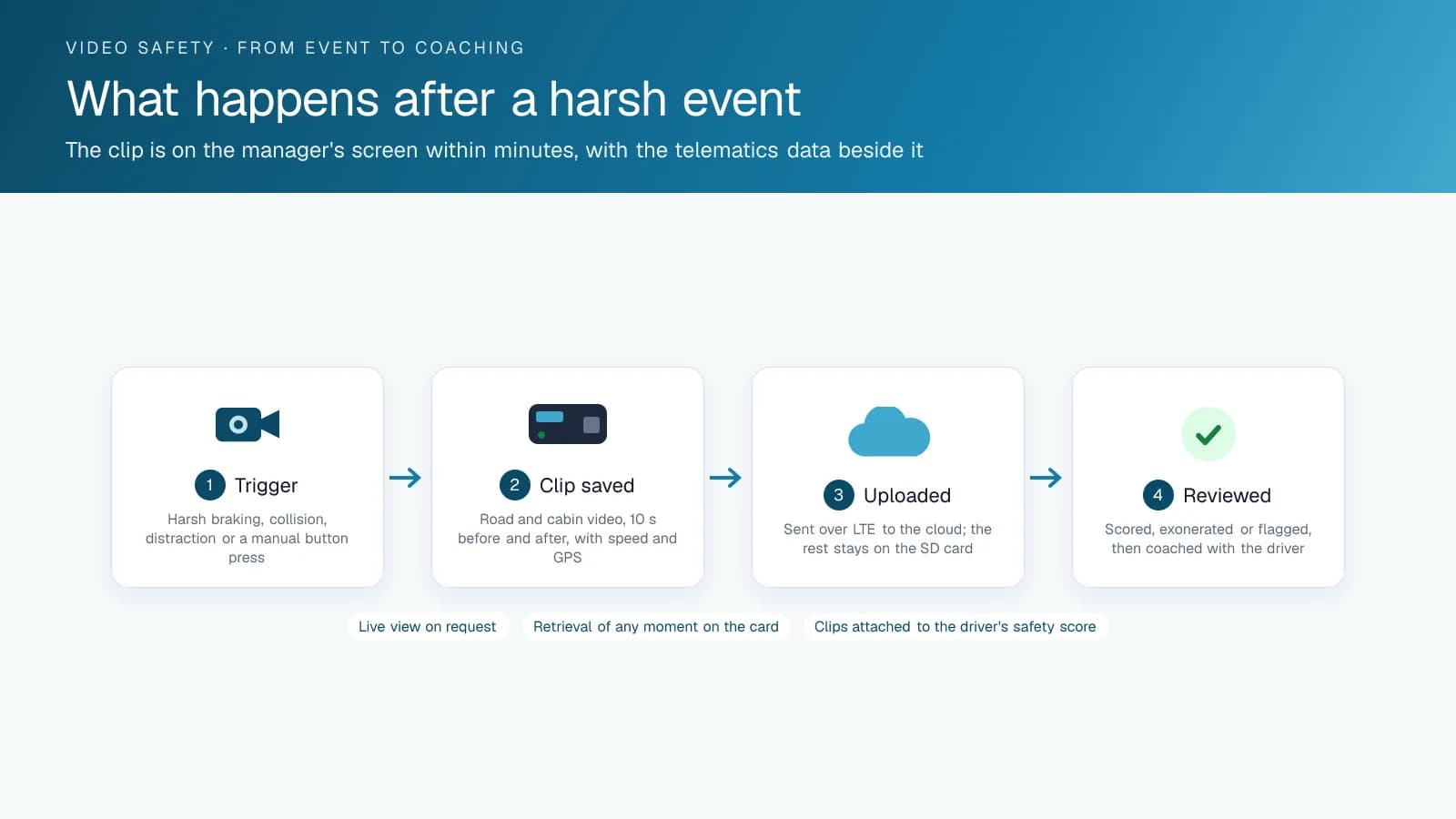
Many dash cam systems, including basic continuous-recording units, overwrite older footage on a rolling loop to manage storage. If nobody flags a claim and saves the clip quickly, the footage that would have settled the dispute can be gone by the time someone asks for it. AI event-triggered systems that upload and keep flagged clips automatically remove most of this risk. You still need a clear internal process for saving footage the moment you know an incident might become a claim.
A good rule of thumb: treat any incident involving another vehicle, a pedestrian or property damage as a trigger to save the footage by hand right away, however minor it looks at the time. Don't wait to see whether a claim shows up. Claims sometimes surface days or weeks after a small incident that didn't seem worth flagging in the moment.
Can Dash Cam Footage Hurt You in a Claim?
Yes, it can, if the footage shows your driver was at fault. Objective evidence cuts both ways. In practice, footage protects a fleet whenever its driver wasn't at fault and had no other way to prove it. Fleets that are open with drivers about this tradeoff tend to get less pushback on a video rollout than fleets that pitch cameras only as a liability shield.
There is a longer-term benefit too, and it's easy to miss in the moment. A driver caught on footage making a mistake gives you a coaching opportunity that prevents a repeat. Without that evidence, the same driver can keep making the same mistake because nobody ever had a clear record of what happened.
Ask Your Insurance Provider What They Need
Some commercial auto insurers offer premium credits or discount programs for fleets running video telematics, but the offers vary a lot by insurer and region, and not every insurer has one. Ask your provider what they offer and what documentation they want to see. Don't assume a discount exists or that any dash cam system will qualify.
Ask the reverse question as well: what does your insurer want from you right after an incident? Some want raw footage within a set window. Others want it packaged with a written statement or in a specific report format. Knowing this before an incident saves time when you have the least of it.
Building an Internal Process Before You Need It
The fleets that get the most out of dash cam footage during a claim usually have a clear internal process in place before anything happens; the camera brand matters less. The process answers who gets notified when an incident-worthy event is flagged, who saves and exports the footage, and who packages it with the speed, location and timestamp data before it goes to the insurer.
Write that process down and walk through it once with the people responsible. It is a small investment, and it means nobody is working it out for the first time in the middle of a real claim, when things are already stressful.
The Claim Package, Assembled
Below is what a fleet sends the adjuster within a day of an incident, and where each item comes from. A complete package like this cuts down on follow-up requests from the adjuster.
| Item | Source | Why the adjuster wants it |
|---|---|---|
| Event clip, road and cab, thirty seconds around the impact | Camera event in the High Point GPS platform | What happened, from the vehicle's view |
| Speed, heading and position for the two minutes before | Trip and exception data | Corroborates the clip; shows the vehicle's speed against the limit |
| Accelerometer trace and collision detection | GPS tracking device event | Severity and direction of impact |
| Collision reconstruction report | Collision Reconstruction add-in | Braking onset and impact speed in plain terms |
| Driver identity and hours status | Driver ID and ELD | Who was driving and that they were within hours |
| Scene photos, other party's details, witnesses | GeoX incident report from the driver app | Stamped at the scene, not reconstructed |
| Pre-trip inspection for the day | DVIR | The vehicle was inspected and defect-free |
| Preservation note | Fleet's claim file | That the footage was preserved immediately and by whom |
Frequently asked questions
Does having a dash cam lower fleet insurance premiums?
It can, with some insurers. A number of commercial auto insurers offer discount programs for fleets running video telematics, but the offers vary by provider and region, and not every insurer has one. Ask your insurance provider what they offer, which camera systems qualify and what documentation they need to see before applying a credit to your premium.
How long should we keep dash cam footage?
At minimum, keep it long enough to cover your state or provincial claims filing window. Many dash cam systems overwrite footage on a rolling basis by default, so set up a process to flag and save footage as soon as an incident might turn into a claim. Relying on the default retention period risks losing the clip you need.
Can dash cam footage be used against a driver in a claim?
Yes, if the footage shows the driver was at fault. Objective video cuts both ways, and that is why it resolves disputes faster than conflicting driver accounts. Sometimes the footage won't favour your driver, but when your driver wasn't at fault, it is often the only clear proof of what happened.
Should we preserve footage even for minor incidents?
Yes. Claims sometimes surface days or weeks after an incident that didn't seem significant at the time, and footage that has been overwritten by then can't be recovered. The safer habit is to save footage by hand for any incident involving another vehicle, a pedestrian or property, however minor it looked at the scene.
Sources
Related solutions & products
Related terms
Continue reading
- Dash Cams & AI Video Safety overview →
- Dash Cam Installation: 5 Mistakes That Void Footage When You Need It Most →
- 4G Fleet Dash Cams as Driver Monitoring Cameras: How Behaviour Events Reach the Manager →
- Dash Cam With Live View for Fleets: What the Stream Shows and When to Use It →
- Rosco DV6 Dash Cam on High Point GPS: A Dual HD Recorder With AI Alerts for Bus and Truck Fleets →
- More in Video Safety & Dash Cams →
Get a free quote
- Over 500 fleets
- Since 2013
- 4.9 on Google (19 reviews)
What are you looking for?
Prefer to talk?Call 1-800-613-6323[email protected]