
GPS Fleet Tracking & Telematics
Fleet Management vs Fleet Tracking: What's the Difference?
What is fleet management? It uses fleet tracking data plus engine, fuel, safety and compliance data to decide how the fleet runs. Tracking shows location.

What Is Fleet Management, and How Does It Differ From Fleet Tracking?
Fleet management covers the decisions you make with fleet tracking data and everything else the vehicle reports. Fleet tracking tells you where each vehicle is, where it has been and usually how it was driven on the way: a dot on a map, a trip history, a speeding event. Tracking is the first thing every buyer asks for and the easiest thing to demo, which is why so much fleet tracking and management software is sold as 'GPS tracking' even when it does much more.
Fleet management is the set of decisions a fleet makes about its vehicles and drivers: when to service a truck, which one to send, how much fuel goes to waste, whether the fleet is the right size, whether the drivers are safe, whether the paperwork will survive an audit. Fleet management software is the tooling for those decisions, and location is one input among many. A fleet can be tracked and still badly managed, because the map does not schedule the oil change.
The difference matters when you buy, because the two are priced, evaluated and adopted differently. The dispatcher buys tracking and judges it within a week. The owner or operations lead buys management and judges it over a year, by whether maintenance costs, fuel spend, incident rates and vehicle count moved.
What Does Fleet Tracking Give You?
Live location and status for every vehicle, so a dispatcher can answer 'where is the truck' without a phone call and send the nearest one to a new job. Trip history with stops and durations, which settles disputes about arrival times and unexplained detours. Geofences that flag a vehicle entering or leaving a yard, a customer site or a region. Basic driver-behaviour events (speeding, harsh braking, hard cornering) tied to a time and a place.
That covers a lot, and for a small fleet it may be most of what you need. The signs that a fleet has outgrown tracking alone are specific. Someone keeps maintenance in a spreadsheet from odometer readings copied by hand. Fuel spend gets reviewed from card statements instead of idling data. Nobody can say how many hours a day each vehicle works.
What Does Fleet Management Add?
Maintenance scheduling driven by real engine hours and odometer, with fault codes reported as they occur instead of turning up at the next inspection. Fuel management: idling by vehicle and driver, fuel-card reconciliation against telematics, and exception reports that catch a card used on a vehicle that was parked. Driver safety run as a program, with scorecards, coaching workflows and dash-cam video tied to the events, in place of a list of alerts. Compliance: ELD hours of service, DVIR inspections and IFTA distance by jurisdiction, all from the same device.
Then there is utilization, the management question fleets skip most often: how many vehicles do you need? Tracking shows each vehicle's day. Management rolls it up into hours worked, kilometres driven and days idle per vehicle per month, and that report is what justifies selling three trucks or buying two.
You can see the difference in who logs in. Tracking has one user, the dispatcher. Management has several: the shop, the safety lead, whoever files IFTA, the owner. If only the dispatcher ever opens a product, it is a tracking product, whatever it was sold as.
Fleet Management vs Fleet Tracking, Side by Side
Take this table into a demo as a checklist. A vendor that calls itself fleet management should be able to show the right-hand column on live data, not on a slide.
| Item | Fleet tracking | Fleet management |
|---|---|---|
| Core question | Where are the vehicles? | Are the vehicles and drivers costing what they should? |
| Primary user | Dispatcher | Owner, operations, shop, safety, compliance |
| Location and trip history | Yes | Yes |
| Maintenance from engine hours and fault codes | No | Yes |
| Idling, fuel and fuel-card reconciliation | Partial | Yes |
| Driver scorecards and coaching | Events only | Yes, as a program |
| ELD, DVIR, IFTA | Rarely | Yes |
| Utilization and right-sizing | No | Yes |
| Judged by | Does the map work this week? | Did costs and incidents move this year? |
How Do You Buy the Right One?
Start from the decisions, not the map. Write down the five things your fleet does by hand or by guesswork today (maintenance intervals, fuel review, IFTA miles, deciding who is closest, deciding how many vehicles to run) and ask the vendor to show each one on live data. If every answer leads back to the map, it is a tracking product.
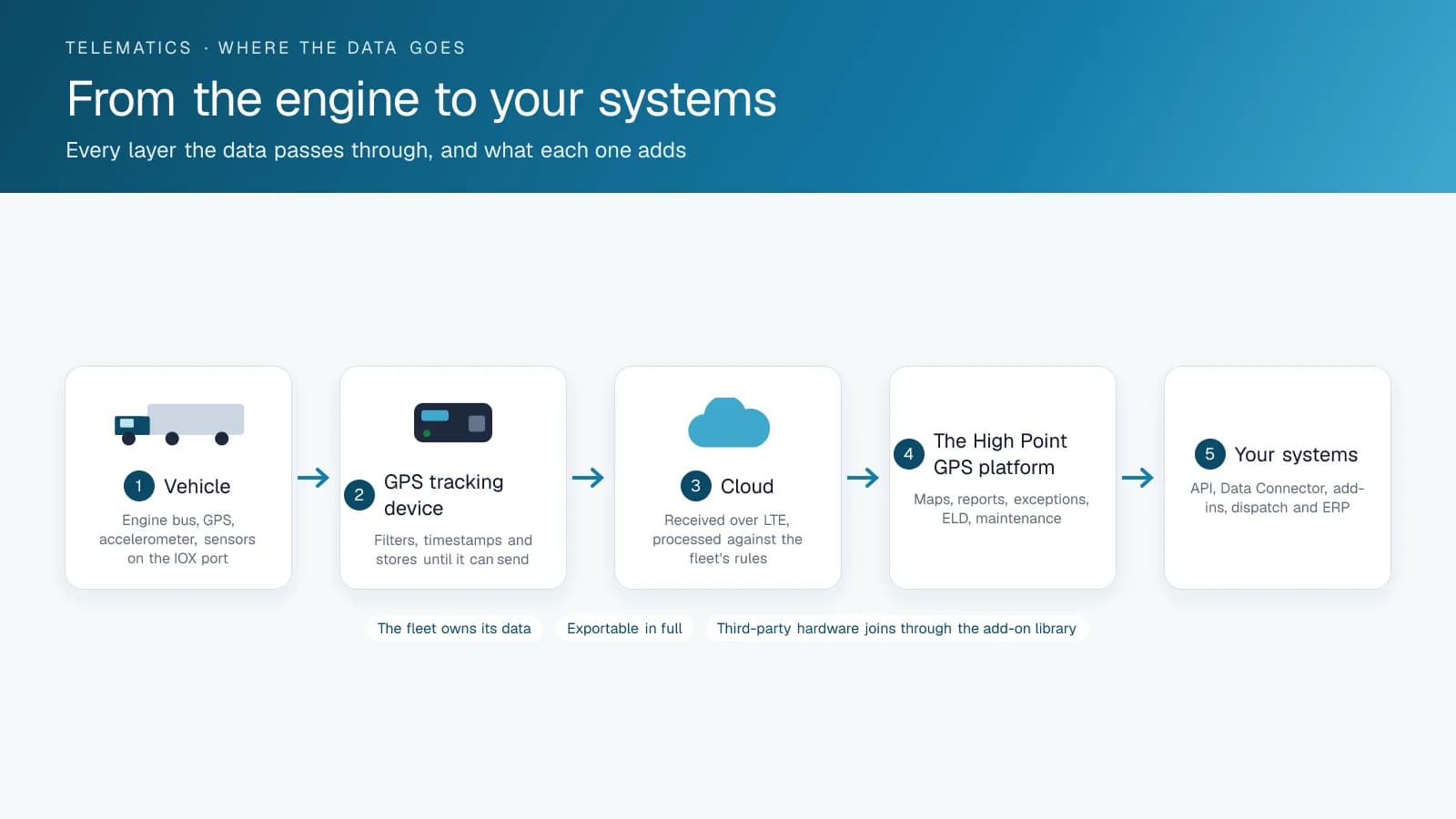
Then check that the platform can grow without a hardware change. On High Point GPS, the same GPS tracking device that draws the dot on the map also reports engine data, runs the ELD, and feeds the maintenance, fuel and IFTA reports. You can start with tracking and switch the rest on when you are ready, with no second install. That is the cheapest path from tracking to management, because the expensive part, getting a device into every vehicle, happens once.
The Five Decisions, Tested
Ask a vendor to show each decision below on live data from your own vehicles. A tracking product answers the first with a map and the rest with a slide.
| Decision the fleet makes by hand today | What to ask to see | Tracking product | Management platform |
|---|---|---|---|
| Which vehicle to send | Nearest available vehicle to a new address | Map | Map plus driver status and hours remaining |
| When to service each vehicle | A reminder generated from real odometer and engine hours | No | Yes, with fault codes and work orders |
| Where the fuel is going | Idle by vehicle and fuel card reconciliation | No | Yes |
| Which drivers need coaching | A score per driver with the events behind it | Speeding alerts at most | Scorecard, camera events, coaching log |
| How many vehicles to run | Utilization per vehicle per month | No | Yes |
| Whether the records survive an audit | ELD, DVIR and IFTA exports for a date range | No | Yes |
Frequently asked questions
Is fleet tracking the same as fleet management?
No. Fleet tracking tells you where vehicles are and how they were driven. Fleet management uses that plus engine, fuel, safety and compliance data to make decisions about maintenance, fuel, drivers, compliance and fleet size. Tracking is one feature of fleet management software, and the two words are not synonyms.
Does a small fleet need fleet management software or just tracking?
It depends on what you still do by hand. A fleet that keeps maintenance in a spreadsheet, reviews fuel from card statements and cannot say how many hours a day each vehicle works has management problems, however small it is, and tracking alone will not fix them.
Can I start with tracking and add fleet management later?
Yes, on a platform where one device does both. The GPS tracking device reports location for tracking and engine data for maintenance, fuel, ELD and IFTA, so you can turn the rest on later without new hardware or a second install, which keeps the move cheap.
What is fleet management software, in one sentence?
Fleet management software takes what your vehicles report (location, engine data, driver behaviour and inspections) and turns it into the maintenance, fuel, safety, compliance and utilization decisions the fleet has to make anyway, so those decisions rest on data in place of guesswork.
Related solutions & products
Related terms
Continue reading
- GPS Fleet Tracking & Management Software overview →
- What Is Fleet Management? A Starter Guide for New Fleet Managers →
- Fleet Management KPIs: What to Track, How to Calculate Them and Where the Data Comes From →
- Full-Service Fleet Leasing vs In-House Fleet Tracking: Which Fits Your Business? →
- Is There GPS Fleet Tracking With No Monthly Fee? →
- More in GPS Fleet Tracking & Telematics →
Get a free quote
- Over 500 fleets
- Since 2013
- 4.9 on Google (19 reviews)
What are you looking for?
Prefer to talk?Call 1-800-613-6323[email protected]