
Industry
GPS Fleet Tracking for Crane & Heavy Haul
GPS tracking for crane and heavy-haul fleets: proof an oversize load stayed on its permitted route, crane boom hours for billing, and ELD hours of service.

Updated September 21, 2026
High Point GPS tracks crane and heavy-haul fleets: mobile crane companies and carriers that move oversize loads under permit. You get route compliance by geofence, crane hours split for billing, journey planning from your own trip history, and ELD hours of service in one platform. Both kinds of operator share two problems: the load is worth more than the truck, and the permit says exactly where the truck may be. An oversize load that leaves its permitted route for one exit means a fine, a lost permit and, if a bridge is involved, far worse. High Point GPS turns the permitted route into a geofenced corridor in the High Point GPS platform, attaches the permit's curfew hours and speed limit to it, and records every kilometre the truck drove inside it. When a state or provincial enforcement officer asks whether the load stayed on route, you show the trip replay, with the escort vehicles' positions on the same map. On the crane side, an IOX-AUXM input reads the boom or the outriggers, so the hours the crane spent set up and lifting go on the invoice, separate from the hours it spent driving to the site. Journey planning draws on previous moves on the same corridor, so the next permit application starts from a route the fleet has already driven. Heavy-haul drivers run under the ELD mandate in both countries, and the driver app records duty status, the pre-trip inspection on tractor and trailer, and the hours left before the driver runs out of time on a two-day move. Every record is kept for the audit, the insurer and the customer who disputes hours per lift.
Common challenges
- No after-the-fact proof that an oversize load stayed on the permitted route and moved only in permitted hours
- Escorts and the load on different radios, and the office guessing where the convoy is
- Crane hours billed from the operator's ticket, and customers disputing set-up and lift time
- Journey planning started from scratch for each permit, with no record of the last move on that corridor
- Hours-of-service problems on two-day moves found at the roadside instead of at dispatch
- Pre-trip inspections on a tractor and multi-axle trailer done from memory and signed at the end of the day
How High Point GPS helps
- The permitted route drawn as a geofenced corridor, with curfew hours and permit speed attached as zone rules
- Alerts to the driver and the office as soon as a load leaves the corridor or moves during curfew
- Escort vehicles and the load on one live map, with the convoy's spacing visible to dispatch
- Trip replay of the whole move as the record for enforcement, the permit office and the insurer
- Boom, outrigger and PTO state through IOX-AUXM, so crane hours split into travel, set-up and lift
- Hours per lift and per site for billing, with the customer's geofence as the boundary
- ELD hours of service and electronic DVIR for tractor and trailer in the driver app
- Journey planning from the fleet's own trip history on the same corridor, including the stops that worked
How do you prove an oversize load stayed on its permitted route?
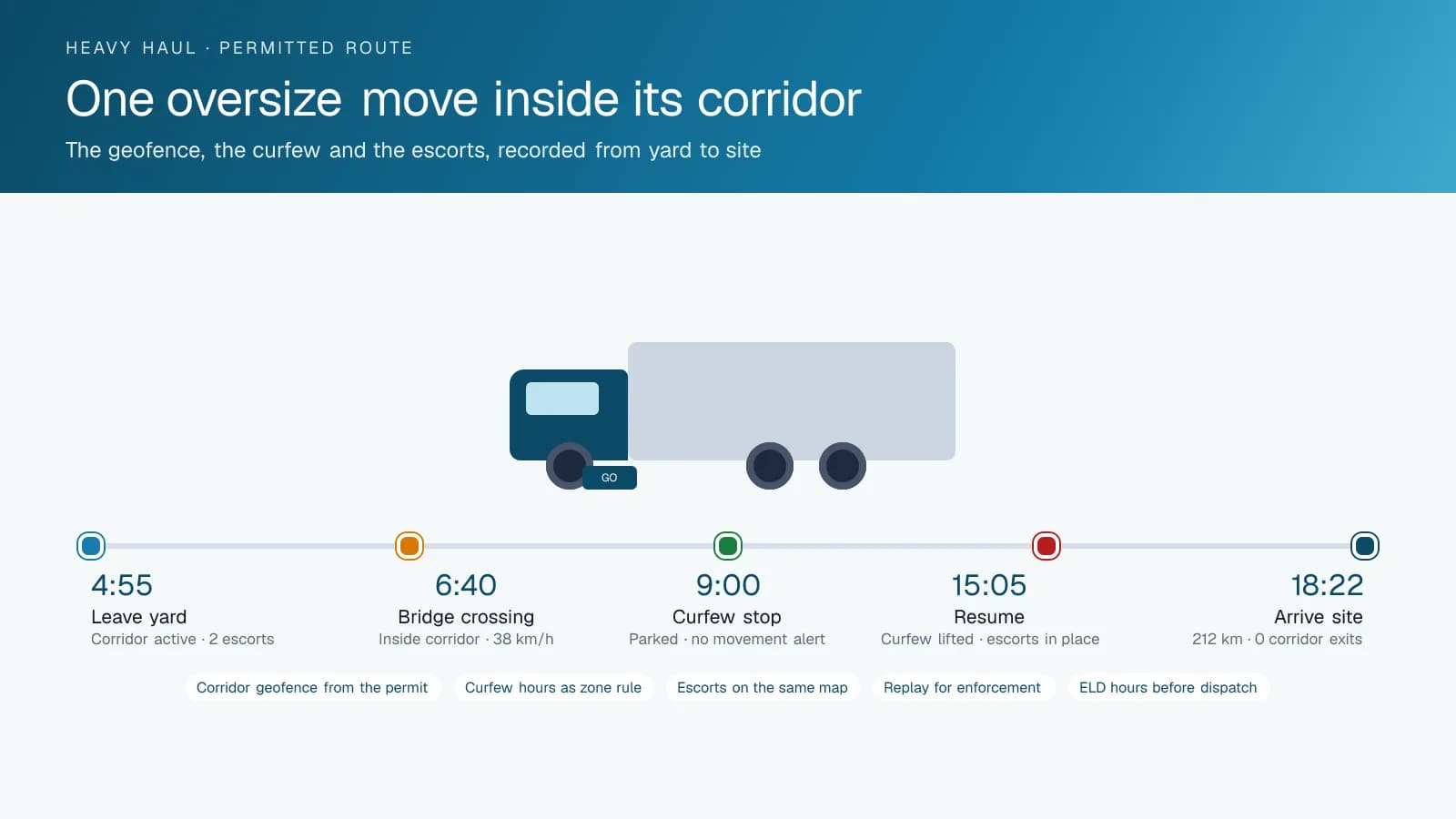
You prove it with a corridor geofence drawn from the permit and the trip replay that shows the load inside it. A permit for an oversize load names the route, the hours it may move and the speed it may travel. Before the move, High Point GPS draws that route as a corridor geofence in the High Point GPS platform, with the permit's curfew and speed limit as rules on the zone. If the truck leaves the corridor, the driver and the dispatcher get an alert within seconds, soon enough to stop before a low bridge or a prohibited ramp. A truck that moves during a curfew window triggers a separate alert. The driver sees the corridor on the same tablet that runs the driver app, and the dispatcher sees the load and every escort vehicle on one map, with the spacing between them.
After the move, the trip replay is the record. It shows the load inside the corridor from origin to destination, the speed on each segment, the stops and how long they lasted, and the escorts alongside. When an enforcement officer, the permit office or the insurer asks whether the load stayed on route, you answer with the replay instead of a driver's memory. Moves on the same corridor build a history, so the next permit application starts from a route the fleet has driven and the stops it used.
Crane Hours: Travel, Set-Up and Lift, Separated
A mobile crane bills for the hours it spends at the customer's site, and the customer's question is always the same: how many of those hours were lifting? An IOX-AUXM input on the crane reads the outriggers, the boom or the PTO that drives the hydraulics, and the platform records when each was engaged. The result is a day split into travel to the site, set-up with the outriggers down, lift time with the boom working and idle time between picks. The invoice for the lift carries those hours, and a customer who disputes them is shown the record for their site geofence, pick by pick.
The same records feed maintenance. Boom hours and engine hours are read from the crane instead of from an operator's log, and the inspection and service intervals the manufacturer sets run on those hours. A crane that has done four hundred boom hours since its last inspection is flagged before the next job, not after a failed pick. Fault codes reach the shop as they occur, and the crane that was booked for Monday's steel erection is confirmed ready on Friday because the platform says so, not because someone walked out to the yard and looked.
Journey Planning and the Convoy on the Road
Planning a heavy-haul move is hours of work on bridge ratings, turning radii and curfews. The fleet's trip history shortens it. Every move the fleet has made on a corridor is stored, with the stops, the average speed and the segments where the convoy slowed. A planner building the next permit application starts from the route that worked, and the dispatcher setting the departure time uses the real duration of the last move instead of an estimate. Pilot cars and the load are all on one map, so a convoy that stretches out on a grade is visible before the escort loses sight of the trailer.
AI dash cams on the tractor record the road ahead and the driver, and the footage is retrieved by trip and by event. On a move where a motorist cuts between the escort and the load, or a low branch strikes the cargo, the video and the position arrive together for the claim. Driver scoring records hard braking and cornering on a truck that weighs what a heavy-haul combination weighs, with thresholds High Point GPS sets for that class of vehicle instead of delivery-van settings. The weekly review starts from a specific event on a specific move.
ELD, Hours of Service and the Two-Day Move
Heavy-haul tractors fall under the ELD mandate in the United States and in Canada. The driver app records the driver's duty status from the GPS tracking device in the tractor, and the dispatcher sees each driver's remaining hours before assigning a move. A two-day move with a curfew in the middle is planned around the hours the driver actually has, and a driver who is running out of time is handed off at a planned point instead of parked on a shoulder with an oversize load. Roadside inspections get the ELD record on the tablet, with the permit and the inspection report beside it.
The pre-trip inspection on a tractor and a multi-axle trailer is a long checklist, and the electronic DVIR in the driver app walks the driver through it with the trailer's own items included. A defect on a steerable axle is a photo and a work order before the load moves. Driver ID through an NFC fob ties each trip and each inspection to the driver at the wheel, which matters when a team drives a move in shifts. Fuel purchases on a fuel card reconcile against the trip record for IFTA, and the distance by jurisdiction is reported without anyone reading odometers.
Frequently asked questions
Can it prove my oversize load stayed on the permitted route?
Yes. High Point GPS draws the permitted route as a corridor geofence, with the permit's curfew hours and speed limit as rules. The trip replay shows the load inside the corridor from origin to destination, along with speed, stops and the escorts' positions. Enforcement, the permit office and the insurer all get the same record.
Will the driver be warned before leaving the route?
Yes. An alert reaches the driver's tablet and the dispatcher within seconds of the load leaving the corridor, and a separate alert fires if the load moves during a curfew window. The driver sees the corridor on the same tablet that runs the driver app, which gives time to stop before a restricted bridge or ramp.
How does it record crane hours for billing?
An IOX-AUXM input reads the outriggers, the boom or the hydraulic PTO, and the platform records when each was engaged. Hours at the customer's site split into set-up, lift and idle time, and those hours go on the invoice. If a customer disputes them, you show the record for their site geofence.
Does it handle ELD and hours of service?
Yes. The driver app records duty status from the GPS tracking device in the tractor, meeting the US and Canadian ELD mandates. Before assigning a move, the dispatcher sees each driver's remaining hours. The electronic DVIR on the same tablet walks the driver through both the tractor and the trailer before the load moves.
Can I see the escort vehicles and the load together?
Yes. Pilot cars and the load share one live map that shows the spacing between them, and their positions are stored in the same trip history. Dispatch sees a convoy stretching out on a grade before the escort loses sight of the trailer, and the replay shows the whole convoy after the move.
Related solutions
Related guides
- What Is Geofencing? How It Works in Fleet Tracking →
- What Is an ELD? Electronic Logging Devices Explained →
- FMCSA Hours of Service Rules (US): 11-Hour and 14-Hour Limits →
- Canada's ELD Mandate: Dates and How It Differs From the US →
- IOX Meaning: What Is an IOX Port and What Does It Do? →
- How Does a Digital DVIR Work? Inspections, Defects and Repairs →
Get a free quote
- Over 500 fleets
- Since 2013
- 4.9 on Google (19 reviews)
What are you looking for?
Prefer to talk?Call 1-800-613-6323[email protected]