
Industry
GPS Fleet Tracking for Foodservice Distribution
GPS fleet tracking for foodservice distribution: proof of every pre-dawn delivery, compartment temperatures and door events at each stop, disputes settled.
Updated September 22, 2026
GPS fleet tracking for foodservice distribution from High Point GPS proves each pre-dawn delivery and records compartment temperatures and door events at every stop. It is built for distributors who serve restaurants, cafeterias, hospitals and schools on tight kitchen windows. Your day is over before most customers open: multi-temperature trailers leave the warehouse at two or three in the morning with frozen, chilled and dry product, and each kitchen expects the driver inside its window. Dispatch sees every truck on one live map with the delivery sequence beside it, and the geofence at each customer records arrival, departure and time on site. Temperature sensors in each compartment report to the same GPS tracking device that reports position, and the trailer's door circuits reach the platform through IOX-AUXM auxiliary inputs. The record of a stop therefore includes how long the reefer door stood open and what the frozen compartment read when it closed. Key-drop deliveries to a locked back door are proved by the geofence entry and the door event, since nobody was there to sign. When a customer claims a short case count or a late delivery, the trip replay shows the truck at the dock, the door open for fourteen minutes and the departure time, and the credit conversation is short. The driver app handles hours of service for drivers whose shifts start at night, and the route data feeds the rebalancing that keeps hand-unload time from stretching one route past its window.
Common challenges
- Delivery windows before opening hours missed, with no record of when the truck reached the dock
- Frozen and chilled product rejected at the door, with no compartment temperature history to show it held all night
- Key-drop deliveries disputed by customers who say nothing was left, with only the driver's word in reply
- Shortage and damage credits issued because the trip record cannot show what happened at the stop
- Hand-unload time that varies by driver and customer, pushing routes past their windows with no data to rebalance them
- Overnight delivery drivers whose hours of service are logged on paper or not at all
How High Point GPS helps
- Live location of every truck on one map for dispatch, with the delivery sequence and the next window beside it
- Geofences at every customer that record arrival, departure and time on site against the delivery window
- Compartment temperature sensors for frozen, chilled and dry zones, reporting through the GPS tracking device on the same timeline as the route
- Reefer and roll-up door open and close events read from the trailer's circuits through IOX-AUXM auxiliary inputs
- Key-drop proof from the geofence entry and the door event at the customer, with a time stamp the customer can check
- Trip replay showing the truck at the dock, how long the door was open and the departure, for shortage and credit disputes
- Hours of service in the driver app for night-shift delivery drivers, with electronic DVIR before the truck leaves the yard
- Route reports on stop count, unload time per stop and window hits, for weekly rebalancing
How do foodservice fleets hit delivery windows before the kitchen opens?
Dispatch sees every truck on one live map with its stop sequence and the window at each stop, so a truck running behind shows up as a projected miss before the customer calls. The customer sets the clock: a hospital kitchen wants its order on the dock by 5:00 a.m., a restaurant group by 6:30 a.m., a school cafeteria before the first bell. High Point GPS sets a geofence around each customer's dock, and the platform records the arrival time, the departure time and the minutes between them without the driver touching anything. At the end of the week, the window report lists every stop, its window and the time the truck arrived.
Planners use that report to decide route density. Two routes that both leave at 3:00 a.m. and finish by 8:00 a.m. can look identical on paper while one spends forty minutes more at docks. Once the time-on-site data shows which stops take longest, a planner moves a heavy hand-unload stop to the route with slack or shifts a start time by half an hour. Rebalancing on measured unload time, and not on case count, keeps drivers inside their windows and their hours, and next week's report shows whether the change worked.
Temperature and doors on the same record as the route
A multi-temperature trailer carries three products with three different failure modes. Wired or Bluetooth temperature sensors in the frozen, chilled and dry compartments report to the GPS tracking device, and the readings sit on the same timeline as the truck's position and its stops. A threshold rule for each compartment sends an alert to dispatch when the frozen zone drifts up, and the alert names the truck, the stop it is approaching and the reading. The customer who rejects a case of chicken at the door can be shown the compartment history from the warehouse to their dock.
Door events explain most temperature drift. The trailer's door circuits connect to the platform through IOX-AUXM auxiliary inputs, and the record of every stop carries the moment the reefer door opened and the moment it closed. A door that stood open for twenty-two minutes at a hand-unload stop in July is the reason the chilled compartment climbed, and the driver, the planner and the customer can all see it. The same door record shows a door opened where no stop was planned, which is how a distributor finds product leaving the truck between customers.
Key drops, shortages and the credit conversation
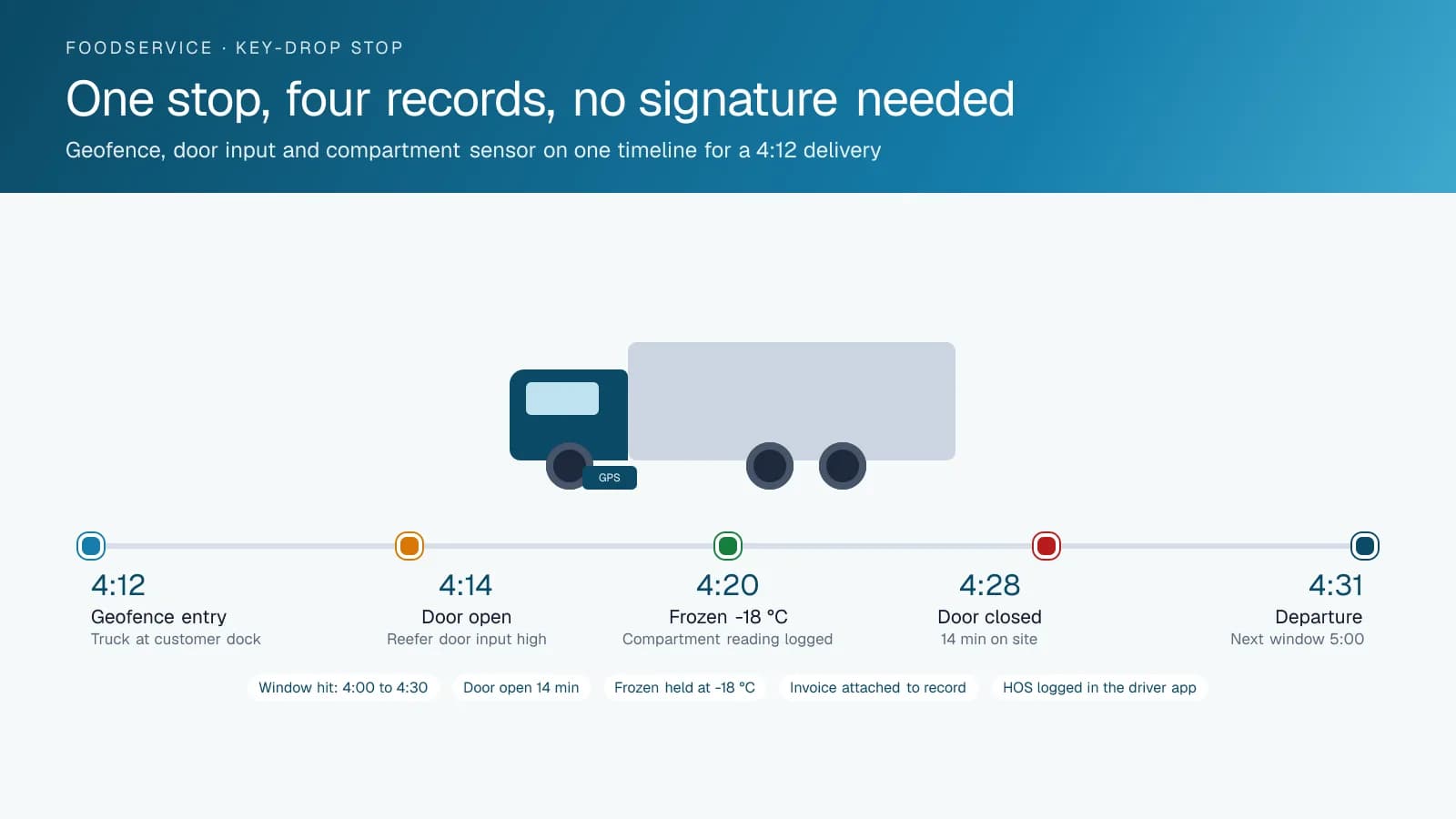
Many foodservice stops are made to a locked back door before anyone arrives, with the driver holding a key or a code. When the customer says the order never came, there is no signature to point to. The geofence entry at 4:12, the door opening at 4:14 and the departure at 4:31 make up the record instead, and a distributor that sends that record with the invoice settles most key-drop disputes without a second call. Where the customer wants more, an AI dash cam with a road-facing view shows the truck backed to the door at the time the record says.
Shortage claims work the same way. A customer reports three cases missing from a forty-case order; the trip replay shows the truck at their dock for the planned unload time, the door open once, and the next stop reached on schedule with its own count intact. If the driver was on site half the expected time, the replay shows that too, and the distributor knows where to look. High Point GPS builds the replay and the stop report so a credit desk can pull them in minutes, and the credits that do get issued are the ones the record supports.
Drivers, hours and the truck itself
Delivery drivers who start at midnight and unload by hand at every stop are covered by hours-of-service rules on both sides of the border, and the driver app logs their hours from the GPS tracking device without a paper log. The same app carries the electronic DVIR, so the reefer unit, the lift gate and the doors are inspected and time-stamped before the truck leaves the yard, and a defect reaches the shop that morning. Driver ID through an NFC reader attributes each route to the person who ran it when trucks are shared across shifts.
The truck's own data closes the loop. Engine-hours maintenance reminders and fault codes reach the shop as the truck reports them, which matters for a fleet that runs every night and cannot lose a unit to a charging fault at 3:00. Driver scoring set for heavy delivery trucks flags harsh braking with a loaded trailer and idling at docks where the reefer is doing the work. Fuel-card integration matches each purchase to the truck's location, and the open API sends stop times and temperatures to the distributor's order and billing systems.
Frequently asked questions
Can it monitor frozen, chilled and dry compartments separately?
Yes. A temperature sensor in each compartment reports to the GPS tracking device, and each compartment has its own threshold rule. The readings appear on the same timeline as the route and the stops. When a zone drifts out of range, dispatch gets an alert that names the truck, the compartment and the reading, while there is still time to act.
How does it prove a key-drop delivery was made?
The geofence at the customer records the truck's arrival and departure, and the door input records when the trailer door opened and closed. Together they show the truck at the dock with the door open at a specific time. A distributor can send that record with the invoice whenever a customer questions a delivery made before anyone arrived.
Does it record trailer door openings?
Yes. The trailer's door circuits connect to the GPS tracking device through IOX-AUXM auxiliary inputs, so every open and close event carries the time and the location. The report shows how long the door stayed open at each stop beside the compartment temperature, and a door opened away from a planned stop is flagged for dispatch to review.
Do our delivery drivers need an ELD?
Often, yes. Drivers who stay near base and return there each day may qualify for the US short-haul exception or Canada's local radius exemption, which replace logs with simpler time records. Other drivers of commercial vehicles covered by hours-of-service rules generally need an ELD. High Point GPS reviews your routes and sets each driver's rulesets.
Can the stop and temperature data reach our order system?
Yes. The open High Point GPS API sends arrival times, time on site, door events and compartment readings to a distributor's order, billing or customer-portal systems. High Point GPS handles the integration and can build a custom add-in when the distributor wants a specific view inside the High Point GPS platform, such as a window report by customer.
Related solutions
Related guides
- GPS Fleet Tracking for Food and Beverage Distributors: Routes, Temperature and Delivery Windows →
- Cold Chain Monitoring and Compliance for Food Fleets →
- Wired Reefer Temperature Monitoring for Multi-Compartment Refrigerated Trucks →
- Delivery Fleet Management: How Last-Mile Companies Hit Delivery Windows →
- What Is Geofencing? How It Works in Fleet Tracking →
- IOX Meaning: What Is an IOX Port and What Does It Do? →
Get a free quote
- Over 500 fleets
- Since 2013
- 4.9 on Google (19 reviews)
What are you looking for?
Prefer to talk?Call 1-800-613-6323[email protected]