
Industry
GPS Fleet Tracking for Sales & Service Fleets
GPS fleet tracking for sales and service fleets: automatic mileage and expense records, a visit log per customer, personal-use privacy and duty of care.
Updated September 22, 2026
GPS fleet tracking for sales and service fleets from High Point GPS logs every trip in a company car and turns it into mileage records, a customer visit log and a driving score. It is built for employers whose account managers, sales reps and field technicians drive sedans and compact SUVs home at night. From the outside, forty such cars in employees' driveways hardly look like a fleet, and the drivers are measured on calls made and tickets closed, with nobody watching how they drive. Finance sees a mileage claim on a spreadsheet, a fuel-card statement that does not match it, a personal-use benefit calculated from a driver's own estimate, and a vehicle count nobody has questioned in years. The GPS tracking device connects at each car's diagnostic port through a T-harness and logs every trip: start, end, distance, duration and the stops in between. A geofence around each customer site turns those stops into a visit log that can feed the CRM through the open API. Drivers mark trips business or personal with one tap, and the mileage record for taxable-benefit and expense purposes fills itself in. Speeding, hard braking and distracted driving are scored per driver, which is how an employer shows it took its duty of care seriously if a rep is in a collision on a work trip. Utilization reporting shows which cars sit idle and whether a pooled fleet could be smaller. High Point GPS configures the policy, the privacy settings and the reports so drivers accept the program and finance can use it from the first month.
Common challenges
- Mileage and expense claims filled in from memory at month end, with no way to check them against actual trips
- Personal-use and after-hours driving that nobody can measure, so the taxable-benefit calculation is a guess
- Sales managers asking how many customer visits a rep made and getting a number from the rep's own calendar
- No record of how company cars are driven, and no defence if an employee is hurt in a collision on a work trip
- A pooled fleet that grew one car at a time, with no data on which vehicles are needed
- Fuel-card charges that cannot be matched to a vehicle, a trip or a driver
How High Point GPS helps
- Automatic trip logs from the GPS tracking device with start, end, distance and stops, in place of paper mileage sheets
- One-tap business or personal trip classification in the driver app, with totals ready for expense and benefit reporting
- Geofences around each customer site that record arrival, departure and time on site per account
- Open API and add-ins that push visit records and mileage into the CRM or expense system the company already uses
- Personal-use privacy mode that stops location reporting on personal trips and still counts the mileage
- Driver scoring for speeding, hard braking, cornering and seat-belt use, weighted for light-duty highway driving
- Utilization and idle-vehicle reports that show which cars in a pooled fleet can go back at lease end
- Fuel-card integration that matches every fill-up to the vehicle, the driver and the odometer reading
How does GPS tracking replace the monthly mileage claim?
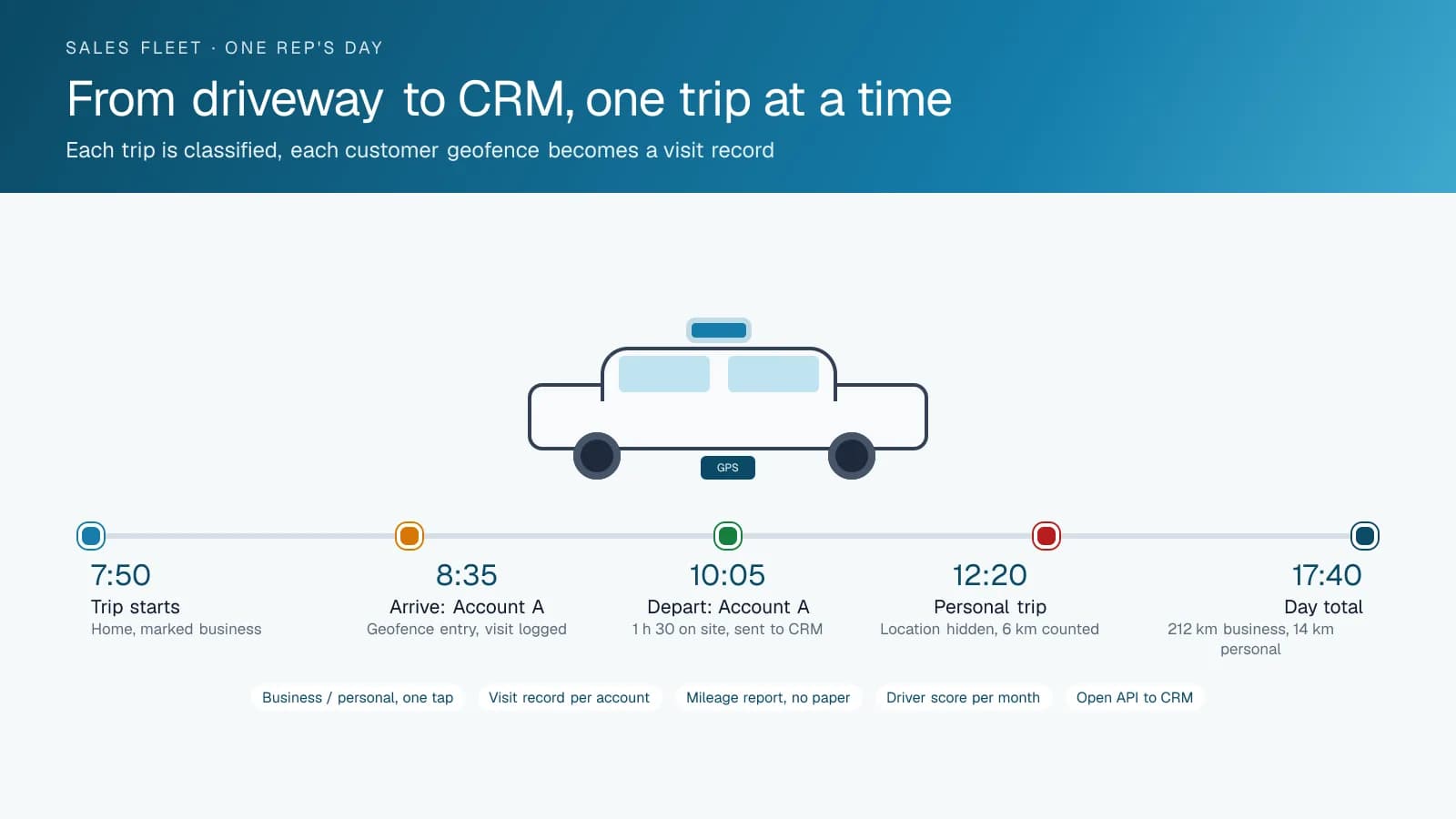
A GPS tracking device in each car logs every trip as it happens, so the monthly mileage claim becomes a report you print instead of a form a rep fills in from memory. Sales teams dislike that form more than any other, and finance trusts it least. Each trip carries the start address, the end address, the distance and the time. The rep opens the driver app and swipes a trip as business or personal, or the platform classifies it by schedule and geofence and the rep corrects only the exceptions. At month end the business mileage total and the personal-use total sit on the same page. An employer needs that record to calculate a taxable benefit for a company car, and a driver needs it when someone questions an expense claim.
Fuel goes on the same record. High Point GPS connects the company's fuel cards to the High Point GPS platform so each transaction is matched to the vehicle, the driver logged in at the time and the odometer reading. A fill-up on a Saturday two hundred kilometres from any customer stands out on its own, and so does a fill-up larger than the tank. Finance can review those exceptions directly instead of sampling receipts.
A visit log for every customer account
A geofence around each customer site turns the trip log into something a sales manager can use. Every arrival inside the zone is a visit, with the time in and the time out, and the visit is attributed to whichever rep was logged in to that car. The weekly report shows visits per account and time on site, which is the number the sales meeting has always wanted and never had. For service technicians the same record shows how long the last three calls at a site took, which is the starting point for a conversation about whether the site needs a different service plan.
The visit records do not have to stay in the High Point GPS platform. The open API lets High Point GPS push each geofence arrival into the CRM as an activity on the account, or build a small add-in that shows the CRM contact list on the map. A rep who left a site at 14:10 sees the visit already logged when they open the account in the CRM. A manager reviewing a territory sees which accounts have not had a visit in sixty days without asking anyone.
Personal use, privacy and a policy drivers accept
A company car goes home at night, and the driver's evening and weekend trips are not the employer's business. The tracking program has to say so and prove it. High Point GPS configures a personal-use mode. When the driver marks a trip personal, or when the trip falls outside the working hours in the policy, the platform records the distance for the mileage total but does not report location or speed. The driver sees the same rule on their own screen. That is what makes the program accepted rather than resented, and it is what an HR department needs to answer a privacy question from an employee or a union.
The written policy matters as much as the setting. It should cover what is recorded, who can see it, how long it is kept and what personal use means, under the privacy rules of the province or state the fleet operates in. The policy, the driver's acknowledgment and the platform's configuration are then consistent, which is the position an employer wants to be in when the question is asked.
Duty of care and a fleet the right size
An account manager driving eight hundred kilometres a week is a professional driver whether or not their job title says so, and their employer owes them a duty of care on the road. Driver scoring in the High Point GPS platform records speeding by the posted limit, hard braking, sharp cornering and seat-belt use, and produces a monthly score per driver. A manager reviews the scores, holds a short conversation with the two or three drivers who need one and records that they did. If a rep is later injured in a collision on a work trip, the employer can show it monitored driving and acted on what it saw. An AI dash cam adds video of the collision itself for the drivers or routes where the exposure justifies it.
Utilization reporting answers the other question finance asks: do we need this many cars? The report shows days driven per vehicle per month, average trip distance and the vehicles that sat for a week or more, which shows whether a pooled fleet could run with fewer cars. The lease-end decision on each car is then a number, and the reservation system for the pool that remains runs on the same driver ID and geofence data.
Frequently asked questions
Can drivers switch tracking off for personal trips?
Yes, within the company's policy. The driver marks a trip personal in the driver app, or the platform applies personal mode outside working hours. The platform does not report location or speed on those trips, but it still counts the distance, so the mileage and personal-use totals stay complete for expense and benefit reporting.
Does it replace the paper mileage log for taxable-benefit records?
It gives you the records the paper log was meant to hold. It produces business and personal distance totals per vehicle and per driver, with the trip-level detail behind them, and employers can use those totals as the basis for the benefit calculation. Your accountant or payroll team still applies the rules for your jurisdiction to the figures.
Can the visit records go into our CRM?
Yes. Geofence arrivals and departures are available through the High Point GPS open API, and High Point GPS can push them into a CRM as an activity on the account. It can also build an add-in for the High Point GPS platform that shows CRM accounts on the map. The exact connector depends on which CRM you use.
How do drivers react to being tracked?
Drivers react best when the policy is clear before the devices go in. They see the same rules the company applies, their personal trips stay private, and the mileage claim they used to fill in by hand is done for them. The time saved on expense reports also helps drivers accept the program.
Does the GPS tracking device work in leased sedans and SUVs?
Yes. The GPS tracking device connects at the diagnostic port under the dash of almost any light-duty vehicle through a T-harness, with no wires cut, so it comes out at lease return without leaving a trace. We always recommend a professional installer, and High Point GPS can coordinate the install at your office or at the dealer.
Related solutions
Related guides
- What Is Geofencing? How It Works in Fleet Tracking →
- Personal Conveyance Rules and MyGeotab Setup: Staying Compliant →
- Fleet API Explained: What You Can Build With High Point GPS →
- Fuel Card Integration With GPS Fleet Tracking: Fraud Prevention →
- GPS Fleet Tracking for Small Business: What a 3 to 20 Vehicle Fleet Needs →
- Do Dash Cams Lower Insurance? How Fleets Get the Discount →
Get a free quote
- Over 500 fleets
- Since 2013
- 4.9 on Google (19 reviews)
What are you looking for?
Prefer to talk?Call 1-800-613-6323[email protected]