
GPS Fleet Tracking & Telematics
Data Connector: Fleet Data in Power BI, Excel and Tableau Without the API
Data Connector is a no-code connector that feeds fleet data (trips, fuel, idle, safety, maintenance) into Power BI, Excel and Tableau, refreshed daily.
What Is Data Connector, and Why Use It?
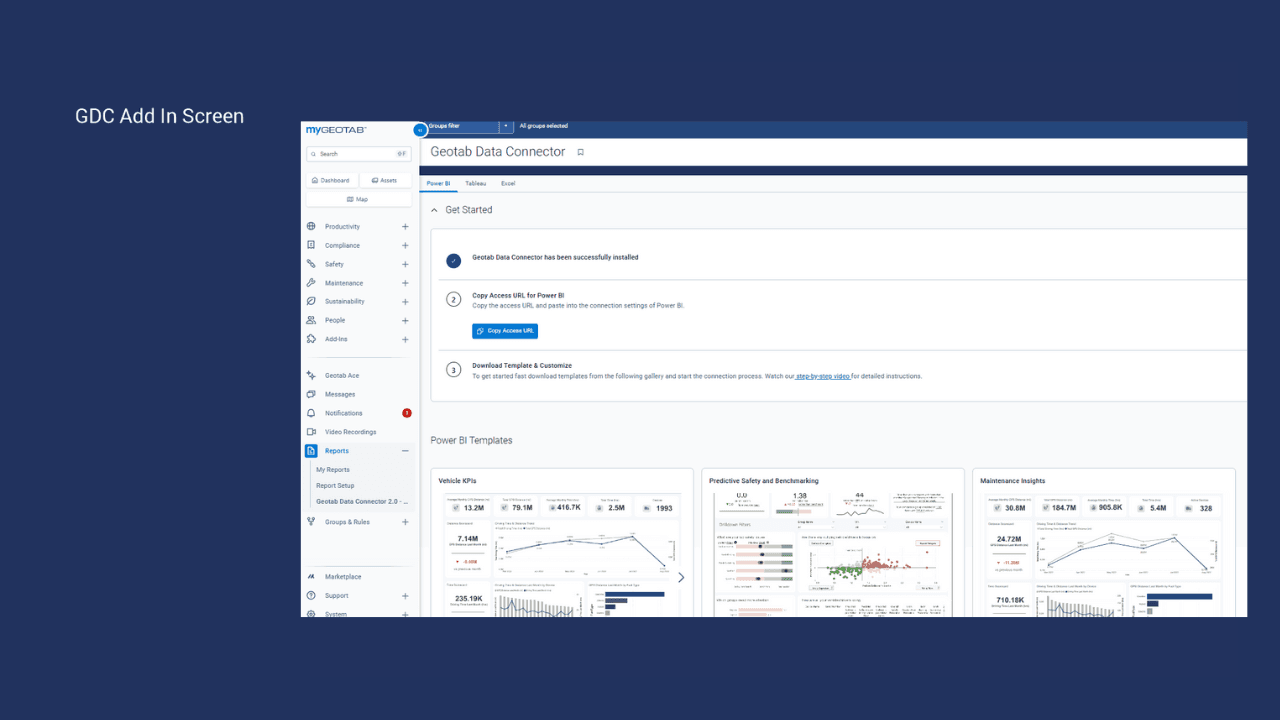
Data Connector is a no-code connector that puts the platform's aggregated fleet data into Power BI, Excel and Tableau as tables, refreshed daily. Finance gets cost per kilometre next to revenue, and operations gets utilization next to the work-order backlog. The High Point GPS platform already has every report a fleet manager needs. The rest of the company works in Power BI, Excel or Tableau, and getting fleet data there has meant exporting reports by hand or asking a developer to write against the API. Data Connector replaces the manual export.
What Fleet Data Does It Provide?
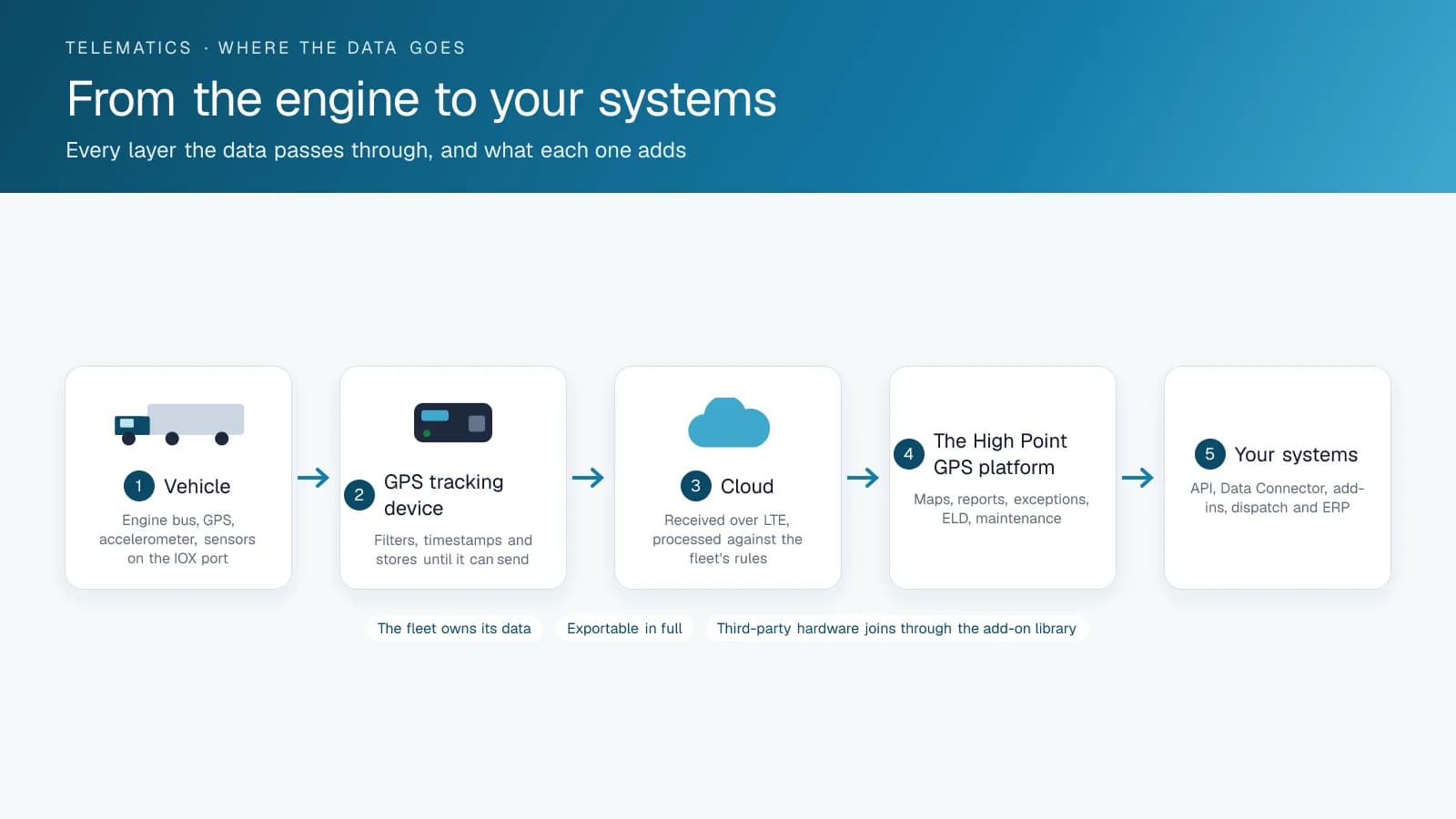
You get pre-built, aggregated datasets instead of raw telemetry: vehicle and driver summaries by day, trips and distance, fuel and idle, safety events and scores, utilization, maintenance and fault codes, EV charging and battery data, plus the fleet's groups so the numbers slice the way your organization does. The platform does the aggregation, so the BI tool receives clean tables sized for a dashboard, not millions of GPS points. Power BI, Excel and Tableau all connect to it as an OData feed.
What Do Fleets Build With It?
Cost-per-kilometre dashboards that set fuel, maintenance and telematics data beside finance's own figures. Utilization reports that justify or cancel the next vehicle purchase. Safety scorecards merged with HR records to run a bonus program. Sustainability reports on fuel, idle and EV charging for a customer's or a board's ESG requirements. And for municipalities, dashboards that put fleet data in the same tool as the rest of the city's operating reports.
When Do You Still Need the API?
Data Connector handles reporting on aggregated data. Real-time integration, such as a dispatch system that needs positions now or a work-order system that needs a fault code the moment it fires, still runs through the High Point GPS API, and that is where High Point GPS builds custom integrations. Many fleets run both: the connector for dashboards and the API for operational systems.
How to Set Up Data Connector in Power BI
A first dashboard takes an afternoon. Open Power BI Desktop, choose Get Data, select OData Feed and paste the access URL that High Point GPS gives you during setup. Sign in with your platform database name and user name, then your password. Pick the tables you need (usually the daily vehicle and driver summaries, the daily safety tables and the device groups) and load them. Build a date table, relate the summaries to it, then add the device groups table so you can slice every visual by depot or division. Start with three visuals: distance and fuel per vehicle per month, idle percentage by group, and safety events per 100 km by driver. Publish to the Power BI service and schedule a daily refresh, since the connector's data updates once a day. Excel loads the same tables through Get Data and OData Feed, and Tableau through its OData connector, so the same tables serve all three tools.
Frequently asked questions
What is the Data Connector?
Data Connector is a connector that feeds the platform's aggregated fleet data into Power BI, Excel and Tableau as tables refreshed on a schedule. Your trips, fuel, idle, safety, utilization and maintenance data reach the BI tool without API code or reports exported by hand.
What data does it include?
It includes daily vehicle and driver summaries, trips and distance, fuel, idle, safety events and scores, utilization, maintenance, fault codes and EV charging data. The fleet's groups come with it, so you can slice every dashboard by depot, division or department to match your organization.
Is it real time?
No. Data Connector refreshes on a schedule, typically daily, and it is built for reporting. A system that needs live positions, or a fault code the moment it fires, such as dispatch or a work-order system, connects through the High Point GPS API instead.
Do I need a developer?
No. Whoever builds your dashboards can configure the connector inside Power BI, Excel or Tableau. They paste the access URL that High Point GPS provides, sign in with their platform credentials, then pick the tables and load them. No step involves writing code.
Can it feed a custom system?
Data Connector is built for BI tools such as Power BI, Excel and Tableau. Custom operational systems, like dispatch or work-order software that needs live data, integrate through the High Point GPS API, and High Point GPS builds those integrations for you.
Related solutions & products
Free tools for this topic
Continue reading
- GPS Fleet Tracking & Management Software overview →
- Asset Data Display: A Fleet Dashboard of Ten Vehicle Metrics in the High Point GPS Platform →
- Benefits of GPS Fleet Tracking: What Changes When You Can See Your Fleet →
- How to Calculate Cost Per Mile: Fleet Formula and Example →
- Fleet Management KPIs: What to Track, How to Calculate Them and Where the Data Comes From →
- More in GPS Fleet Tracking & Telematics →
Get a free quote
- Over 500 fleets
- Since 2013
- 4.9 on Google (19 reviews)
What are you looking for?
Prefer to talk?Call 1-800-613-6323[email protected]