
GPS Fleet Tracking & Telematics
Asset Data Display: A Fleet Dashboard of Ten Vehicle Metrics in the High Point GPS Platform
Asset Data Display is a fleet dashboard add-in showing up to ten vehicle metrics, like fuel, speed and engine hours, on one High Point GPS platform panel.
What Does Asset Data Display Solve?
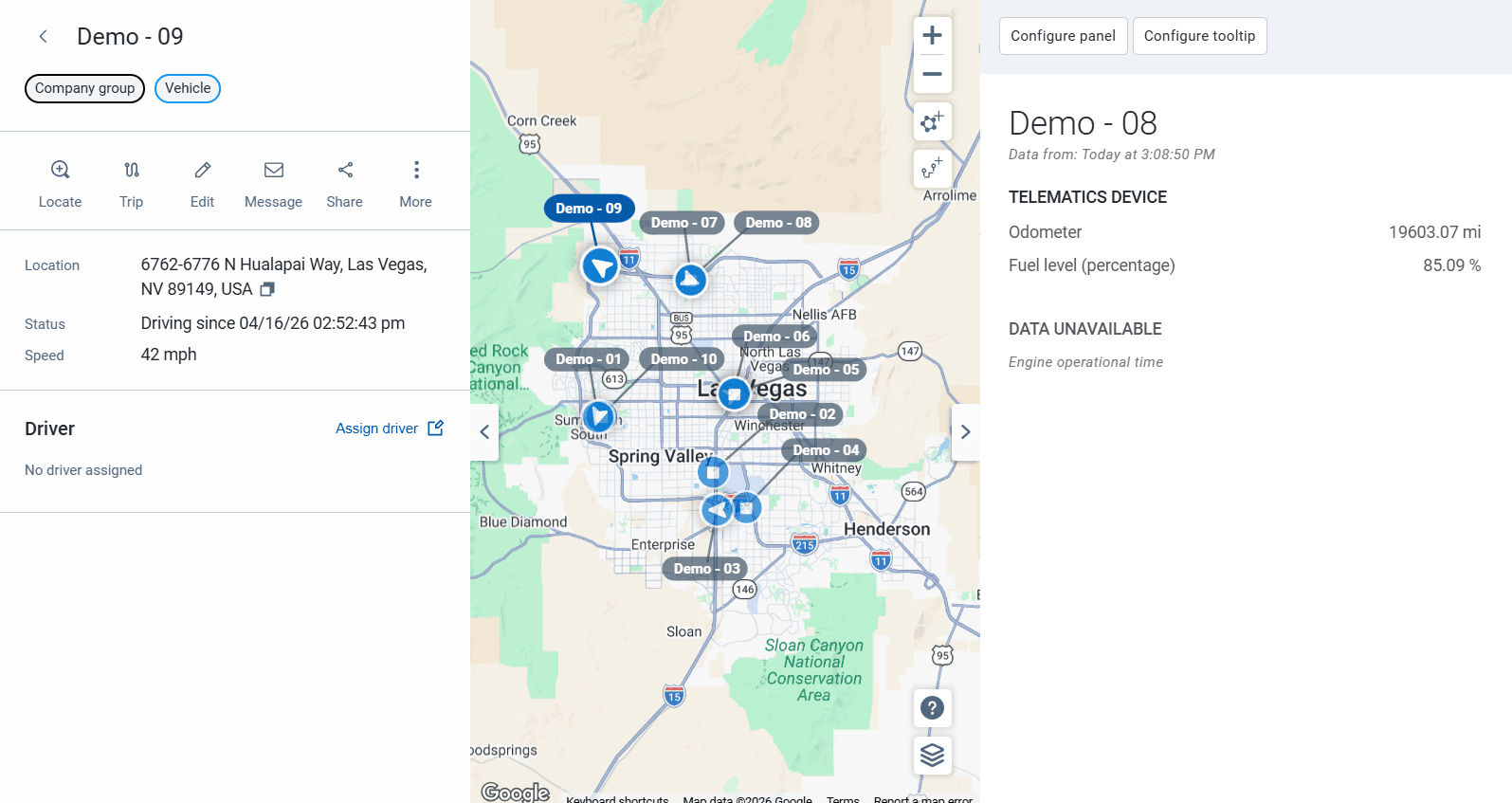
Asset Data Display is a fleet dashboard add-in from the add-on library that puts up to ten metrics you choose for each vehicle on one panel in the High Point GPS platform. Your GPS tracking device reports position, speed, fuel level, odometer, engine hours, coolant temperature, battery voltage, seat belt, state of charge on an EV, and whatever IOX sensors add. The platform files each reading where it suits reporting, so engine data, trips and exceptions sit apart. That suits analysis, and it is slow when you need to know if unit 14 has fuel and is running.
What Does the Fleet Dashboard Panel Show?
The fleet picks up to ten metrics per vehicle or per group, and the panel shows the latest value of each as the device reports. A dispatcher might carry location, speed, fuel and driver. A mechanic would pick engine hours, odometer, coolant temperature, battery voltage and active faults, and a cold-chain manager, reefer temperature and door state from the IOX sensors. A value that crosses a threshold changes colour, so the panel doubles as a status board.
Who Uses Asset Data Display?
Dispatch desks watch a group of vehicles all day without opening each one. Shop supervisors use it to pick the next unit to pull in, and equipment fleets follow engine hours and fuel on machines at remote sites. It also replaces any spreadsheet of readings kept by hand.
Example Panels by Role
The add-in pays off when each role gets its own ten metrics instead of one shared panel. Below are the configurations High Point GPS sets up most often, and each takes a few minutes to change once the fleet sees what it watches.
| Role | Metrics on the panel |
|---|---|
| Dispatcher | Location, speed, driver, fuel level, next stop ETA, ignition state |
| Shop supervisor | Engine hours, odometer, coolant temperature, battery voltage, active faults, last DVIR |
| Cold-chain manager | Reefer temperature per compartment, door state, setpoint, location |
| Equipment manager | Engine hours, fuel level, last movement, location, PTO state |
| EV coordinator | State of charge, charging status, range estimate, location, plug-in time |
How Is Asset Data Display Set Up?
You install it from the add-on library into your fleet's High Point GPS platform database and configure panels per user role. High Point GPS sets up the panels during deployments for fleets across Canada and the United States, and builds custom displays when a fleet needs a metric the add-in does not offer.
Frequently asked questions
What is Asset Data Display?
Asset Data Display is an add-on library add-in for the High Point GPS platform. It shows up to ten metrics you choose for each vehicle on one panel, updated as the GPS tracking device reports, so you can read the state of a unit at a glance.
Which metrics can it show?
It can show a wide range of data the GPS tracking device reports, including fuel level, speed, odometer, engine hours, temperatures, battery voltage, EV state of charge, active faults and IOX sensor values. Each panel holds up to ten, so pick what that role checks most.
Can different users see different panels?
Yes. Panels are configured per user role, so each team sees the metrics it needs. Dispatch can watch location, speed, fuel and driver, while the shop watches engine hours, odometer, battery voltage and active faults on a separate panel of its own.
Does it alert?
Yes, on screen. A value that crosses a threshold changes colour on the panel, so a dispatcher or mechanic watching it spots the problem. The add-in does not send notifications itself. Those come from the High Point GPS platform's own rules.
Does it need extra hardware?
No. Asset Data Display reads the data your GPS tracking device already reports. The one exception is a metric that comes from an IOX sensor, such as reefer temperature or door state: the fleet needs that sensor installed before the panel can show it.
Related solutions & products
Free tools for this topic
Continue reading
- GPS Fleet Tracking & Management Software overview →
- Data Connector: Fleet Data in Power BI, Excel and Tableau Without the API →
- GeoX Accident Report App: Documenting a Collision From the Cab Before the Tow Truck Arrives →
- Who Owns Your Fleet Telematics Data? →
- Bus Route Progress: Bus Route Tracking That Shows Which Buses Are On Route, Late or Parked →
- More in GPS Fleet Tracking & Telematics →
Get a free quote
- Over 500 fleets
- Since 2013
- 4.9 on Google (19 reviews)
What are you looking for?
Prefer to talk?Call 1-800-613-6323[email protected]