
Industry
GPS Fleet Tracking for Concrete & Ready-Mix
GPS tracking for ready-mix concrete fleets shows where every mixer is and times load, travel, wait and pour against each load's discharge limit.
Updated October 14, 2026
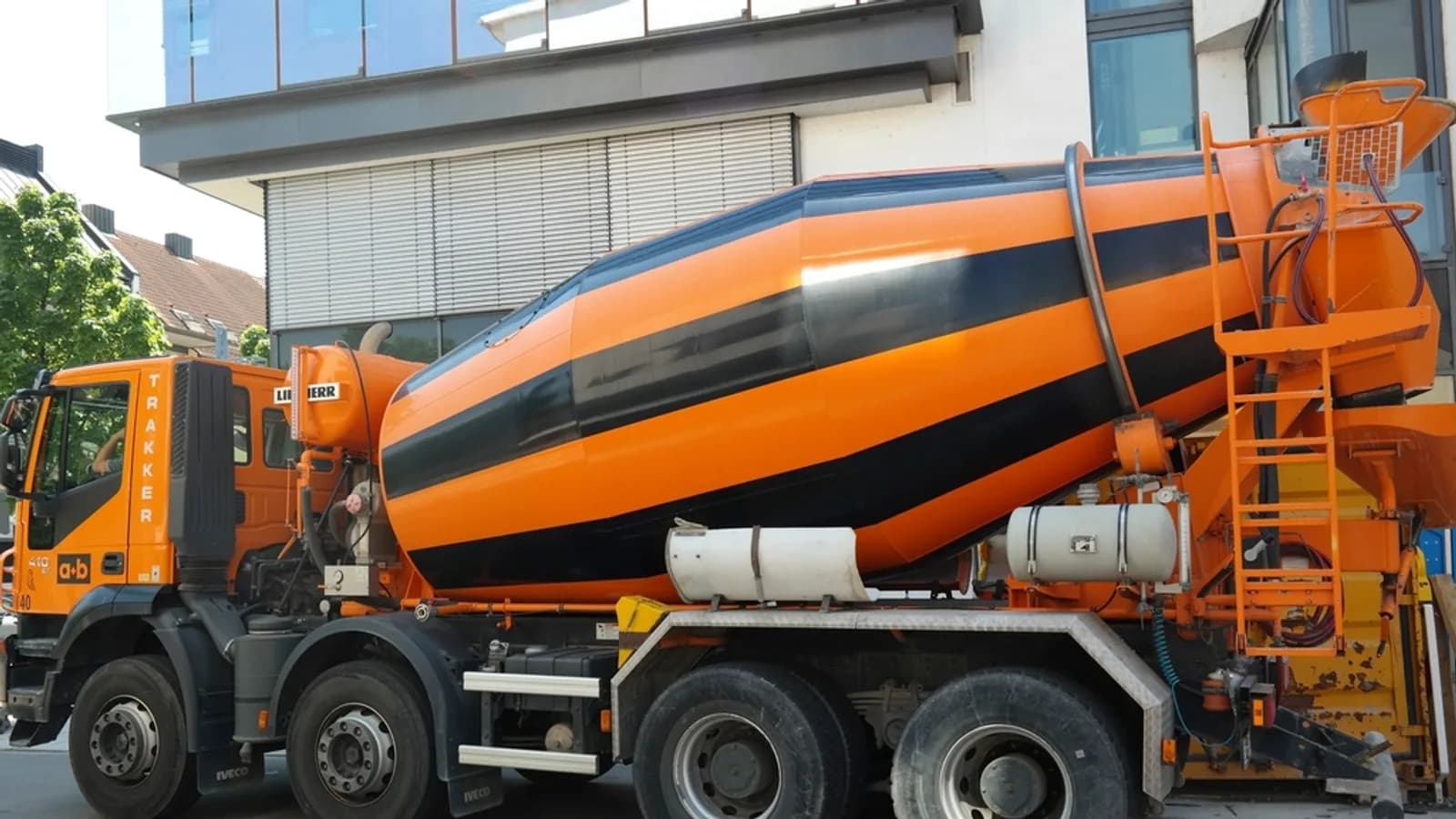
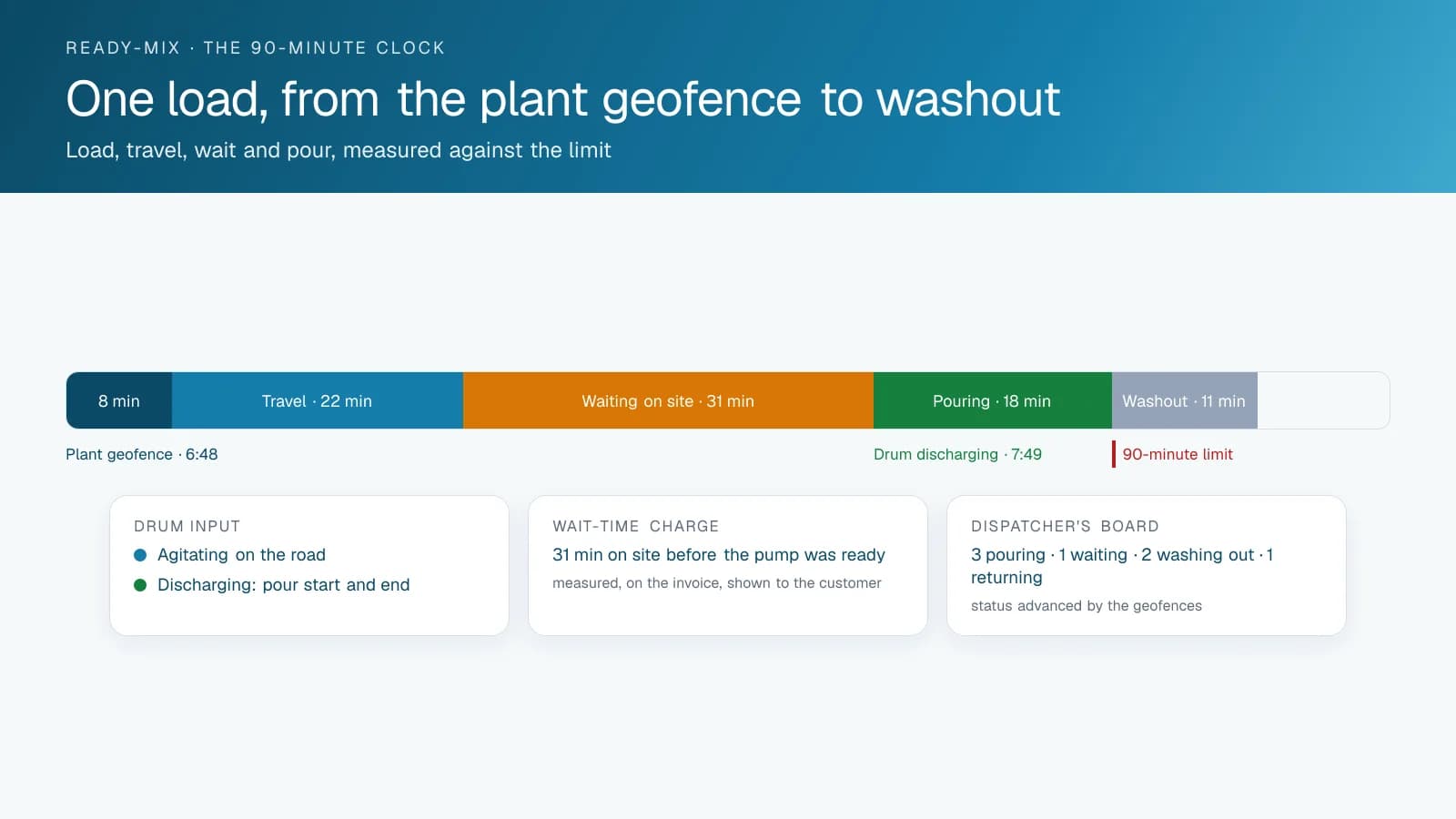
High Point GPS provides GPS tracking for ready-mix concrete producers, from single-plant operations to multi-plant fleets. The dispatcher sees every mixer on one live map, and geofences around the plant, the job sites and the washout pads time-stamp each stage of every load. Ready-mix concrete goes bad in the truck. From the moment water hits cement at the plant the clock runs, and the whole fleet is organized around the discharge limit that follows (90 minutes under ASTM C94 in the US, 120 minutes after batching under CSA A23.1 in Canada, unless the project sets another limit): the drive to the site, the wait there, the pour and the washout. Where the mixer provides a drum rotation signal, an auxiliary input on the GPS tracking device records it, so the platform shows when and where the drum was turning. Dispatch sees which trucks are on the road, which are waiting at a site that is not ready and which are washed out and available, and the customer gets an arrival time from the map instead of a guess. Load-by-load records feed the delivery ticket, the wait-time charge and the dispute over a load that arrived past its time. Maintenance runs on engine hours and drum hours, electronic DVIR covers the mixer-specific checklist, and driver scoring reflects how a loaded drum behaves on a corner.
Common challenges
- Dispatchers who cannot see which mixers are pouring, waiting or washed out, so the next load goes out on a guess
- Loads that pass their discharge limit on site, with nothing to show whose delay it was
- Wait-time charges the customer disputes because the ticket shows the arrival and nothing after it
- Drum hours and engine hours piling up at idle on job sites while maintenance runs on mileage
- Rollovers on corners and ramps with a loaded drum, and no driver-behaviour record from before the incident
- Washout and yard time eating the afternoon's capacity, with nobody measuring it
How High Point GPS helps
- Every mixer on one live map for the dispatcher, with its load status and the time since batching
- Plant, job-site and washout geofences that time-stamp loading, travel, arrival, wait, pour and washout for every load
- Drum rotation and discharge read through auxiliary inputs on the GPS tracking device, on mixers that support it
- Time since batching on the map, with an alert when a load on site nears its limit
- Customer arrival notifications and a job-site view for the contractor's foreman, sent from the platform or the dispatch software
- Wait-time and cycle-time reports per load, per site and per customer, feeding the ticket and the invoice
- Driver scoring set for a loaded mixer, with cornering, ramp speed and hard braking weighted for a high centre of gravity
- Engine-hours and drum-hours maintenance, electronic DVIR with the mixer checklist, and fault codes sent to the shop
How does GPS tracking work as a ready-mix batch board?
GPS tracking turns the live map into the ready-mix batch board: every mixer shows its position and status, so the dispatcher picks the truck for the next load from what the trucks are doing now. The radio only tells you what a driver last reported. The map shows three trucks pouring at the bridge deck, one waiting at a site whose pump has not arrived, two washing out and one on its way back empty. Geofences around the plant, each job site and the washout pad move the status forward on their own as each truck works through the cycle, so nobody has to update the board by hand.
High Point GPS connects the tracking to the batching and dispatch software the plant already runs, so the batch ticket and the truck's live position share one record. The customer's foreman sees the next truck's arrival time on a phone or hears it from the dispatcher, and the crew schedules the pour around a truck it can see on the map.
Every Load Against the Clock
The record of a load starts when the truck leaves the plant geofence with the batch time attached. The map shows the time since batching for every loaded truck, and an alert reaches the dispatcher when a truck has been waiting at a site long enough to put the load at risk. When a load is rejected on site for being past its time, the record shows whether the truck arrived at 22 minutes and waited 70, or left the plant late, and the conversation with the customer starts from that.
Wait time is money on both sides of the ticket. The platform records the arrival at the job-site geofence, the start of discharge from the drum input, and the departure, so the wait-time charge on the invoice is a measured figure the customer can be shown. Cycle-time reports per site and per customer show which jobs consistently hold trucks and which contractors are ready when the mixer arrives.
Driving a Loaded Drum
A loaded mixer has a high centre of gravity, and its rollover risk on a corner or a ramp is a matter of physics. The platform's driver-scoring rules for a ready-mix fleet weight cornering and ramp speed accordingly, so a cornering event that would be minor in a straight truck is scored as what it is in a mixer. Supervisors coach from a specific event on a specific delivery, and the record shows the coaching happened.
AI dash cams add the road-facing view for the incident review and the driver-facing view for distraction on the long haul back to the plant. On job sites, the road-facing camera records the ground guide, the pump and the site conditions, which is the evidence that settles a claim about a damaged curb or a truck that backed into something.
Maintaining Drums, Engines and Trucks
A mixer's engine runs whether the truck is moving or not, because the drum has to turn. Engine hours accumulate at idle at every job site and every washout, and mileage-based maintenance misses most of them. The GPS tracking device reads engine hours, and through the drum input, drum hours. The High Point GPS platform then schedules engine, hydraulic and drum-drive service on the hours the truck actually works. Engine fault codes reach the shop as they are logged, which is how a cooling fault gets fixed at the plant and not on a hill with a full drum.
Electronic DVIR in the driver app walks the driver through the mixer-specific checklist, including the chutes, the water system and the drum drive, and a defect reaches the shop before the first batch. The same platform holds the fuel record per truck, with idling reported per site so the plant sees which jobs burn diesel waiting.
Do ready-mix drivers need an ELD?
Many ready-mix drivers do not, because they work close to the plant and come back every day. In the United States, 49 CFR 395.1(e)(1) exempts a driver from logs and ELDs when the driver stays within a 150 air-mile radius of the normal work reporting location and is released within 14 consecutive hours; the carrier keeps time records for 6 months instead. In Canada, section 77 of the federal Commercial Vehicle Drivers Hours of Service Regulations lifts the ELD requirement for a driver who stays within 160 km of the home terminal and returns there each day to start at least 8 consecutive hours off duty, provided the carrier keeps records of the cycle and on-duty times for at least 6 months. That federal rule covers extra-provincial carriers; a carrier that never leaves its province follows its province's rules, so confirm with your provincial regulator.
US rules also give mixer drivers one specific allowance. Under 49 CFR 395.1(t), a ready-mixed concrete driver who must take the 30-minute break may count 30 minutes or more spent waiting with the truck at a job site or terminal, as long as the driver does no other work during that time. Geofence arrival and departure times at each site show when that waiting happened, and the plant geofence gives the office a daily start and release time to check against its records. Trucks that run outside these limits, such as long hauls to a remote project, still need an ELD.
What should you compare when choosing GPS tracking for ready-mix and aggregate trucks?
Start with the drum. Ask how each system reads it and on which of your mixers. On the High Point GPS platform, Geotab's IOX-AUXM module reads four on/off signals per module, up to eight with two modules, on GO7 and newer devices, and we check each mixer's wiring before quoting. Then ask how loads are timed: geofences around the plant, the job sites and the washout pad should move each truck's status without the driver touching anything.
Next, look at the software around the trucks. The tracking should connect to the batching and dispatch system you already run, through an open API, so the ticket and the truck's position share one record. Aggregate and dump trucks, loaders and trailers should sit on the same map as the mixers, so the yard is one fleet in one place. Finally, ask who installs on heavy trucks and who answers when a unit stops reporting. High Point GPS installs with professional installers across North America, including Montreal, and supports fleets in English and French.
What should your ready-mix fleet do next?
Make a list of your mixers and support trucks with make, model year and drum controls, and note the batching and dispatch software the plant runs. High Point GPS, a Geotab partner in Montreal, uses that list to match each truck to a device and harness, plan the drum inputs and scope the dispatch connection. Use the free quote form on this page to send it.
Frequently asked questions
Can it tell when the truck is pouring?
Yes, on mixers that expose a drum rotation signal. An IOX-AUXM module on the GPS tracking device records that signal as an auxiliary input, so the platform shows when the drum was turning, where and for how long. On mixers without that signal, the job-site geofence and the driver's status in the app mark the start and end of the pour.
Does it work with our batching and dispatch software?
In most cases, yes. The platform has an open API, and High Point GPS builds the connection to the batching and dispatch systems that ready-mix plants run. The batch ticket and the truck's live position then share one record, so the dispatcher works from a single screen and the customer's arrival notice uses the truck's real position.
How does it help with wait-time disputes?
The job-site geofence records arrival and departure, and the drum input records when discharge started, so the wait time on the invoice is a measured figure. You can show that record to the customer, and cycle-time reports show which sites hold trucks again and again, which helps when you price the next job.
Can the customer see when the truck will arrive?
Yes. Arrival notifications can go out from the platform or from the connected dispatch software. You can also share a job-site view with the contractor's foreman, who then sees the next truck's position and arrival time on the map and can have the crew and the pump ready when the mixer pulls in.
How is maintenance scheduled for a mixer?
Maintenance runs on engine hours and drum hours read from the truck, not only on mileage, because the engine runs to turn the drum whether the truck moves or not. The platform schedules engine, hydraulic and drum-drive service on those hours, and engine fault codes go to the shop as the truck logs them.
Can a ready-mix driver count waiting time on site as the 30-minute break?
Yes, in the United States. Under 49 CFR 395.1(t), a ready-mixed concrete driver who must take the 30-minute rest break may use 30 minutes or more spent waiting with the truck at a job site or terminal, provided no other work is done during that time. Geofence arrival and departure times show when the truck was waiting at each site.
Do ready-mix drivers in Canada need an ELD?
Not when they stay close to the plant. The federal hours of service regulations lift the ELD requirement for drivers who stay within 160 km of the home terminal and return each day to start at least 8 consecutive hours off duty, if the carrier keeps cycle and on-duty records for 6 months. Carriers that stay within one province follow provincial rules.
Related solutions
Related guides
- Construction and Concrete Dispatch Software: Sites, Equipment, Loads →
- Fleet Maintenance Schedule: Engine Hours vs Calendar and Mileage →
- IOX Meaning: What Is an IOX Port and What Does It Do? →
- What Is Geofencing? How It Works in Fleet Tracking →
- How Does a Digital DVIR Work? Inspections, Defects and Repairs →
- Construction Equipment and Asset Tracking Software: Machines, Attachments, Materials and Tools →
Get a free quote
- Over 500 fleets
- Since 2013
- 4.9 on Google (19 reviews)
What are you looking for?
Prefer to talk?Call 1-800-613-6323[email protected]