
Industry
GPS Fleet Tracking for Excavation & Demolition
GPS tracking for excavation and demolition contractors: engine hours and PTO on each machine, haul cycle counts, site theft alerts and tablet inspections.

Updated September 21, 2026
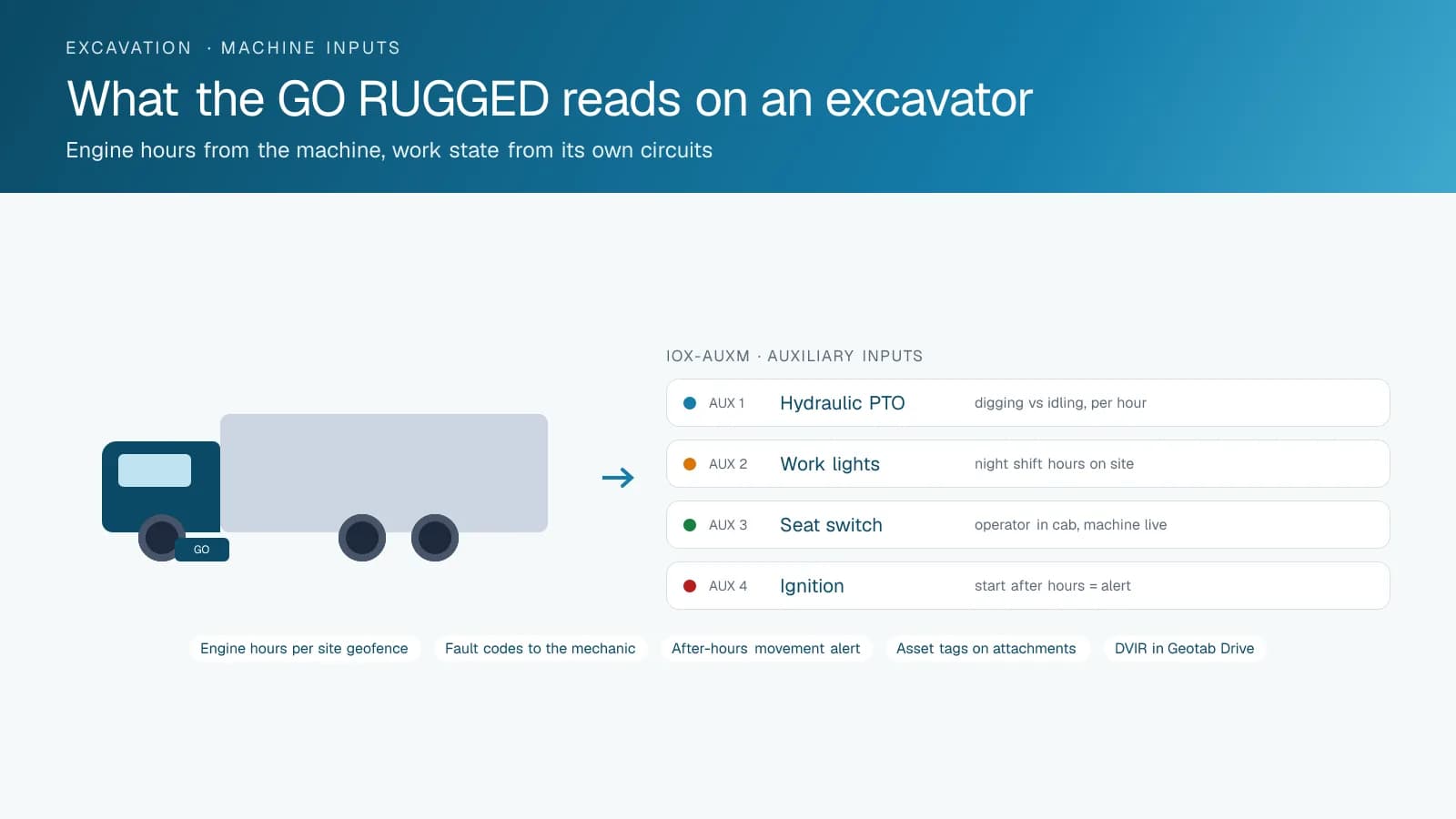
High Point GPS gives excavation and demolition contractors GPS tracking on every excavator, dozer, loader and dump truck, with the engine hours, load counts and theft alerts that billing and recovery depend on. You bill by the hour, haul by the load and own equipment that thieves want more than almost anything else on wheels, and foreman notes cannot back up any of it. A rugged GPS tracking device goes on each machine and a GPS tracking device in each dump truck, and the records build up from there without anyone writing them down. Engine hours come from the machine itself, and the hours inside each site's geofence are the hours billed to that job. An IOX-AUXM input reads the hydraulic PTO or a work-mode circuit, so the platform can tell a machine running from a machine working. Dump trucks cycling from the site to the fill or the pit get a load count from the geofence arrivals, and that count is the invoice for a trucking broker or the quantity for a client who disputes the yardage removed. Every site is a geofence with rules: a machine that moves after hours or leaves the fence raises an alert, and the office follows it on the map while the police are on the phone. The daily inspection on each machine happens in the driver app, where a hydraulic leak becomes a photo and a work order. When a demolition site goes quiet for a day of dust control or a client questions a machine's hours on a T&M job, the record answers.
Common challenges
- Machine hours billed from foreman notes and hour-meter photos that do not match the client's own count
- No way to tell a machine idling from a machine digging, so utilization on a T&M job is a guess
- Dump truck cycles to the fill counted from tickets, and brokers invoicing loads that never arrived
- Excavators, skid steers and attachments stolen from sites at night and never seen again
- Machines moved between sites by lowboy, with nobody sure which site they are on today
- Paper daily inspections that miss a hydraulic leak until it turns into a failed hose on a job
How High Point GPS helps
- Rugged GPS tracking devices on excavators, dozers, loaders and compactors that read engine hours, idle time and fault codes
- PTO and work-mode state through IOX-AUXM, separating running hours from working hours on each machine
- Engine hours inside each site's geofence as the billable hours for that job, per machine and per day
- Haul cycle counts for dump trucks from site and fill-site geofences, with a load count per truck per day
- Site geofences with after-hours movement alerts and live tracking for theft recovery
- Bluetooth asset tags on buckets, breakers, compaction plates and other attachments that move between machines
- Electronic DVIR for machines in the driver app, with photos and defects sent to the shop
- Maintenance reminders on engine hours, with fault codes sent to the mechanic as they appear
How does GPS tracking record excavator engine hours for billing?
A rugged GPS tracking device on the machine reads engine hours from the machine itself, and the High Point GPS platform records them against the site the machine is sitting in. On a time-and-materials job, those hours are the invoice. Say the client's site superintendent puts the 320 on site for six hours on Thursday and the invoice says nine. The record shows the machine entered the site geofence at 6:48, ran until 16:12 with forty minutes of idle at lunch, and left on the lowboy at 16:40. The contractor gets paid for the hours worked, and the same argument does not come up again.
A machine can run without working. An IOX-AUXM input reads the hydraulic PTO or a work-mode circuit, and the platform records when the machine was digging and when it was idling with the cab heater on. A utilization report might show a dozer that ran seven hours and pushed for three, and the contractor uses that to decide whether the dozer stays on this site or moves to the next job. Idle time on a fleet of diesel machines also burns fuel, and the report puts a number on it by machine and by operator.
Haul Cycles from the Site to the Fill
A mass excavation moves thousands of cubic metres in dump trucks, and every truck cycle is a ticket that somebody has to reconcile. Geofences around the site and around the fill site or the pit record each truck's arrival and departure, and the arrivals at the fill are the load count. Hired trucks are paid on that count; the client is invoiced on that count; and the two counts match because they come from the same record. When a broker's invoice shows loads the geofence never saw, the contractor has the times and positions of every load it did see.
The cycle-time report shows where the trucks spend their day: loading under the excavator, on the road, queued at the fill, or parked at a coffee shop with a full box. When the excavator is waiting on trucks, the site needs more; when the trucks are queued, it needs fewer. High Point GPS sets the report up so the foreman sees the day's cycle count and average cycle time on a phone before the last truck is back. A truck that takes a longer route to the fill, or stops on the way, shows up in the same report with the time it cost.
Sites as Geofences: Theft Alerts and Recovery
A mini excavator on a trailer is gone in ten minutes, and a skid steer is gone in five. Every site High Point GPS sets up is a geofence with a schedule. A machine that starts, moves or leaves the fence outside working hours triggers an alert to the owner's phone with the machine's position, and the rugged GPS tracking device keeps reporting as the machine moves. The police get a live location and a direction of travel, and the machine that is recovered the same night is the one that stays off the insurance claim. Battery trackers on trailers and Bluetooth tags on attachments extend the same coverage to the things that leave the site with the machine.
The geofence record also settles which machine was on which site. Equipment moved by lowboy between three sites in a week carries a record of every site it entered and how long it stayed, so the hours on each job are the hours inside that fence. When a client asks why a compactor was billed to their site on a day the foreman says it was elsewhere, the site history for the machine answers in a minute. Asset tags on buckets, breakers and plates show which machine each attachment was last seen with, which is how a missing breaker gets found on the wrong truck.
Inspections and Maintenance on Machines That Work Hard
Workplace safety rules such as Ontario's construction regulation (O. Reg. 213/91) require machines to be kept in safe condition and not used while defective, and a daily walk-around is the practical way to check. The driver app on the operator's phone or tablet carries a checklist built for the machine: tracks, hydraulic lines, bucket pins, fire extinguisher. A defect is a photo and a note that goes to the shop as a work order before the machine starts the day, and the record shows who inspected what and when. When a hose fails and a client asks whether the machine was inspected, the DVIR history is the answer.
Maintenance reminders run on the engine hours the device reads, so a 500-hour service on a dozer is scheduled when the machine reaches it rather than when the mechanic notices the sticker. Fault codes from the engine reach the shop as the machine logs them, and a machine with a rising coolant temperature on Wednesday is the one that gets looked at before Thursday's pour. Across a fleet of thirty machines on eight sites, the mechanic's day is planned from the platform instead of from phone calls, and the hours lost to breakdowns show up in the utilization report as the number they are.
Frequently asked questions
How does it read engine hours on an excavator?
A rugged GPS tracking device installed on the machine reads engine hours, idle time and fault codes from the machine, and the High Point GPS platform records them against the site geofence the machine is in. The hours inside each site become the billable hours for that job, per machine and per day, and nobody has to photograph the hour meter.
Can it tell working hours from idling?
Yes. An IOX-AUXM input reads the hydraulic PTO or a work-mode circuit, and the platform records when the machine was working and when it was running but idle. Utilization reports show hours run, hours worked and hours idle by machine and by operator, and contractors use them to decide which machine moves to the next site.
How are haul cycles counted?
Geofences around the site and the fill site or pit record each dump truck's arrival and departure. Each arrival at the fill counts as one load, and the count per truck per day is what hired trucks are paid on and what the client is invoiced on. The cycle-time report shows where the trucks spent the day.
What happens if a machine is stolen?
A machine that starts, moves or leaves a site geofence outside working hours triggers an alert with its position, and the device keeps reporting as the machine moves. The office follows it on the map while the police are on the phone. Battery trackers on trailers and asset tags on attachments cover the equipment that leaves with it.
Can operators do machine inspections in the app?
Yes. The driver app carries a checklist built for each machine type, such as tracks, hydraulic lines and bucket pins on an excavator. The operator works through it on a phone or tablet and adds photos of any defect, which goes to the shop as a work order. The record shows who inspected each machine and when.
Related solutions
Related guides
- Construction Equipment Telematics: Tracking Heavy Machines, Not Just Trucks →
- Heavy Equipment GPS Tracking: Which Tracker Fits Each Machine? →
- Heavy Equipment Theft Recovery: How GPS Gets Stolen Machines and Trailers Back →
- Fleet Maintenance Schedule: Engine Hours vs Calendar and Mileage →
- How Does a Digital DVIR Work? Inspections, Defects and Repairs →
- Equipment Utilization Tracking: How to Find Idle Machines →
Get a free quote
- Over 500 fleets
- Since 2013
- 4.9 on Google (19 reviews)
What are you looking for?
Prefer to talk?Call 1-800-613-6323[email protected]