
Industry
GPS Fleet Tracking for General Contractors & Home Builders
GPS fleet tracking for general contractors and home builders: every truck, trailer and machine on one map by job site, with a log of who arrived when.
Updated September 21, 2026
GPS fleet tracking for general contractors and home builders from High Point GPS puts every truck, trailer and tagged machine on one live map, with a geofence around each job site that logs who arrived, when, and for how long. It is built for builders in Canada and the United States whose fleet is spread across a dozen active sites on any given morning. That fleet is superintendents' pickups, a labour crew's van, a skid steer on a trailer and a dump truck that belongs to a subcontractor half the time, and the office usually knows only roughly where each one is. The GPS tracking device records the moment a truck enters a site, how long it stays and when it leaves. The High Point GPS platform turns those records into a site-by-site labour and equipment log that the project manager checks against the schedule and the invoice. Bluetooth asset tags and battery trackers follow the compactors, generators and trailers that never plug into anything. Engine-hours maintenance reminders keep the older trucks and the loaders in service through the busy season. When a homeowner disputes a service call, or a subcontractor bills for a day the crew was somewhere else, the trip replay settles it. Electronic DVIR inspections in the driver app keep the trucks roadworthy, and driver scoring keeps young crews driving company trucks the way the insurer expects. The whole operation runs from one High Point GPS platform database that grows with each new phase and each new subdivision.
Common challenges
- No reliable record of which crew was on which site on a given day when a change order or back-charge is disputed
- Trailers, compactors and generators left on a site for weeks after the phase that needed them ended
- Superintendents driving between sites all day, and no way to know where they actually spent their hours
- Subcontractor and rental equipment billed by the day with no independent record of the days it was really there
- Pickups and dump trucks skipping oil changes because nobody tracks mileage across a dozen sites
- A homeowner or an inspector claiming nobody showed up, and the office unable to prove otherwise
How High Point GPS helps
- Every truck, van and trailer on one live map, filtered by job site, phase or superintendent
- A geofence around each site that records arrival, departure and time on site for every vehicle and tagged asset
- Bluetooth asset tags and battery trackers for compactors, generators and trailers with no power of their own
- Trip replay showing where a superintendent's pickup went, how long it stayed and what route it took
- Site time reports that line up against subcontractor invoices, rental bills and the project schedule
- Engine-hours and mileage maintenance reminders, with fault codes sent to the shop or the dealer as they appear
- Driver scoring on speeding, harsh braking and idling for crews driving company pickups and dump trucks
- Electronic DVIR inspections in the driver app for the trucks and trailers that cross a scale or a border
How does GPS tracking show which truck is on which job site?
High Point GPS draws a geofence around each lot, each subdivision and each supplier yard and names them the way the project schedule does, so the live map shows every vehicle by job site. You see which superintendent is at which site, which trailer is parked where and which dump truck is on its way back from the pit. A builder with eight subdivisions and forty custom homes under way cannot run the fleet from memory. A project manager who needs the framing crew's van at the Maple Street site sees whether it has left the previous job before picking up the phone. Filtering by site, phase or crew leader cuts a fleet of sixty units down to the four that matter right now.
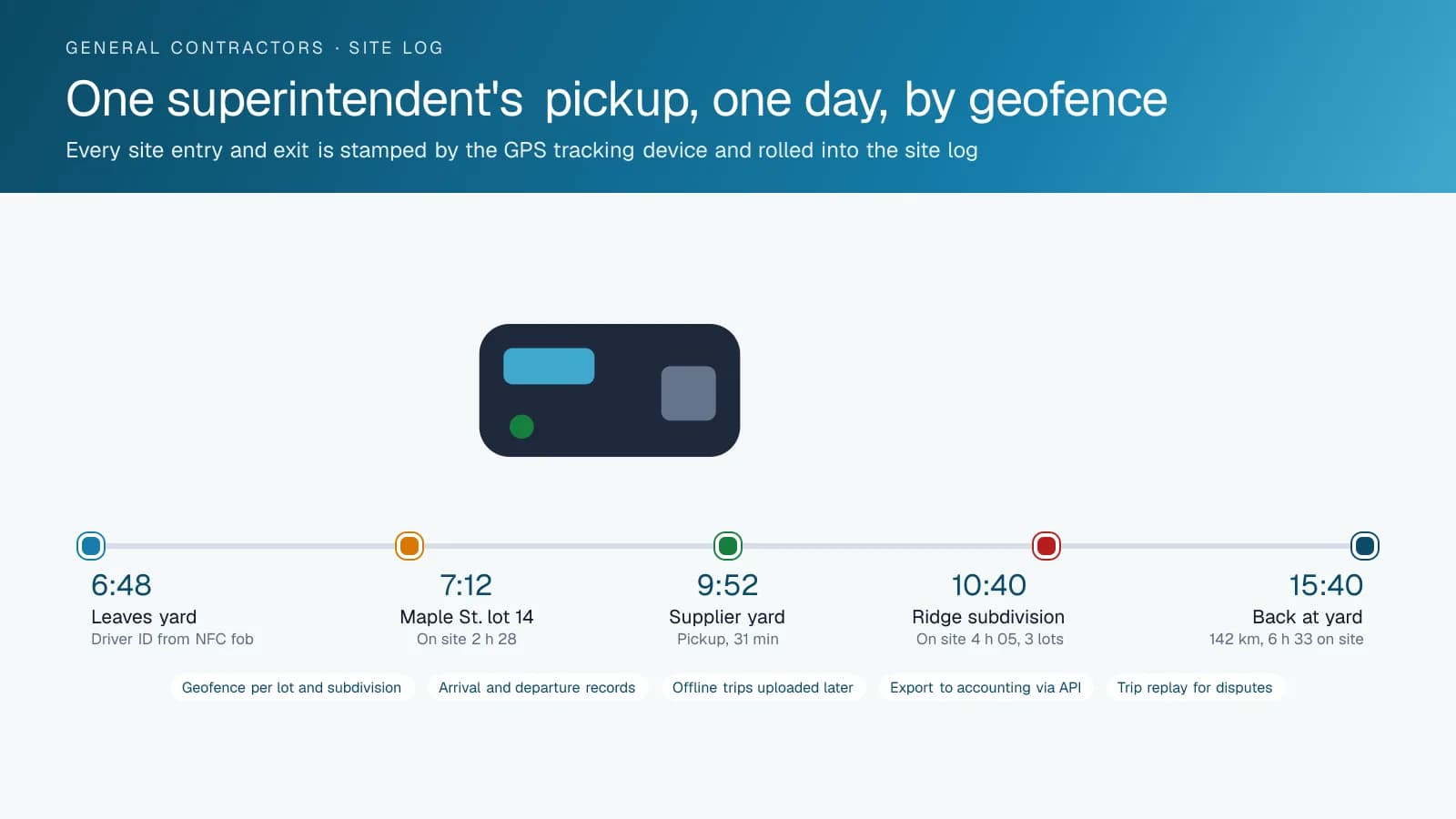
The same geofences produce the record. Each entry and exit is stamped with the vehicle, the driver from the NFC key fob and the time, and the High Point GPS platform rolls them up into a site log. Nobody has to rely on the foreman's memory to know whether a crew spent four hours or forty minutes on a lot. When a rural site has no coverage, the GPS tracking device stores the trips and uploads them as soon as the truck reaches a signal again. The log is complete either way, with the same times it would have carried in town.
Tracking the equipment that walks off between phases
The powered fleet is only half of what a general contractor owns. Plate compactors, generators, light towers, mortar mixers and the trailers that carry them sit on a site for the phase that needs them and then are forgotten. Bluetooth asset tags reporting through any GPS tracking device that passes nearby, and battery-powered trackers for anything that leaves the yard for months, keep those assets on the same map as the trucks. A superintendent who needs a generator sees the nearest one and which site it is sitting on. Assets that have not moved in thirty days show up on a report before the rental company sends a bill for a second one.
Theft is the other reason. A trailer that leaves a site at two in the morning triggers an alert, and the tracker reports its position until the police recover it. The record also settles the rental-return dispute: the tag shows the mini excavator leaving the site on the twelfth, not the seventeenth the rental yard billed for. High Point GPS sets the alert rules for after-hours movement, off-site departures and low battery on each tracker, and the office learns about a problem before the crew arrives to find an empty spot.
Site time that matches the invoice and the schedule
Back-charges, change orders and subcontractor invoices all turn on the same question: who was there, and for how long. The site log from the geofences answers it from the platform's own data rather than a time sheet filled in at the end of the week. When a subcontractor's truck is tagged, its days on site appear alongside the invoice line. When a rental loader is tagged, its days on site appear alongside the rental bill. A project manager reconciling a phase sees the gap between what was billed and what the platform recorded in a single report exported to the accounting system through the open API.
The homeowner side is similar. A custom-home client who says the crew did not show on Tuesday gets a reply that cites the van's arrival at 7 h 12 and departure at 15 h 40, with the trip replay to back it. An inspector who says the site was unattended during a pour gets the same. High Point GPS builds these reports once, with the columns a builder's accounting and the project team ask for, and they run on a schedule from then on, one per site and one for the whole portfolio.
Keeping trucks, drivers and inspections in order
A builder's pickups and dump trucks cover hard miles between sites and pits, and the maintenance schedule slides when the trucks are never in one place. The High Point GPS platform tracks mileage and engine hours per unit and raises a reminder when an oil change, a brake inspection or a DOT inspection comes due. Engine fault codes reach the shop or the dealer the day they appear, which is how a charging fault on a superintendent's truck gets fixed before it strands them at a site an hour from town. For the dump trucks and equipment trailers that cross a scale, electronic DVIR in the driver app replaces the clipboard and routes each defect to whoever fixes it.
Driver scoring rounds it out. Young crews driving company trucks between sites are the builder's largest liability exposure, and the insurer knows it. Speeding, harsh braking and idling are scored per driver, with the NFC reader tying each trip to the person behind the wheel rather than the truck. AI dash cams add the road and cab view for the trucks that tow, and the footage is pulled by event rather than by scrolling. A supervisor coaches from a specific trip, and the insurer sees a fleet with a program.
Frequently asked questions
Can it track subcontractor and rental equipment as well as our own trucks?
Yes. A Bluetooth asset tag or a battery-powered tracker goes on a subcontractor's trailer or a rented loader for the length of the job. It reports on the same map and in the same site log as the builder's own fleet, so its days on site sit beside the invoice line when the bill arrives.
How does site time get recorded without the crew doing anything?
High Point GPS draws a geofence around each job site, and the GPS tracking device records every entry and exit with the time, the vehicle and the driver from the NFC key fob. The High Point GPS platform rolls those into a site log the project manager reads or exports, with no time sheet or check-in from the crew.
What about sites with no cell coverage?
The GPS tracking device keeps working. It stores every trip and every geofence event when there is no signal and uploads them as soon as the truck returns to coverage. The site log is complete either way, and only the live map lags while the truck is out of range.
Will it help with a back-charge or a homeowner dispute?
Yes. The trip replay shows where each truck went, when it arrived at a site and when it left, with the driver identified. The project manager cites those arrival and departure times in the reply, and the record comes from the High Point GPS platform instead of anyone's recollection of the day.
Can it tell us when equipment has been sitting on a site too long?
Yes. A utilization report lists every tagged asset that has not moved in a set number of days and the site it is sitting on. Superintendents see the nearest idle generator or compactor before renting another, and the office spots a trailer that should have moved on to the next phase.
Related solutions
Related guides
- Construction Fleet Tracking: GPS for Trucks and Heavy Equipment →
- Construction Equipment and Asset Tracking Software: Machines, Attachments, Materials and Tools →
- Asset Tracker Tags vs. Powered GPS Trackers for Equipment →
- What Is Geofencing? How It Works in Fleet Tracking →
- Heavy Equipment Theft Recovery: How GPS Gets Stolen Machines and Trailers Back →
- Fleet Maintenance Schedule: Engine Hours vs Calendar and Mileage →
Get a free quote
- Over 500 fleets
- Since 2013
- 4.9 on Google (19 reviews)
What are you looking for?
Prefer to talk?Call 1-800-613-6323[email protected]