
Industry
GPS Fleet Tracking for Moving & Storage
GPS tracking for moving and storage fleets: honest arrival windows, timed records for damage and delay claims, trailer tracking, and ELD and IFTA.

Updated September 21, 2026
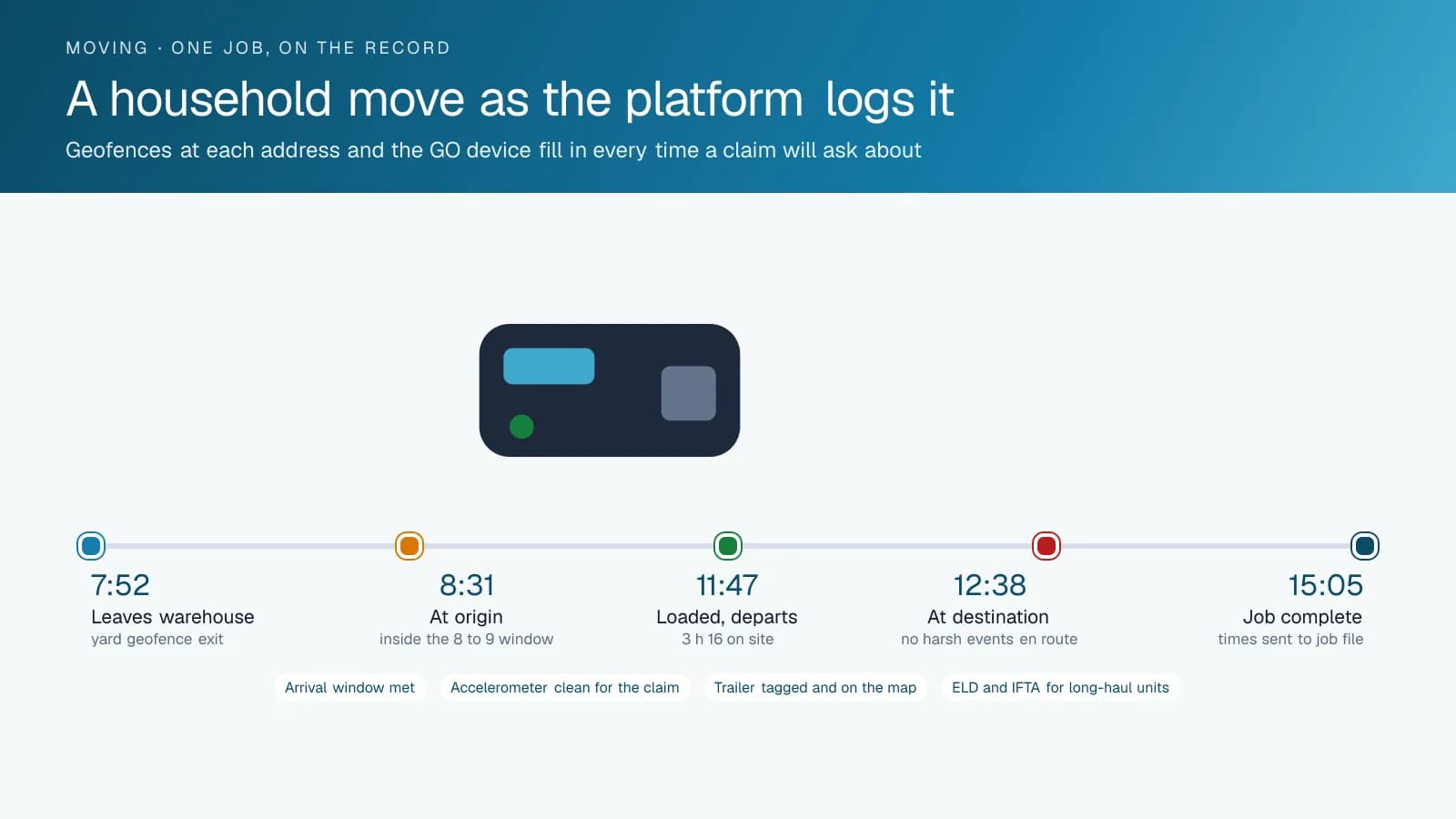
GPS tracking for moving and storage companies from High Point GPS puts every truck, tractor, trailer and container on one live map and keeps a timed record of each job for arrival windows and claims. It covers the local household-move fleet and the long-distance side, with ELD, hours of service and IFTA. Most movers run two fleets under one name: local straight trucks doing three household moves a day, and tractors and trailers carrying long-distance shipments across a border or across the continent. The customer at the door judges both. The office can tell a customer when the crew will arrive from the truck's position, without guessing from the last phone call. Every job carries a record: departure from the warehouse, arrival at origin, time on site, departure with the load, arrival at destination and time at the door. When a customer claims a damaged dresser or a late delivery, that record shows how long the truck spent at each address and how it was driven in between, with accelerometer data from the GPS tracking device and dash-cam video where the company has cameras fitted. On long-distance work, the driver app provides the ELD record for hours of service in the US and Canada, automated IFTA mileage by jurisdiction and electronic DVIR inspections. Trailers and storage containers carry powered trackers or Bluetooth asset tags, so nobody has to hunt for the trailer left in a customer's yard. High Point GPS builds the High Point GPS platform database around the company's mix of local and long-haul work and connects it to the moving software the office already runs.
Common challenges
- Customers waiting at an empty house for a truck the office can place no closer than "on the way"
- Damage and delay claims decided on the customer's word against the crew's, with no record of time on site or driving
- Interstate tractors on paper logs, or on a separate ELD that shares no data with the local fleet's tracking
- IFTA mileage compiled from driver trip sheets every quarter, with the errors a jurisdiction audit will find
- Trailers and containers that go missing between jobs, left at a customer's property or a partner's yard
- Long-distance crews driving tired to make a delivery window, leaving the company exposed if something happens
How High Point GPS helps
- Live position of every straight truck, tractor, trailer and container on one map, with the day's jobs and arrival windows beside them
- Per-job records from geofences at origin and destination: arrival, time on site and departure at each address
- Accelerometer and trip data that show how the load was driven, plus dash-cam video by event where cameras are fitted
- ELD hours of service in the driver app for interstate and cross-border crews, with the roadside inspection view ready
- Automated IFTA mileage by jurisdiction from the GPS tracking device, matched to fuel-card purchases for the quarterly return
- Powered trackers on the fleet's trailers and Bluetooth asset tags on containers, crates and pads
- Electronic DVIR inspections on trucks and trailers, with defects sent to the shop before the unit is loaded
- Job records and arrival times passed to the company's moving software through the open API
How can a moving company give customers an accurate arrival window?
With every truck on a live map, the office answers the customer's call with a position and an estimate instead of a promise to call back. The customer has taken the day off, the building has booked the elevator for two hours and the truck is somewhere between the last job and this one. Geofences at the origin and destination addresses record arrival and departure for each job, so the dispatcher sees the previous job running long before the next customer notices. Arrival windows come from real traffic and real drive times in the trip history, and the crew's optimism stays out of it.
The same records run the day's dispatch. A crew that finishes a small move early shows up on the map and can take an add-on job nearby; a crew stuck at a fourth-floor walk-up shows a longer time on site, and the office reschedules the afternoon before the phone starts ringing. High Point GPS connects those arrival and departure records to the company's moving software through the open API, so the job file carries the times without anyone typing them. A customer who wants to know where the truck is can get a link, or the office reads the estimate from the map, based on the vehicle's position instead of the crew's phone.
Claims: What Happened to the Dresser and Why the Truck Was Late
A damage claim on a household move comes down to two questions: how was the load handled, and how was it driven. The trip record answers the second. The GPS tracking device's accelerometer records hard braking, sharp cornering and impacts along the route, and a claim that the truck was driven roughly is confirmed or refuted by the data. A road-facing dash cam adds the video, retrieved by trip and by event, and a driver-facing camera covers the crew's conduct in the cab. Time on site at origin and destination shows whether the crew rushed the load or had the hours the estimate allowed.
Delay claims are simpler still. The record shows when the truck left the previous job, the route it took and when it arrived. When a customer claims the truck was three hours late, the office sees a two-hour delay at the previous customer's address and can show it. When the crew was late through their own choice of route, the office sees that too and settles the claim with the facts in hand rather than after a dispute. Time on site at each address, the crew on the job through driver ID and the route in between are the whole record, and the office has it the day the claim arrives.
Long-Distance Work: ELD, Hours of Service and IFTA
The interstate and cross-border side of a moving company falls under the ELD mandates in both the United States and Canada. The driver app on a tablet in the cab provides the hours-of-service record with the ruleset the crew is operating under, and the roadside inspection view a driver hands to an officer. Dispatch sees remaining hours for every long-distance driver before assigning the next leg, and a crew that would have to drive tired to make a window is rescheduled rather than sent. Electronic DVIR inspections cover the tractor and the trailer with time-stamped defects that reach the shop.
IFTA mileage comes from the GPS tracking device rather than from trip sheets. Distance is recorded by jurisdiction as the tractor crosses each state or provincial line, and fuel-card integration matches purchases to the unit and the jurisdiction. The quarterly return is a report, and the record behind it survives an audit. Distance by jurisdiction also feeds any IRP apportioned registration the company holds, from the same trip data, with no second system to reconcile.
Trailers, Containers and the Yard
A moving company's trailers and storage containers spend their lives dropped at customers' properties, at partner agents' yards and at storage facilities. Powered trackers on the fleet's trailers report position on a schedule when unhitched and continuously when moving, so the trailer left at a customer's driveway for a week shows up on the map and on the dormant-asset report. Bluetooth asset tags on containers, crates and equipment report through any GPS tracking device that passes within range, which is how the office finds the container a partner agent swears was returned.
In the yard, the same tags and geofences show what came back and what did not. Utilization reports show which trailers sit idle and which are turned every day, which is the number that decides whether the company buys another one. High Point GPS sets up the trackers and tags to match how the company moves its equipment, and builds the reports the operations manager reads on Monday morning. When a trailer or container leaves a yard geofence after hours, the alert names it and the tag or tracker follows it, which is the difference between a theft report and a recovery.
Frequently asked questions
Can it help with damage and delay claims?
Yes. Each job carries geofence records of arrival, time on site and departure at each address, and the GPS tracking device's accelerometer records how the truck was driven in between. Where the company has cameras fitted, dash-cam video by event adds the picture. The office settles claims from that record instead of from two conflicting accounts.
Do we need ELD on our long-distance trucks?
In most cases, yes. Interstate and cross-border tractors are covered by the ELD mandates in the United States and Canada. The driver app provides the hours-of-service record and the roadside inspection view, and High Point GPS configures the ruleset for the work. Short-haul work can be exempt: within 150 air-miles in the US, or 160 km of the home terminal in Canada. High Point GPS confirms which trucks qualify.
How does it track trailers and containers?
Powered trackers on the fleet's trailers report position on a schedule when parked and continuously when moving. Bluetooth asset tags on containers, crates and pads report through any GPS tracking device within range. Both appear on the same map as the trucks, and a dormant-asset report lists anything that has not moved in a set number of days.
Does it produce IFTA reports?
Yes. The GPS tracking device records distance by jurisdiction as a tractor crosses each state or provincial line, and fuel-card integration matches purchases to the unit. The quarterly IFTA return comes from a report in the High Point GPS platform, and the trip-level record behind it is available if a jurisdiction audits the company.
Will it work with our moving software?
Yes. The open High Point GPS API carries vehicle position, arrival times and job records to the company's moving or dispatch software. High Point GPS builds the connection, or a custom add-in where the vendor has no existing integration, and the job file then carries the arrival and departure times without anyone entering them by hand.
Related solutions
Related guides
- What Is an ELD? Electronic Logging Devices Explained →
- IFTA Reporting Software: How High Point GPS Automates Fuel Tax Reports →
- How Does Trailer GPS Tracking Work, With or Without a Truck? →
- Dash Cam Footage for Insurance Claims: What to Send the Insurer →
- FMCSA Hours of Service Rules (US): 11-Hour and 14-Hour Limits →
- Asset Tracker Tags vs. Powered GPS Trackers for Equipment →
Get a free quote
- Over 500 fleets
- Since 2013
- 4.9 on Google (19 reviews)
What are you looking for?
Prefer to talk?Call 1-800-613-6323[email protected]