
Industry
GPS Fleet Tracking for Ports, Drayage & Intermodal
GPS tracking for drayage and intermodal carriers: every container move logged, terminal turn time measured at the gate, chassis in view, detention evidence.
Updated September 21, 2026
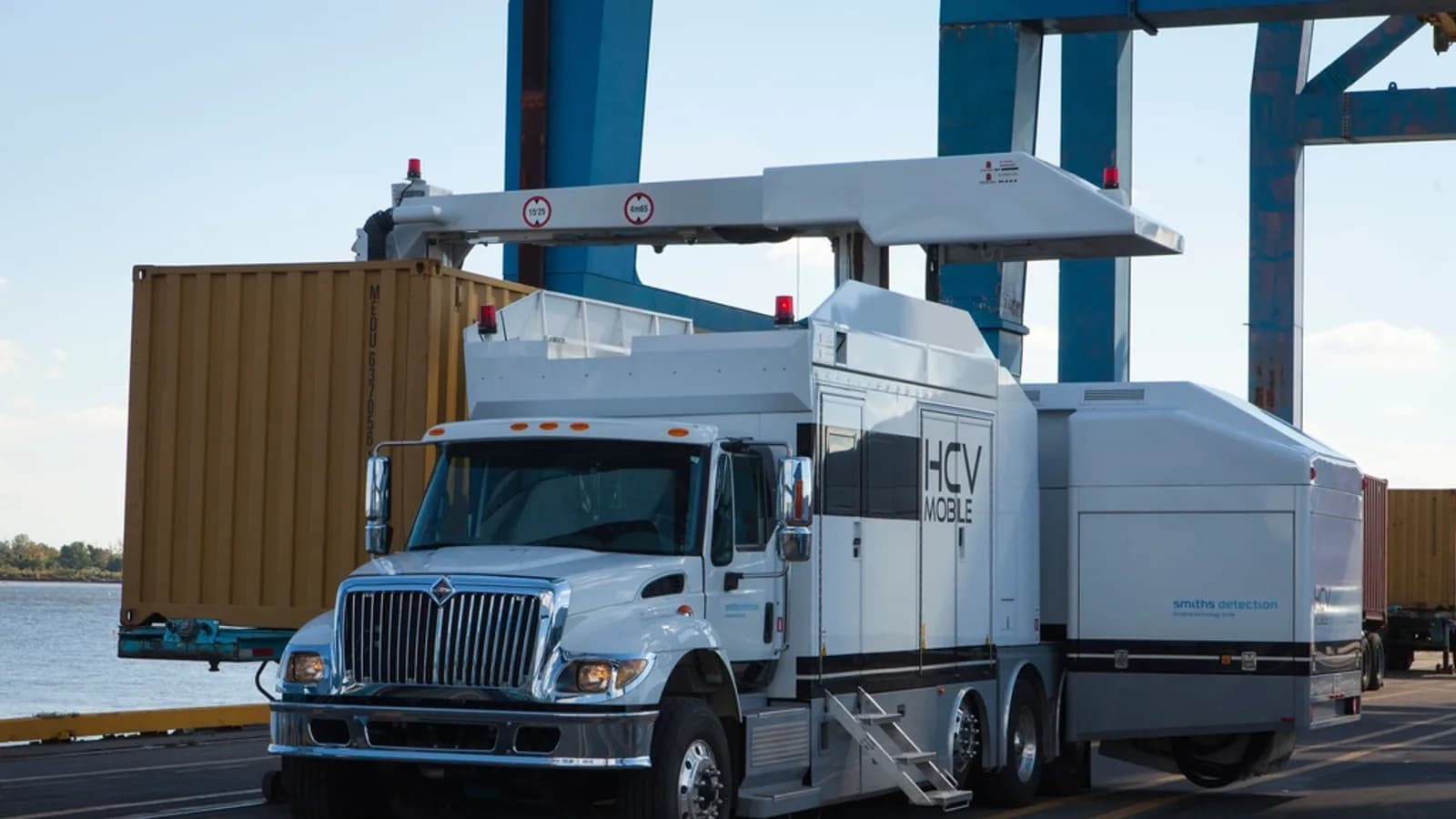
GPS tracking for ports, drayage and intermodal carriers from High Point GPS puts every tractor, chassis and container move on one map and time-stamps each stop between terminal, rail ramp, yard and customer dock. It gives dispatch and the operations desk the turn-time and dwell records that detention and demurrage disputes turn on. Drayage runs on turn times: an hour in a terminal queue is an hour the tractor is not moving the next box, and a container that sits past free time is a charge someone pays. High Point GPS draws geofences around each terminal, rail ramp, container yard and customer dock, and the GPS tracking device logs every entry and exit without the driver touching anything. From those records come the turn-time report for each terminal, the evidence attached to a detention invoice and the proof that an empty went back before free time ran out. Bluetooth tags and battery trackers keep unpowered chassis in view, under a load or parked in a pool lot. The driver app handles hours of service on runs that need an ELD, and the same trip data gives IFTA distance by jurisdiction for carriers that cross state and provincial lines to reach an inland ramp. Dispatch sees which tractor is closest to the next open appointment, and the operations desk sees which containers are nearing a deadline before the charge lands.
Common challenges
- Terminal turn times everyone complains about and nobody can document with arrival and departure times
- Detention and demurrage invoices the customer disputes because the only record is the driver's word
- Chassis lost in pool lots and customer yards while the carrier pays daily rental on equipment it cannot find
- The next pull assigned to the wrong tractor because dispatch cannot see who is still in the queue
- Per diem and free-time deadlines missed because nobody can see which empties are still out
- ELD and IFTA on inland moves handled with a separate device and a separate paper trail
How High Point GPS helps
- Geofences around each terminal, rail ramp, container yard and customer dock that log arrival and departure on their own
- Turn-time reports by terminal and by hour of day, built from every tractor's gate-in and gate-out times
- Time-stamped arrival, dwell and departure at the customer's dock to back each detention invoice
- Bluetooth asset tags and battery-powered trackers that find chassis and other unpowered equipment in pool lots and yards
- Geofence reports of pulls and empty returns, checked against each box's last free day to show which are nearing a deadline
- A live dispatch view of which tractor has cleared the terminal and is closest to the next appointment
- Hours of service in the driver app for moves that need an ELD, with short-haul exemptions applied where they fit
- IFTA distance by jurisdiction from the same trip records, for carriers running to inland ramps across borders
How does GPS tracking measure turn time at the terminal gate?
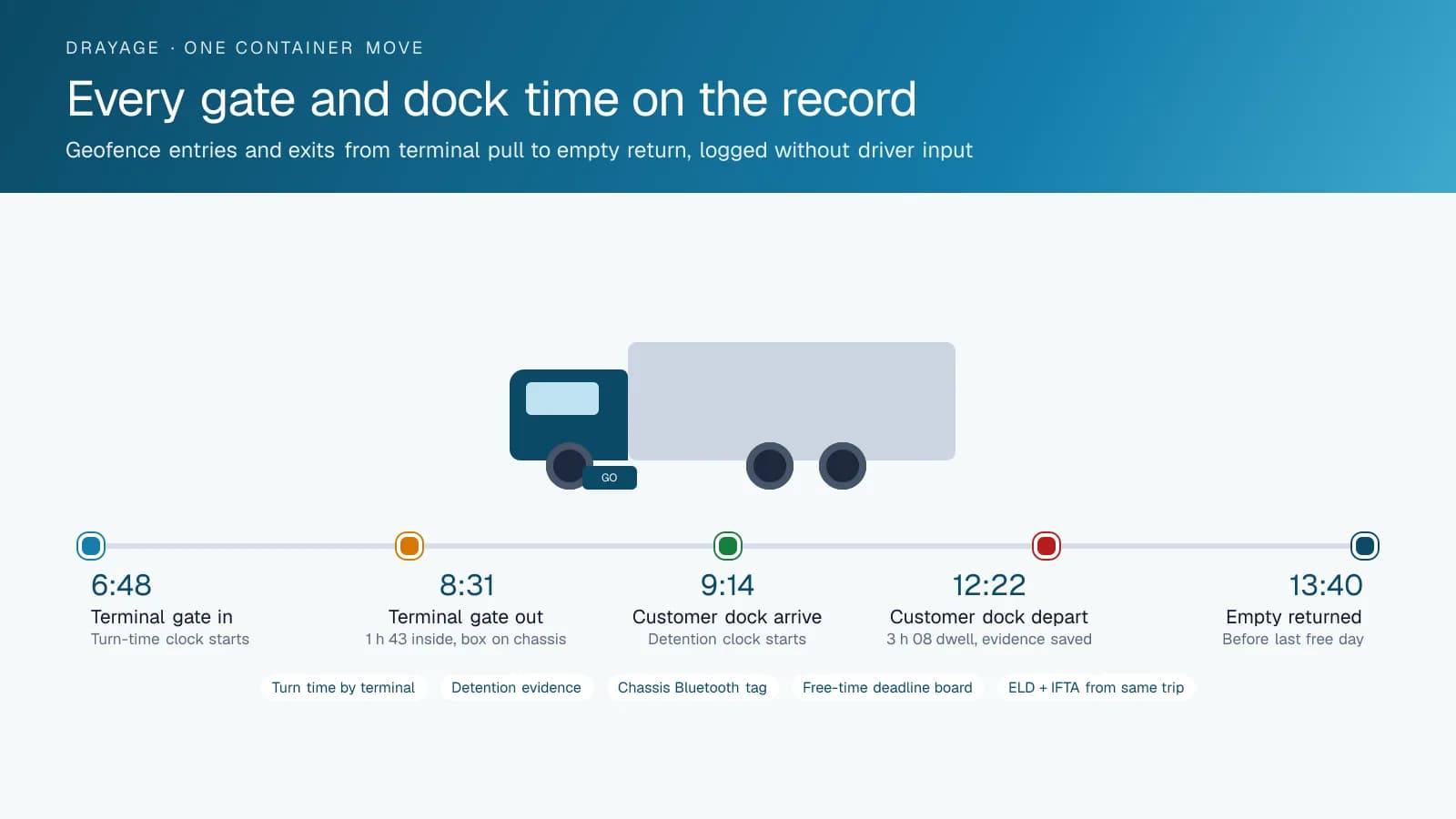
A geofence at the gate starts the clock and stops it. High Point GPS sets one geofence at each terminal gate and another around the terminal grounds. A tractor that crosses the outer line starts the timer, and the timer stops when it leaves. You get gate-in, gate-out and time inside for every move, by terminal, by day and by hour. An operations manager who brings a two-hour average at one terminal into a meeting is bringing a record of hundreds of moves, which is harder to wave off than a complaint. The same report shows which appointment windows move fast and which ones stall, so dispatch can shift the schedule.
Inside the terminal, the driver is out of contact and often out of coverage. The GPS tracking device keeps logging position offline and uploads the trip once the tractor reaches the exit, so the dwell record has no gaps. Dispatch sees the tractor reappear on the live map as it clears the gate, and that is when the next pull can be assigned with confidence. After a quarter of data, you can see which terminals are worth the queue and which ones call for a different appointment plan.
Evidence for detention and demurrage
A detention invoice is only as good as the time stamps behind it. When a tractor waits three hours at a customer's warehouse for an unload, the geofence around that dock records the arrival at 9:14 a.m. and the departure at 12:22 p.m., and the trip replay shows the tractor sitting in the same spot the whole time. High Point GPS attaches those records to the invoice, so the conversation with the customer starts from the platform's data rather than a note on a bill of lading.
Demurrage runs the other way: the charge lands on the carrier or the shipper when a box stays at the terminal past free time. Geofence reports from the trip data show every box that has been pulled and every empty that has been returned, and set against each box's last free day they show which ones are still out. The operations desk gets the list before the deadline, not after the invoice. When a charge does come in, the return record with the gate geofence time shows whether it was earned, and a wrongly billed day is contested with the time stamp in hand.
Keeping chassis and containers in view
A chassis has no engine and no power, and it spends most of its life unattended. Bluetooth asset tags read by any passing GPS tracking device report which tractor picked up which chassis and where it was left, and a battery-powered tracker on higher-value or owned chassis reports position on a schedule for months without a charge. When a chassis is on daily rental from a pool, the tracker shows the day it was picked up and the day it went back, which is the record that settles a pool invoice. When one goes missing from a customer yard, the last report says where to look.
The same approach reaches the box itself on moves where the carrier is responsible for it between the ramp and the customer. A tag on the container pairs it with the tractor and chassis that carried it, and the trip record shows the chain of custody from gate-out to delivery to empty return. That chain is what a shipper's claims department asks for when a seal is reported broken or a load arrives late, and it is ready in the platform rather than assembled from phone calls and terminal receipts after the fact.
Hours of service, IFTA and dispatch on the same data
Many drayage moves stay inside a short-haul radius, and some do not. The driver app logs hours of service for the drivers and days that require an ELD, and the ruleset settings let a carrier apply the short-haul exemption where the operation qualifies while keeping full logs on the inland runs. Distance by jurisdiction for IFTA comes from the same GPS tracking device trip records for the tractors that cross a state or provincial line to reach an inland ramp. There is one device in the cab and one set of data behind the compliance reports, the turn-time reports and the detention evidence.
Dispatch works from the same map. The operations desk sees which tractors have cleared the terminal, which are at a customer dock and which are on the way back with an empty, and assigns the next appointment to the one that is actually free. Driver ID from the IOX-NFCREADERA ties each move to the driver, which matters when owner-operators share tractors. Engine-hours maintenance and fault codes reach the shop so a tractor in the queue with a charging problem is caught before it is stranded in the terminal with a box on the chassis and an appointment missed.
Frequently asked questions
Can the system prove how long my driver waited at a customer's dock?
Yes. A geofence around the dock records the arrival and departure times, and the trip replay shows the tractor parked in between. High Point GPS sets these geofences up per customer, so the dwell record is ready to attach to a detention invoice. Nobody has to rebuild the day from the driver's notes or a bill of lading.
Does the tracking work inside the terminal where there is no signal?
Yes. The GPS tracking device keeps recording position and time offline, then uploads the trip when it gets coverage again, usually at the gate. The turn-time record inside the terminal stays complete. Dispatch sees the tractor reappear on the live map as soon as it clears the exit, ready for its next assignment.
How do I track chassis that have no power?
Put a Bluetooth asset tag on the chassis. Any GPS tracking device that passes reads it and records which tractor picked it up and where it was left. For chassis that sit unattended for long stretches, a battery-powered tracker reports on a schedule for months and shows where the equipment is in a pool lot or customer yard.
Do drayage drivers need an ELD?
It depends on the move. Drivers who stay within 150 air-miles (US) or 160 km (Canada) of their home base and meet the return-to-base conditions may qualify for the short-haul exemption, while inland runs generally need full logs. The driver app handles both. High Point GPS configures the ruleset for each driver, so every day is logged the way the regulation requires.
Can I see which containers are close to a free-time deadline?
Yes. Geofence reports draw on the records at the terminal and at the customer. They show which boxes have been pulled, which empties have gone back and which are still out against their last free day. The operations desk gets that list in time to act, before the demurrage charge arrives.
Related solutions
Related guides
- Detention Time in Trucking: What It Costs and How to Bill Detention Pay With GPS →
- What Is Geofencing? How It Works in Fleet Tracking →
- How Does Trailer GPS Tracking Work, With or Without a Truck? →
- Asset Tracker Tags vs. Powered GPS Trackers for Equipment →
- What Is an ELD? Electronic Logging Devices Explained →
- IFTA Reporting Software: How High Point GPS Automates Fuel Tax Reports →
Get a free quote
- Over 500 fleets
- Since 2013
- 4.9 on Google (19 reviews)
What are you looking for?
Prefer to talk?Call 1-800-613-6323[email protected]