
Industry
GPS Fleet Tracking for Uniform & Linen Services
GPS fleet tracking for uniform and linen service routes: every RSR stop logged to the minute, routes rebalanced on real data, and proof behind invoices.

Updated September 21, 2026
GPS fleet tracking for uniform and linen services from High Point GPS puts every route truck on one live map with its stop list and its progress through the day, and logs each customer stop to the minute. It is set up for a single plant's routes or a regional laundry with a dozen branches. A linen route is a weekly promise to hundreds of customers, each expecting the same truck at about the same hour, with clean goods dropped and soiled ones picked up. To that customer, the route service representative is the company, and until something goes wrong the branch manager sees the route only through the RSR's handheld. With the map, the branch knows the truck is running late on the west side before the customer calls. Geofences around each customer record arrival, departure and stop length, and that record backs an invoice dispute, a missed-stop credit and the route rebalancing discussion at quarter's end. Driver scoring for step vans that work residential streets and loading docks all day, idling reports for a fleet that stops sixty times a shift, electronic inspections and engine-hours maintenance keep the trucks running and the RSRs safe. Fuel-card integration and the open API link the route data to the route accounting system the branch already uses.
Common challenges
- Customers calling the branch to ask where the truck is, with the RSR's handheld as the only clue
- Missed-stop credits and invoice disputes with no independent record of when the truck was at the customer
- Routes that grew unevenly for years, so one RSR finishes at two and another at six
- Sixty stops a day with the engine running at most of them, and a fuel bill nobody can explain
- Step vans on residential streets and tight docks, with backing incidents and complaints that come down to the RSR's word
- Pre-trip inspections skipped because the RSR is loading garments at five in the morning
How High Point GPS helps
- Every route truck on one live map, with its stop list, the stops done and the ones still to go
- Geofences on every customer that log arrival, departure and time on site for each weekly stop
- Trip replay of the route, stops and speed for any truck on any day, for a customer dispute or a route review
- Stops per hour, time on site and kilometres between stops by route and by RSR, for rebalancing on real data
- Idling and fuel reports for a fleet that stops sixty times a shift, with fuel-card transactions matched to each truck
- Driver scoring set for step vans on residential streets: speed by zone, hard braking, backing events, seatbelt use
- Electronic DVIR in the driver app, with engine-hours maintenance reminders and fault codes sent to the shop
- Open API and add-on library integrations that send stop records to route accounting and customer-facing ETAs
How does GPS tracking record every uniform and linen stop?
Each customer gets a geofence, and the truck's arrival and departure are logged on every weekly visit. A linen customer notices a missed stop as soon as the towels run out, and then the branch gets a call. With every truck on the live map and its stop list beside it, the branch manager sees which stops the RSR has made, which are left and where the truck is now, so the caller gets a time instead of a promise to find out. Branches that want to go further can send key accounts an ETA as the truck gets close, through the open API and the customer's own portal.
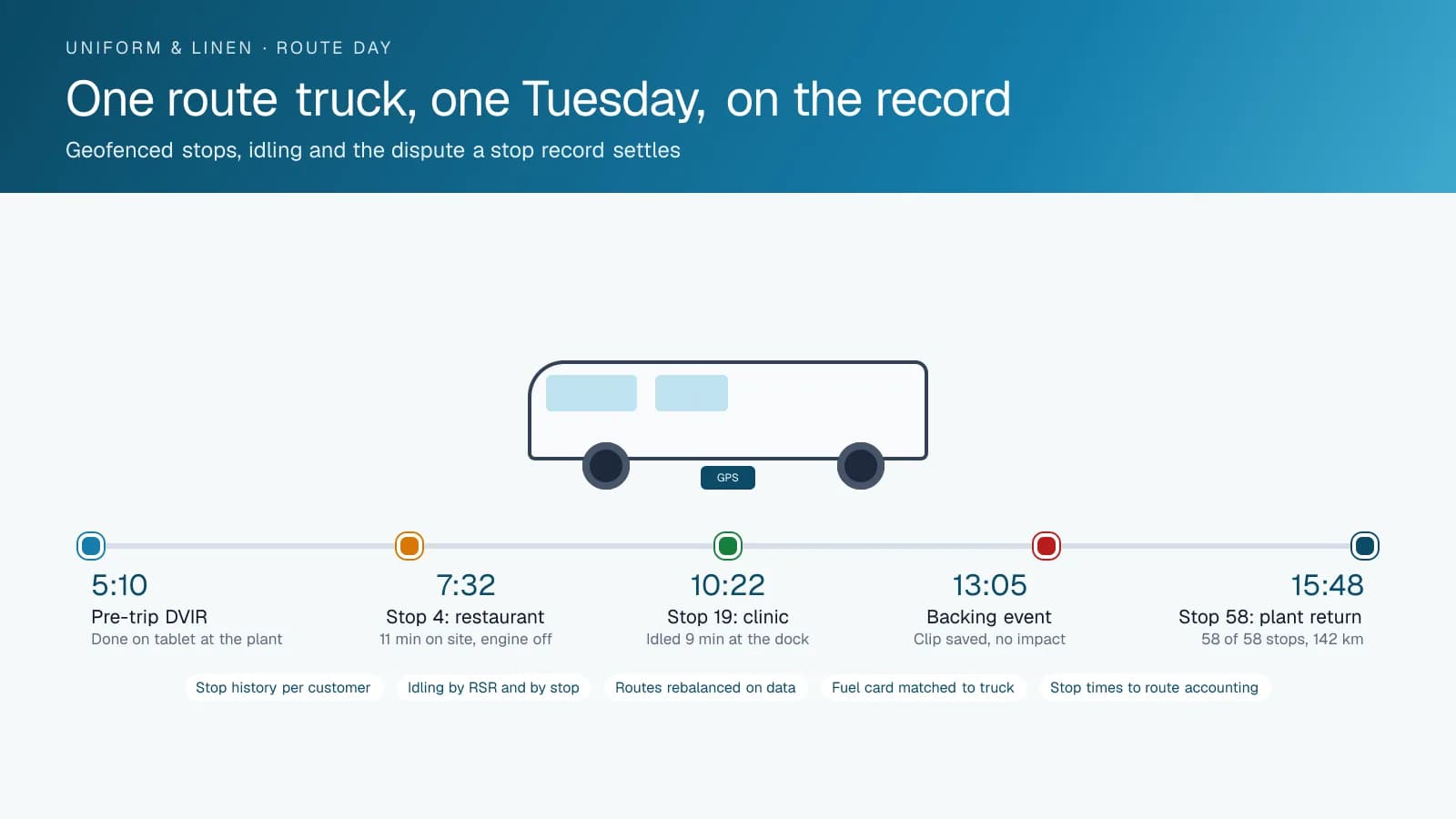
The record behind the map is what settles an invoice. A restaurant disputes a week of charges and says the truck never came, and the geofence log shows the truck at the back door for eleven minutes on Tuesday at 10:22 a.m. A clinic says the pickup was late and the soiled linen sat over the weekend, and the log shows the stop at 3:40 p.m. on Friday. High Point GPS sets up the reports so an account manager can pull a customer's full stop history for the quarter at once, and that same report backs a rate discussion.
Rebalancing routes on real data
Uniform routes grow one account at a time, and after a few years one RSR is done by two while another is still on the road at six. The platform reports stops per hour, time on site and kilometres between stops by route, by RSR and by day, from the trucks rather than from a handheld the RSR controls. The route manager sees which routes are heavy, which stops take twenty minutes when they should take five, and where two routes cross the same street on different days. That is the basis for a rebalance the RSRs will accept, because it comes from what the trucks did.
The same data shows the branch what a new account costs to serve before the contract is signed. A prospective stop on the far side of the territory adds kilometres and time that the report can show against the routes that pass nearby. A customer who keeps the RSR waiting at a locked dock is visible as time on site, and that is a conversation with the customer rather than a slower route. Routes that were built on guesswork get rebuilt on the record, and the next rebalance is a report rather than a project.
Sixty stops a day and the engine running at most of them
A route truck's fuel bill is not the miles; it is the stops. An RSR who leaves the engine running at each of sixty stops burns hours of fuel a week standing still, and nobody sees it in the odometer. The platform reports idling by truck, by RSR and by stop, and separates the idling at the plant during loading from the idling at the customer's door. A branch can share each RSR's idling number every week, so the conversation starts from the truck's own record.
Fuel-card integration matches each purchase to a truck and a driver, and a purchase that does not line up with the truck's position is flagged for the branch manager. Maintenance reminders run on engine hours and mileage, which matters for a step van that runs hard hours on short distances, and engine fault codes reach the shop as the truck logs them. The electronic DVIR in the driver app takes the RSR through the pre-trip on the tablet at the plant, and a defect reaches the shop before the truck is loaded.
Step vans, loading docks and the RSR's safety
A step van on residential streets, in restaurant alleys and at hospital loading docks has the exposures of a delivery fleet without the delivery fleet's supervision. Driver scoring with speed limits by zone, hard braking and backing events gives the branch manager a short weekly list and a specific trip to coach from. AI dash cams add the view from the cab when the company wants it: a road-facing camera records the cyclist in the alley and the car that backed into the truck at the dock, and a driver-facing camera flags phone use, with clips saved by event.
The record protects the RSR as much as the company. A customer who says the driver hit the dock door meets a replay that shows the truck stopped for two minutes with no impact event, and a complaint about a speeding truck on a residential street meets the speed on every segment. When a collision does happen, the trip replay and the event clip are with the insurer before the other party's story is. Sharing that footage with the insurer gives the claim a record to work from.
Frequently asked questions
Can the branch see which stops the RSR has completed?
Yes. Every customer location is a geofence, and the platform logs the arrival, departure and time on site for each stop as the truck makes it. The live map shows the stop list with completed and remaining stops. The branch spots a route running late before the customer calls, and can give the caller a time.
How does it help with an invoice dispute?
The customer's stop record lists every visit in the period, with arrival and departure times to the minute. An account manager pulls that stop history in one report and shares it with the customer, so a dispute about missed or late service starts from the same record on both sides. The trip replay is there if the customer wants to see the route as well.
Can it connect to our route accounting system?
Yes. The open API and add-on library integrations send stop times, mileage and driver data to the route accounting or ERP system the branch already uses. High Point GPS scopes the integration during onboarding. When a standard connector does not cover what you need, High Point GPS builds a custom add-in.
Will it show us how to rebalance routes?
It gives you the data to do it. Stops per hour, time on site and kilometres between stops are reported by route, by RSR and by day, based on what the trucks did. The route manager sees which routes are heavy and where they overlap, and rebalances from the record instead of from guesswork.
What does the RSR have to do differently?
Very little. RSRs run the pre-trip inspection in the driver app at the plant instead of on paper, and log in so the day's trips are attributed to them. Tracking, stop recording and idling reports work without any input from the RSR, and the handheld they already carry for invoicing stays as it is.
Related solutions
Related guides
- What Is Geofencing? How It Works in Fleet Tracking →
- Fleet Fuel Management: How to Reduce Fleet Fuel Costs →
- Route Optimization Software: What It Does and When It Pays →
- Driver Safety Scorecard: How Driver Scoring Works for Fleets →
- Fuel Card Integration With GPS Fleet Tracking: Fraud Prevention →
- Fleet API Explained: What You Can Build With High Point GPS →
Get a free quote
- Over 500 fleets
- Since 2013
- 4.9 on Google (19 reviews)
What are you looking for?
Prefer to talk?Call 1-800-613-6323[email protected]