
Video Safety & Dash Cams
Best AI Dash Cams for Fleets in 2026: Four Models Compared by Fleet Type
The best AI dash cams for fleets in 2026: GO Focus Plus, GO Focus Pro, Lytx Surfsight AI-12 and Rosco DV6 compared on specs, with a pick per fleet type.
Which AI Dash Cam Is Best for Your Fleet in 2026?
For vans, pickups and service vehicles, the best AI dash cam in 2026 is the Geotab GO Focus Plus, a road and driver camera that detects risky driving on the camera itself and warns the driver by voice. For straight trucks, tractor-trailers, buses and refuse trucks with side and rear blind spots, the GO Focus Pro is the better buy, because it takes up to 5 auxiliary cameras and its maker lists pedestrian, motorcycle and traffic light detection. High Point GPS installs both as a Geotab partner. The other two cameras compared here, the Lytx Surfsight AI-12 and the Rosco DV6, are Geotab Marketplace options that other providers offer; they suit fleets that already run those makers' cameras or want a detection only they list, such as Surfsight's seat belt alert.
The table below compares the four on the specifications their makers publish, and the sections after it give the pick for trucking, municipal and construction fleets. For Samsara, Motive, Lytx, Netradyne and Geotab compared brand against brand, see our guide Fleet Dash Cams Compared.
Four AI Dash Cams for Fleets Compared
Every figure comes from the maker's product page or specification sheet, listed in the sources at the end of this guide. Where a maker does not publish a figure, the table says so instead of guessing. Prices are left out: High Point GPS quotes each fleet. All four can report their events into MyGeotab next to the GPS tracking device's data; the two Geotab cameras are the ones High Point GPS installs.
| Item | Geotab GO Focus Plus | Geotab GO Focus Pro | Lytx Surfsight AI-12 | Rosco DV6 |
|---|---|---|---|---|
| Built-in cameras | 1080p road, 720p cabin with infrared; Road Only version available | 1080p road, 1080p cabin with infrared; road-only model available | 1080p road, 720p cabin with infrared | Full HD road and driver cameras |
| Road field of view (horizontal) | 116° | 120° | 118° | Not published on the pages cited |
| Extra cameras | 1 optional rear camera, in-cab or IP69K external | Up to 5: up to 4 side or external rear, plus 1 rear | Up to 4, wired or Wi-Fi | Expandable to 6 views in total |
| Road AI listed by the maker | Tailgating and hard braking; rear-end and backing incidents with the rear camera | Pre-collision and forward collision warning, traffic lights, pedestrians, motorcycles, low-profile hazards, licence plate recognition | Tailgating, speed limit, harsh acceleration, braking and turns | Forward collision warning, headway monitoring, tailgating |
| Driver AI listed by the maker | Distraction, fatigue | Distraction, fatigue, phone use, Smart Driver ID (dual model) | Phone use, driver unbelted, smoking, food and drink, distraction, possible fatigue | Drowsiness, phone use, inattention |
| Storage on the camera | 128 GB card included; 512 GB and 1 TB options | 128 GB card included; two slots, up to 2 TB in total | 128 GB card included, shared with any auxiliary cameras | Kits with 128, 256 or 512 GB cards; up to 1 TB |
| Event video in the cloud | 365 days by default | 365 days by default | Not stated on the pages cited | Up to 1 year in RoscoLive |
| Operating temperature | -20 °C to +60 °C | -20 °C to +60 °C | 0 °C to 55 °C; does not start outside that range until it reaches it | "Operational in extreme temperatures", no range on the listing |
| Best for | Vans, pickups, service and delivery vehicles that need a road and driver view; Road Only where policy keeps lenses off the driver | Straight trucks, tractor-trailers, buses, refuse trucks and construction vehicles with side and rear blind spots | Fleets that already use Surfsight, or want the seat belt alert and up to 4 extra cameras | Bus and transit fleets already using Rosco equipment, and fleets that want 6 views and a year of cloud video |
Which AI Dash Cam Fits Which Fleet?
Vans, pickups and service fleets: the GO Focus Plus. These vehicles need a record of the road ahead and of the driver, and the Plus covers both with a 1080p road camera and a 720p infrared cabin camera, with voice alerts in the cab for distraction, fatigue and tailgating. One optional rear camera covers backing. Choose the Road Only version where drivers or company policy rule out a cabin lens.
Trucks and buses: the GO Focus Pro. The SAAQ, Quebec's road safety authority, says a heavy vehicle's blind spots sit in front of the cab, along both sides and behind it, and grow with the vehicle's height and length. Of the four cameras, the Pro takes the most auxiliary cameras (up to 5), and it is the only one whose maker lists pedestrian, motorcycle and traffic light detection on the pages we cite.
Fleets that already run Lytx or Rosco through another provider can keep the camera they know. The Surfsight AI-12 is the only one of the four whose published detection list includes an unbelted driver, and it takes up to 4 auxiliary cameras. Its operating range starts at 0 °C, and Surfsight says it does not start below that until it warms up, which matters for vehicles parked outside in a Canadian winter. The Rosco DV6 records full HD from both lenses, expands to 6 views and keeps video in Rosco's cloud for up to 1 year.
Which AI Dash Cam Suits a Municipal Fleet?
Most municipal fleets mix refuse trucks, buses and other heavy vehicles with pickups and cars, so they run two models: the GO Focus Pro on the heavy vehicles and the GO Focus Plus on the light ones. The SAAQ says most collisions involving a pedestrian or cyclist happen at urban intersections, and singles out a truck's front and right-side blind spots in a right turn. That is the case for side cameras on the curb side of a refuse truck, with the IP69K external rear camera on the back of the body.
For geofenced event detection, Geotab's Marketplace listing for the Surfsight says any Geotab rule can be turned into a video event, so a rule built on a zone, such as a school zone or a depot, can request video when a vehicle enters it. Event video from the GO Focus cameras stays in the platform for 365 days by default; a public body should check that period against its own records retention rules.
Which AI Dash Cam Suits a Construction Fleet?
For dump trucks, mixers and other heavy vehicles on a site, the GO Focus Pro is the pick. Geotab lists low-profile hazard detection for objects such as bollards, speed bumps and curbs, and side and rear auxiliary cameras cover reversing, where the SAAQ warns that a heavy vehicle's rear blind spot is very long. The rear camera also comes in an external version with an IP69K rating. Pickups and crew trucks that run between sites are covered by the GO Focus Plus.
Check the operating range for vehicles parked outside over winter: Geotab rates both GO Focus cameras from -20 °C to +60 °C, and Surfsight rates the AI-12 from 0 °C to 55 °C.
What Does AI Do in a Fleet Dash Cam?
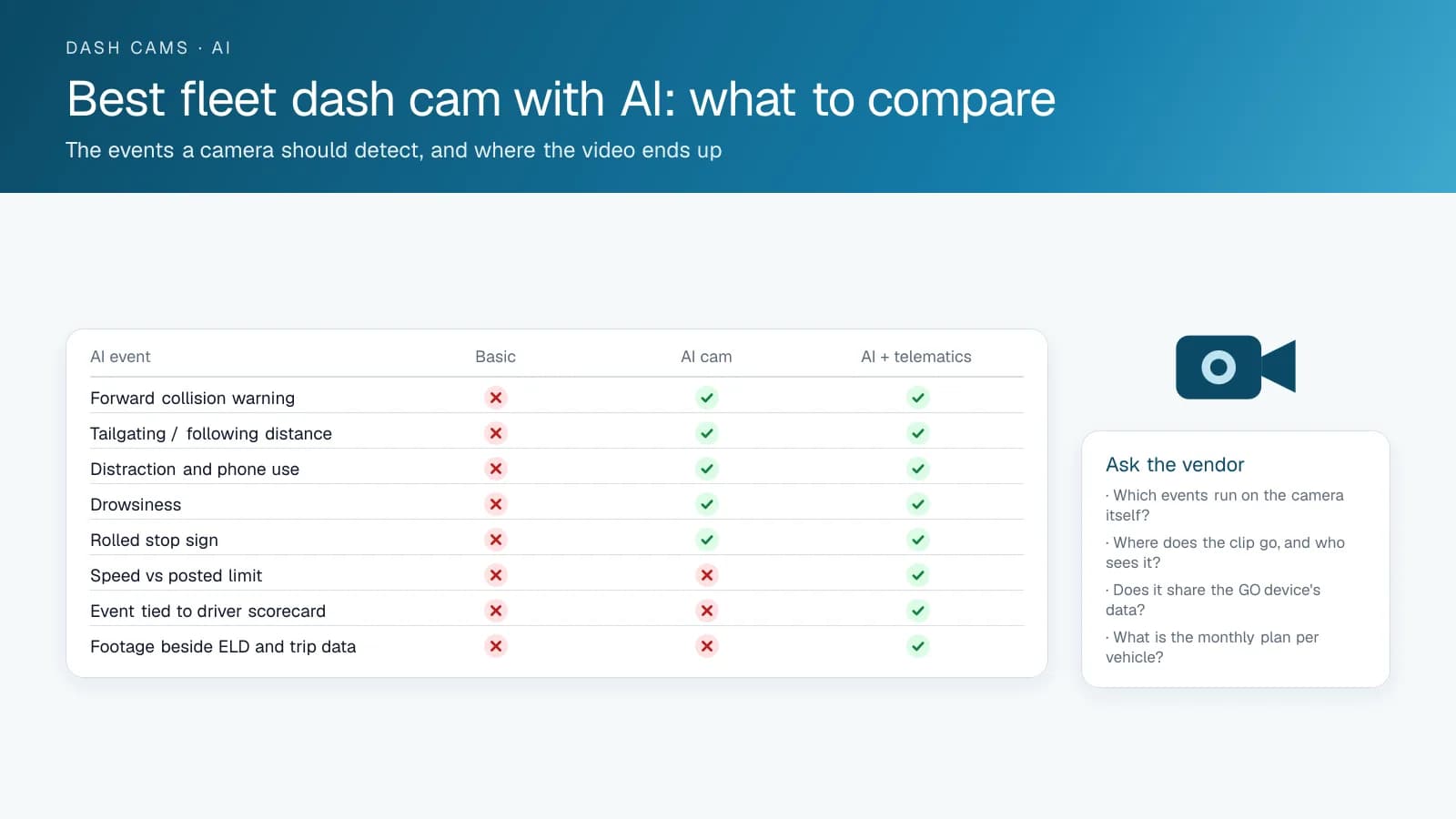
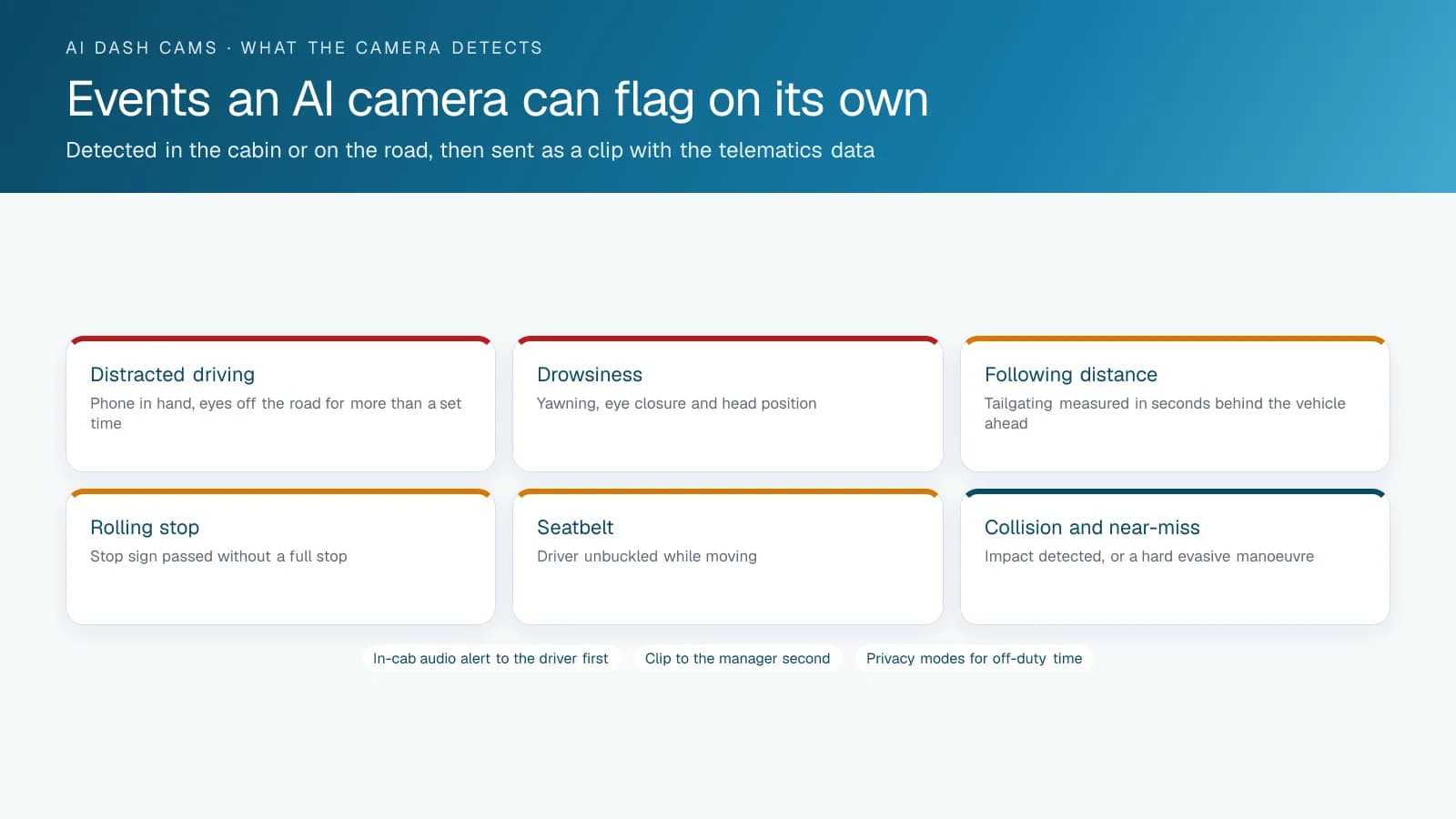
The best AI dash cam for fleets is the one that detects the events behind your fleet's collisions, warns the driver in the cab and files the clip next to your telematics data. For trucking and other commercial fleets in Canada and the United States, High Point GPS supplies and installs AI dash cams that work with the High Point GPS platform, so camera events and driving data share one scorecard. An AI dash cam runs detection on the camera itself, in real time, so nobody has to sit through hours of footage later. The road-facing lens watches following distance, forward collision risk, lane position and stop signs. The driver-facing lens watches the driver's eyes, hands and posture for distraction, phone use and drowsiness. When a detection crosses a threshold, the camera flags an event, saves the clip around it, alerts the driver with a tone or voice prompt, and uploads the event to the platform. A basic camera records the same scene and flags nothing, so you learn about the tailgating from the collision.
Basic, AI or Integrated: How Do Fleet Cameras Compare?
The market splits into three tiers. Basic cameras record and upload on impact: they cost little, and they settle the claim after the fact. AI cameras detect the events above and coach in the cab, so they change behaviour before there is a claim. AI cameras integrated with telematics add what the lens cannot see (speed against the posted limit, harsh braking and cornering from the vehicle's own accelerometer, the trip and the ELD context) and put each event on the driver's scorecard beside everything else. That third tier is what you get on the High Point GPS platform. The GO Focus Plus and the GO Focus Pro, for trucks that need side and rear views, show up alongside the GPS tracking device's data; Marketplace cameras from Lytx (Surfsight) and Rosco, offered by other providers, link to the same platform through the cloud.
A handful of specific questions separate AI dash cam vendors. Which events run on the camera itself, and which need a server? Where is the clip stored, and who can see it? Does the camera share the GPS tracking device's data or keep its own? Can you tune or switch off the in-cab alert for each event? What does the monthly plan per vehicle cover, data included?
How Much Does an AI Dash Cam for Fleets Cost?
Cost depends on the camera hardware, the number of lenses and the monthly video plan, which sets what uploads, clip retrieval, live view and data are included. High Point GPS does not publish prices, so ask each vendor for a written quote for your fleet size and compare what the monthly plan covers line by line. Then weigh the total against what collisions and disputed claims cost your fleet today.
Which Tier Fits Your Fleet?
Trucking and delivery fleets with a claims history buy the integrated tier, for the scorecard and for the conversation with the insurer. If your main exposure is one disputed collision a year, start with a good AI camera and add integration later. At any tier, the camera is worth only as much as the weekly review behind it: the collision rate drops when a manager looks at the events and coaches the few that matter. High Point GPS supplies and installs AI cameras with High Point GPS platform integration across Canada and the United States.
Questions to Ask Every AI Dash Cam Vendor
Put the same questions to each vendor in the same words so the answers line up. Fill in the sheet during the demo, not from the brochure.
| Question | Why it matters |
|---|---|
| Which events are detected on the camera itself, in real time? | Only on-camera detection alerts the driver in the moment |
| Which events are found later on a server? | After-the-fact events review, but do not coach |
| Does the camera share the GPS tracking device's data, or keep its own? | One scorecard, or two systems to reconcile |
| Can each in-cab alert be tuned or switched off per vehicle? | False alerts get cameras taped over |
| Where are clips stored, for how long, and who can open them? | Retention for claims and privacy for drivers |
| How many days of continuous footage stay on the card? | How far back a late complaint can be answered |
| What does the monthly plan include: uploads, retrieval, live view, data? | The real per-vehicle cost |
| What happens out of coverage? | Buffering and upload on return, or gaps |
| Who installs and who answers support calls in our region? | Whether the camera works in month six |
Frequently asked questions
What is the best AI dash cam for fleets?
For vans, pickups and service vehicles, the GO Focus Plus: a 1080p road camera, a 720p infrared cabin camera and voice alerts in the cab. For trucks, buses and refuse trucks with side and rear blind spots, the GO Focus Pro, which takes up to 5 auxiliary cameras and detects pedestrians and motorcycles. The Lytx Surfsight AI-12 and Rosco DV6 suit fleets already using those makers.
Which AI dash cam is best for trucks with blind spots?
The GO Focus Pro. The SAAQ places a heavy vehicle's blind spots in front of the cab, along both sides and behind it. The Pro takes up to 4 side or external rear cameras plus 1 rear camera, and Geotab lists pedestrian, motorcycle and low-profile hazard detection for it.
Which AI dash cam works for a municipal fleet?
Most municipal fleets mix heavy and light vehicles, so they use two models: the GO Focus Pro on refuse trucks and other heavy vehicles that turn at urban intersections, and the GO Focus Plus on pickups and cars. Event video stays in the platform for 365 days by default; check that against your own records retention rules.
What events should an AI dash cam detect?
An AI dash cam should detect following distance, forward collision risk, lane departure, rolled stops, phone use, distraction, drowsiness and seat belt use. It should run those detections on the camera itself, in real time, so it can alert the driver in the cab while there is still time to correct.
How much does an AI dash cam for fleets cost?
It depends on the camera hardware, the number of lenses and the monthly video plan, which covers uploads, clip retrieval, live view and data. High Point GPS does not publish prices. Ask each vendor for a written quote for your fleet and compare exactly what the monthly plan includes before you compare totals.
Does an AI dash cam need the telematics device?
No. An AI dash cam works on its own, detecting events and coaching drivers in the cab. An integrated camera shares the GPS tracking device's speed, braking and trip data, though, which makes each event and the driver scorecard more complete and spares you from reconciling two systems.
Which AI cameras work with High Point GPS?
High Point GPS installs two AI dash cams on its platform: Geotab's GO Focus Plus and GO Focus Pro. Each one shows its events in the High Point GPS platform next to the GPS tracking device's data, so camera events and driving data share one scorecard. The Lytx Surfsight AI-12 and Rosco DV6 are Marketplace options that other providers offer.
Sources
- Geotab: GO Focus Plus product page
- Geotab Support: GO Focus Plus technical specifications
- Geotab: GO Focus Pro product page
- Geotab Support: GO Focus Pro technical specifications
- Surfsight: AI-12 dashcam specifications
- Surfsight: Auxiliary camera overview
- Geotab Marketplace: Lytx Surfsight AI-12 Dash Cam
- Geotab Marketplace: Rosco DV6 Kit GPS WiFi 4G FHD AICam
- Geotab Marketplace: Rosco DV6 AI-Powered Recording
- Rosco: DV6 HD video recorder with DMS technology
- SAAQ: Angles morts des véhicules lourds (heavy vehicle blind spots, in French)
Related solutions & products
Continue reading
- Dash Cams & AI Video Safety overview →
- Rosco DV6 Dash Cam: A Dual HD Recorder With AI Alerts for Bus and Truck Fleets →
- Best Dash Cam for Fleets: Features to Look For Beyond Consumer Models →
- Lytx Surfsight AI-12 Camera: What It Detects and How It Integrates →
- Dash Cam Installation: 5 Mistakes That Void Footage When You Need It Most →
- More in Video Safety & Dash Cams →
Get a free quote
- Over 500 fleets
- Since 2013
- 4.9 on Google (19 reviews)
What are you looking for?
Prefer to talk?Call 1-800-613-6323[email protected]