
Video Safety & Dash Cams
Best Dash Cam for Fleets: Features to Look For Beyond Consumer Models
A fleet dash cam uploads event clips over cellular, tags them to telematics events and controls privacy. What a consumer model lacks, feature by feature.
Why Doesn't a Consumer Dash Cam Work for a Fleet?
The best dash cam for fleets uploads the clip that matters over cellular, ties it to the telematics event that triggered it and gets it to a safety manager the same day. A consumer dash cam is built for one driver who owns the car. It records continuously to a memory card and overwrites itself, and footage comes out when someone pulls the card, usually the person who was driving. In a fleet, each part of that breaks down. The clip you need is overwritten before anyone asks for it, the card is in a truck three provinces away, the driver who would retrieve it is the one the footage is about, and nobody sees the near-misses that never turned into a claim.
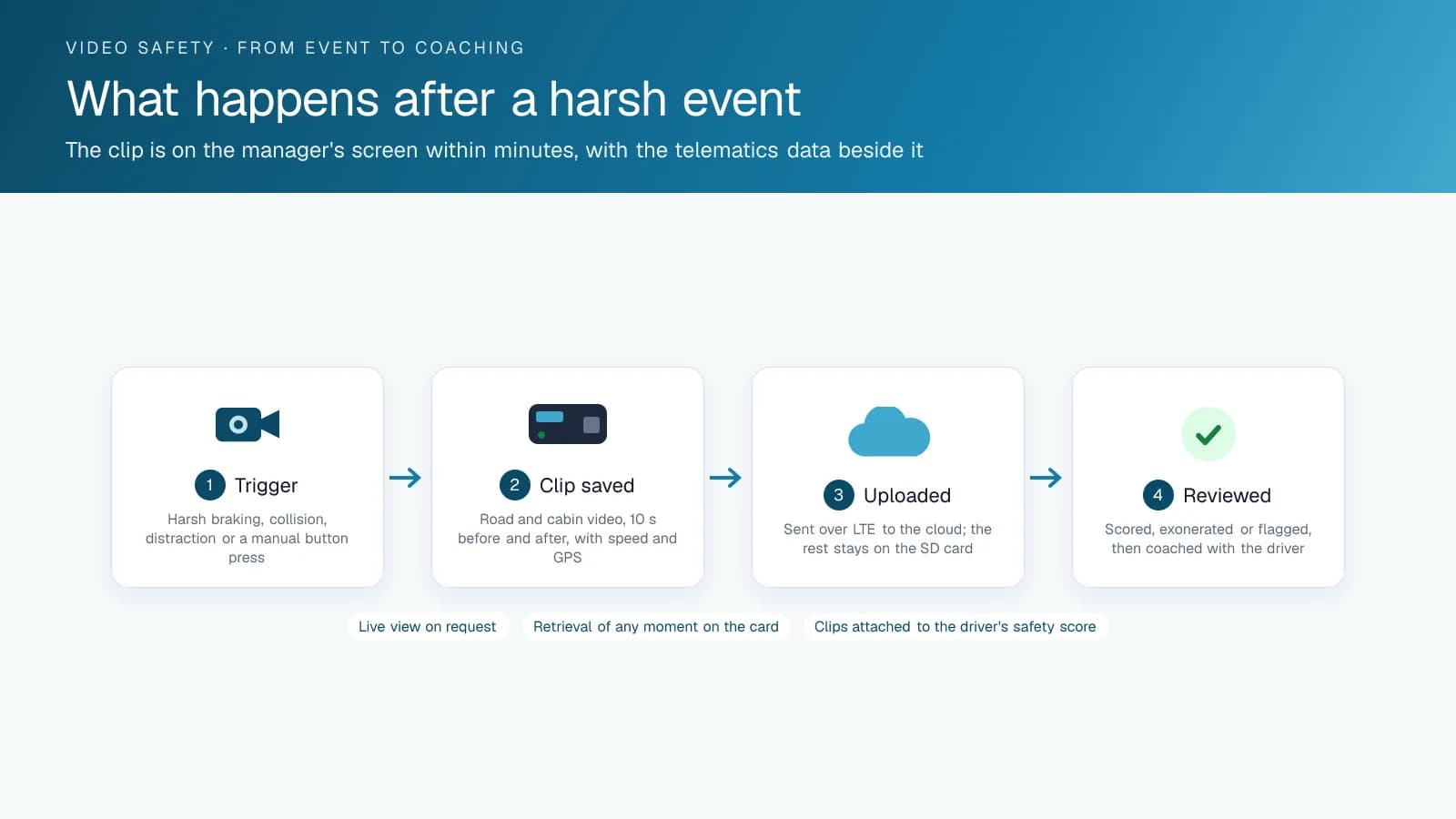
A fleet camera is designed around those gaps. It uploads event clips over cellular, the telematics device's own detection of harsh events and collisions triggers the recording, and the footage lands in the fleet platform tagged to the vehicle, driver, time and place.
What Features Should the Best Dash Cam for Fleets Have?
The features that count for a fleet, roughly in order of importance:
| Feature | Why it matters |
|---|---|
| Event-triggered upload over cellular | The clip that matters arrives without anyone touching the truck |
| Integration with the telematics device | Harsh braking, collision and speeding events from the GPS tracking device request the video automatically |
| Road-facing plus driver-facing lens | Exoneration needs the road; coaching needs the cab; the driver-facing lens is policy-configurable |
| AI detection in the camera | Distraction, phone use, following distance, seat belt, flagged in real time, with an in-cab alert |
| Video request on demand | Pull footage from any time window from the platform, not from the card |
| Retention and privacy controls | Who can see what, for how long; audio on or off; driver-facing on or off by vehicle |
| Multi-camera expansion | Side and rear cameras for trucks with blind spots and backing incidents |
| Clip quality at night and in weather | The incident is at 5am in the rain |
| Mount and install | Windshield mount, cable run to the device, tamper detection |
Road-Facing, Driver-Facing, or Both?
Road-facing footage clears drivers. It shows the car that cut in, and nearly every fleet wants it. Driver-facing footage is for coaching, because it shows the phone, the drowsiness and the unbuckled seat belt. It is also where drivers push back, so your policy decides whether it works. Pick a camera that lets you turn on driver-facing recording vehicle by vehicle, control audio and limit who can view the footage, and you can run a coaching program drivers will accept. Fleets that install driver-facing cameras without a written policy usually end up switching them off.
AI in the Camera vs AI in the Cloud
Current fleet cameras run detection on the device. They spot the phone or the short following distance and alert the driver in the cab while it is happening, and that in-the-moment alert is what changes behaviour. Cloud analysis of uploaded clips helps with review, but it comes after the fact. Ask each vendor which events the camera detects and alerts on live, and which ones only show up later.
How to Choose the Best Dash Cam for Your Fleet
Start with your telematics platform. The camera that integrates with it is the one whose clips arrive tagged to events and drivers. On High Point GPS, that means a camera paired with the vehicle's telematics device: the GO Focus Plus is built to work that way, and the GO Focus Pro adds side and rear cameras for trucks with blind spots. Next, settle your driver-facing policy before you buy. Last, test night footage from the exact model you plan to buy, since a spec sheet won't show you what a wet windshield at dawn looks like.
Consumer and Fleet Cameras, Side by Side
These differences decide whether the footage exists when your fleet needs it.
| Item | Consumer dash cam | Fleet dash cam integrated with telematics |
|---|---|---|
| Where footage lives | On a card in the vehicle | Event clips in the cloud, continuous on the card |
| Who retrieves it | The driver, by pulling the card | The office, from the platform, by time window |
| What triggers a clip | G-sensor on the camera, if set | Telematics events plus the camera's AI detections |
| Tagging | File name and time | Vehicle, driver, location, speed, event type |
| Driver alerts | None | In-cab audio at the moment of the behaviour |
| Tamper detection | None | Lens covered or unplugged raises an alert |
| Privacy controls | None | Per-vehicle recording modes, role-based access, audit log |
| Support | Retailer | The installer, with the rest of the fleet system |
Frequently asked questions
What features separate a fleet dash cam from a consumer one?
A fleet dash cam uploads event clips over cellular and records when the telematics device detects a harsh event or collision. It files the footage in the fleet platform, tagged to vehicle, driver, time and place. A consumer camera records to a memory card in the cab, overwrites itself until someone pulls the card.
Do I need a driver-facing camera?
You need one for coaching, while the road-facing lens is enough to clear drivers after an incident. If you add driver-facing recording, choose a camera that lets you turn it on per vehicle, control audio and restrict who can view footage. Write the policy and share it with drivers before you install anything.
What does AI in a dash cam do?
It detects distraction, phone use, following distance and seat belt use inside the camera itself, then alerts the driver in the cab in real time. That live alert is what changes behaviour. Cloud review of uploaded clips is still useful to a safety manager, but it only happens after the fact.
Which dash cam works with High Point GPS?
Cameras that connect to the vehicle's telematics device work with High Point GPS, because their clips are tied to events from the GPS tracking device. The GO Focus Plus is built for that connection, and the GO Focus Pro adds side and rear cameras for trucks with blind spots and backing incidents. We confirm the pairing for each vehicle before install.
Related solutions & products
Continue reading
- Dash Cams & AI Video Safety overview →
- 4G Fleet Dash Cams as Driver Monitoring Cameras: How Behaviour Events Reach the Manager →
- Do Dash Cams Lower Insurance? How Fleets Get the Discount →
- Best AI Dash Cams for Fleets in 2026: Four Models Compared by Fleet Type →
- What Is a Driver Safety Program? How Fleets Build One That Works →
- More in Video Safety & Dash Cams →
Get a free quote
- Over 500 fleets
- Since 2013
- 4.9 on Google (19 reviews)
What are you looking for?
Prefer to talk?Call 1-800-613-6323[email protected]