
Compliance
Compliance Data Summary: Hours of Service and Inspection Status on the Live Map
Compliance Data Summary shows each driver's hours of service left and each truck's DVIR status on the live map, before dispatch assigns a load.

Why Dispatchers Need Compliance Data on the Live Map
Compliance Data Summary is the High Point GPS platform add-in that puts each driver's hours of service and each truck's inspection status on the live map, beside the vehicle. Without it, the map shows where every truck is but not that the driver in the nearest one has ninety minutes left on a fourteen-hour window, or that the truck's DVIR flagged a defect this morning that nobody has signed off. The dispatcher gives the load to the nearest truck, the driver takes it because that is the job, and the violation or out-of-service order happens two hundred kilometres later.
What Compliance Data Summary Shows for Each Vehicle
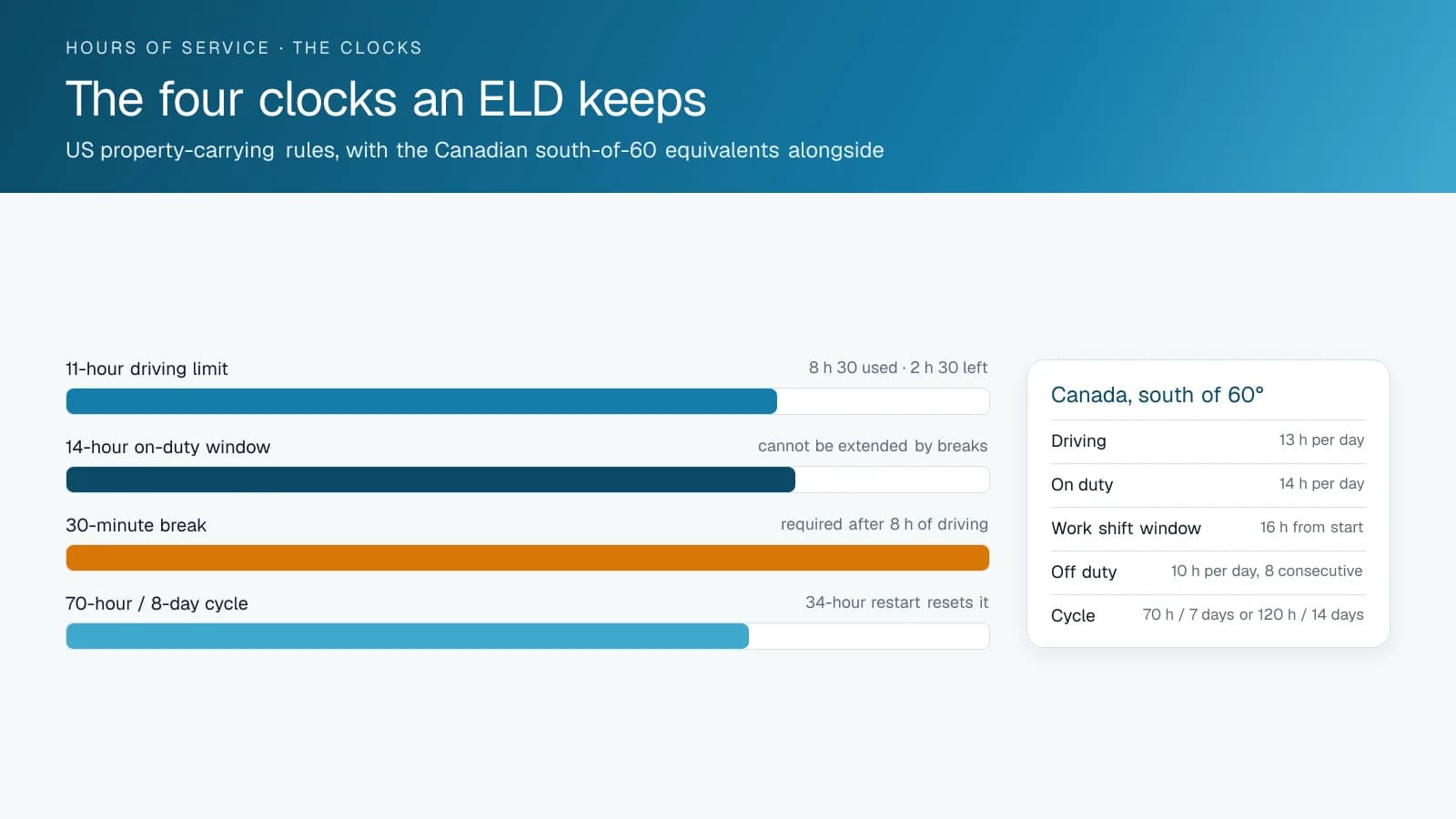
The add-in shows, for each vehicle, the logged-in driver, their remaining driving and on-duty time under the ruleset they are running, their next required break, and whether they are close to a limit. It also shows the vehicle's inspection status: the last DVIR, any open defects, and whether the driver has done a pre-trip today. The values come from the ELD and DVIR data the driver app already records. A vehicle with a driver near a limit or an open defect is coloured on the map, so the dispatcher sees it before opening anything.
What Changes for Dispatch and Safety
Loads go to trucks whose drivers can legally complete them, and trucks with open defects go to the shop instead of the customer. Violations that used to turn up in the weekly HOS report get caught at assignment. The safety manager stops hearing about drivers caught over hours at roadside on loads the fleet assigned that morning.
How Dispatchers Use It Through a Shift
The add-in changes three moments in a dispatcher's day. At the morning assignment, the map shows each driver's remaining window beside the truck, so a 6-hour run goes to a driver with 8 hours left over the nearest one with 3. At midday, when a customer adds a stop, the dispatcher checks whether the driver's remaining time covers it before saying yes, and moves it to a second truck if it does not. At the end of the day, trucks with an open DVIR defect show up before tomorrow's loads are built, so they go to the shop tonight, not to tomorrow's pre-trip. The point is to catch hours-of-service problems at assignment: the drivers stay the same, and the way loads are assigned changes.
Setup Requirements
The add-in needs the fleet to run the driver app for ELD and DVIR. It reads only those records. High Point GPS installs it as part of ELD deployments for carriers across Canada and the United States, configured for the Canadian and US rulesets each fleet runs.
Frequently asked questions
What is Compliance Data Summary?
Compliance Data Summary is a High Point GPS platform add-in that shows each driver's hours-of-service status and each vehicle's inspection status on the live map. Dispatchers see remaining time and open DVIR defects beside the truck before they assign a load.
Where does the data come from?
The data comes from the ELD and DVIR records the driver app already keeps. The add-in needs no extra hardware and no extra input from drivers, so a fleet already running the driver app for logs and inspections has everything it needs.
Does it work with Canadian and US rules?
Yes. The add-in shows remaining hours under whichever ruleset the driver is running. High Point GPS configures it for the rulesets your fleet uses as part of the ELD deployment, so each driver's remaining time reflects the rules they are logged under.
Does it prevent violations?
It helps prevent the violations that start at dispatch, when a load goes to a driver who cannot legally complete it. The dispatcher sees remaining driving and on-duty time before handing out the load, not afterwards in the weekly HOS report.
Does it show open DVIR defects?
Yes. A vehicle with an unresolved DVIR defect is flagged on the map, along with whether a pre-trip has been completed today. Dispatchers see those trucks before building the next day's loads and can send them to the shop instead of to a customer.
Sources
Related solutions & products
Related terms
Continue reading
- Compliance (ELD, DVIR, IFTA) overview →
- How to Pass a DOT Inspection: Checklist and Inspection Levels →
- Personal Conveyance Rules and MyGeotab Setup: Staying Compliant →
- HOS Driver Summary: The Weekly HOS Violations Report That Runs Itself →
- ELD Compliance Guide: What the ELD Enforces and What Fleets Still Do →
- More in Compliance →
Get a free quote
- Over 500 fleets
- Since 2013
- 4.9 on Google (19 reviews)
What are you looking for?
Prefer to talk?Call 1-800-613-6323[email protected]