
Video Safety & Dash Cams
Dash Cam With GPS Tracking: Do Fleets Need Both?
A dash cam with GPS tracking pairs video with speed and location: GPS shows where and how fast, the clip shows what happened. Why fleets run both together.
Does a Fleet Need Both a Dash Cam and GPS Tracking?
Yes. A dash cam with GPS tracking answers two different questions, and combined the two are worth more than the parts added up. Any fleet buying safety technology for the first time ends up asking whether it needs GPS tracking, a dash cam or both, and both is the answer that holds up.
GPS tracking tells you where a vehicle was, how fast it went and how long it sat. That is enough to spot a pattern, such as a driver who keeps speeding on one route or a vehicle that idles far more than it should. Telemetry can't tell you what happened in a specific moment, though. A hard-braking event shows up as a data point with no story behind it.
What Does a Dash Cam Add That GPS Data Can't?
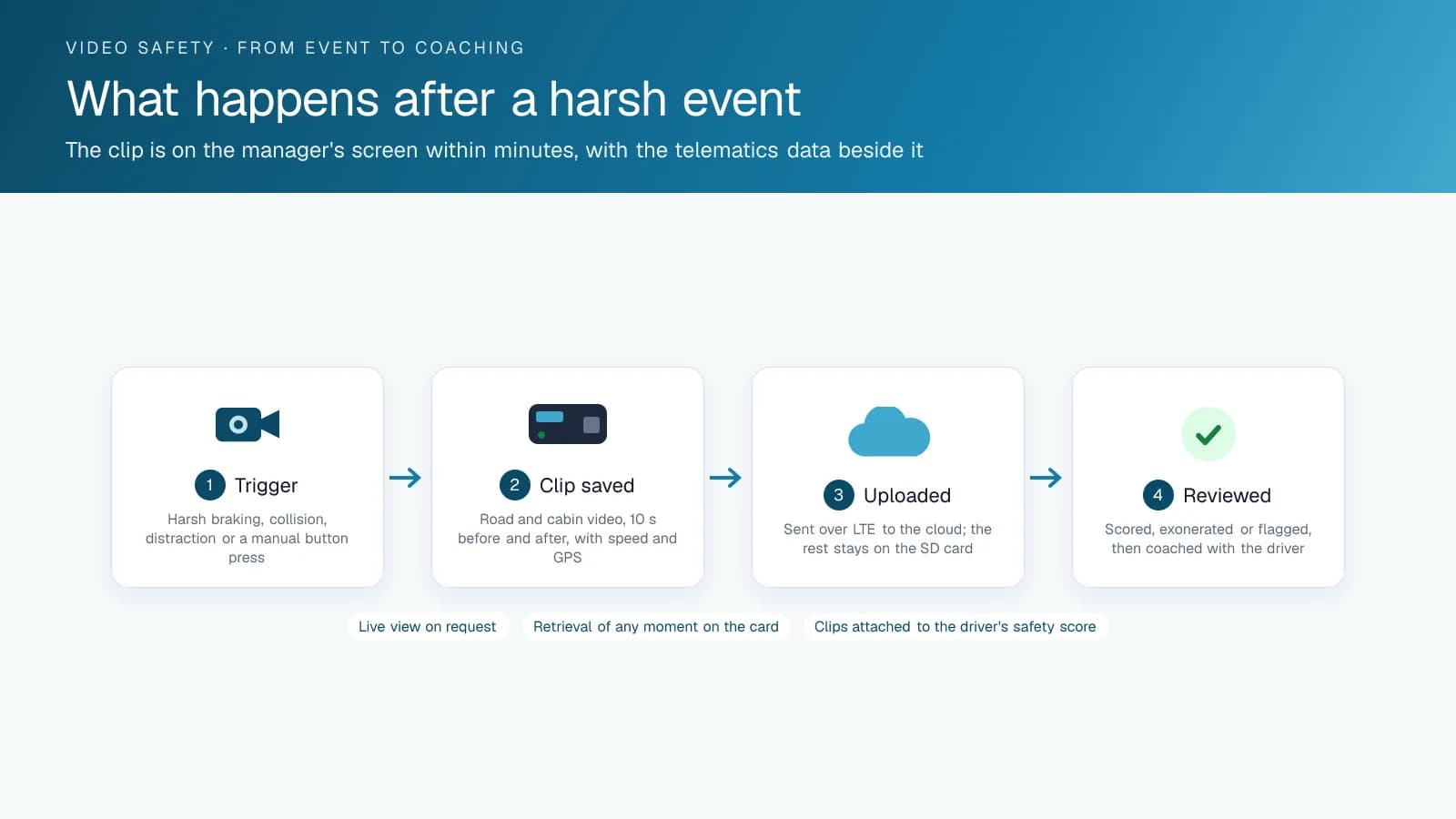
A dash cam fills that gap. When an event triggers, road-facing and driver-facing footage shows what happened. Did the driver brake hard because someone cut them off, or because they were following too close and not paying attention? In the data, both look identical. On video, they lead to two different conversations with the driver.
Disputes are where the camera pays off. Picture a rear-end collision claim where the other party says your driver was speeding. A clip that shows the exact speed, the location and what was happening on the road at that moment, all tied together automatically, can resolve the claim faster than your driver's account set against a stranger's insurance claim.
Each piece alone leaves a gap. GPS data proves what a vehicle did, but not why. Video shows what happened, but without speed and location attached, the other side of a dispute can argue around a clip much more easily. Combined, the record covers both.
Can You Add a Dash Cam to the GPS Tracking You Already Run?
If you already run a GPS tracking device, adding video usually means adding a compatible camera to the same platform, such as the GO Focus Plus AI dash cam, whose pairing with your vehicles High Point GPS confirms before install. You don't need a separate system with its own login and its own data plan, or a dash cam from a vendor whose system won't talk to the tracking you already have.
It also speeds up rollout. A camera added to a platform your team already knows means less training, because the safety manager reviews footage in the same dashboard they check every day for location and driver behaviour, with no second tool to learn from scratch.
Confirm that compatibility before you sign with a standalone camera vendor, even one that markets itself as fleet-focused. A camera system that can't tie its footage to your GPS platform's speed and location data will always produce a weaker record than one integrated from the start, however good its video quality is.
Does a Dash Cam With Built-In GPS Replace the Tracking Device?
Usually not. Many fleet dash cams carry their own GPS receiver and cellular modem, but a camera on the windshield does not read the engine, so it cannot report fault codes, fuel level, odometer or engine hours the way a tracking device on the diagnostic port does. The GPS in the camera stamps each clip with location and speed, and the tracking device supplies the rest of the vehicle record.
Geotab's GO Focus Plus shows how the two split the work. Its spec sheet lists multi-constellation GNSS (GPS, QZSS, GLONASS and Galileo) and an LTE CAT 6 modem, yet it is not a standalone camera: the vehicle interfaces it lists are Geotab GO9 devices and factory (OEM) telematics, and Geotab's GO10 page describes the GO10 as compatible with GO Focus dash cams. The camera handles video and in-cab detection. The GO device handles engine data, trips, exception rules and, with the driver app, hours of service.
Before you sign, check two things: whether the camera needs a specific tracking device or factory telematics to work, and whether its clips land in the same platform as your trips and engine alerts. High Point GPS confirms the pairing for each vehicle before the install.
Can You Pull Footage of a Moment That Didn't Trigger an Event?
Yes, as long as the camera records continuously to its memory card and the footage has not been overwritten yet. Event clips upload on their own. Everything else stays on the card in a loop, so how far back you can go depends on the card size and how many hours the vehicle drives.
Geotab's published figures give a sense of the window. The GO Focus Plus ships with a 128 GB card, which Geotab rates at roughly 35 to 40 hours of dual-camera driving, with 512 GB and 1 TB options. The GO Focus Pro has two card slots that take up to 1 TB each. On both cameras, event videos are kept in MyGeotab for 365 days by default. GO Focus Plus video can be watched in real time from the trips history page, and the GO Focus Pro adds video on demand.
The trips history is where GPS and video meet. You find the moment on the map by time, place or speed, then pull the footage for that stretch. Set a rule for how quickly a manager requests video after a complaint or claim comes in, because a vehicle that drives long days overwrites its oldest recordings within days.
Four Incidents, With and Without Video
The table shows the same four events, first with telematics alone and then with an integrated camera. Each one is an illustrative example of a pattern common in fleet claims.
| Incident | Telematics alone shows | With integrated video |
|---|---|---|
| Rear-end collision, your truck behind | Speed 48 km/h, harsh brake 1.2 s before impact | The car that cut in from the right lane and braked; claim reassigned |
| Rear-end collision, your truck in front | Stationary for 40 s, then impact from behind | Rear camera shows the following car on a phone; not-at-fault confirmed |
| Customer says the driver was speeding in their yard | 12 km/h maximum inside the geofence | Clip shows a forklift crossing; the speed record was already enough |
| Harsh-braking event flagged for coaching | Deceleration 0.45 g on an arterial road | Driver was following at under a second; the coaching conversation is different |
Frequently asked questions
Can a dash cam and a GPS tracker work together on one platform?
Yes, when the camera is compatible with your tracking platform. High Point GPS pairs a GPS tracking device with a compatible AI dash camera, so location, speed and video event data all show up in the same dashboard. You avoid running two disconnected systems, and each clip comes with the speed and location from that exact moment.
Does combining video and GPS data help with insurance claims?
It usually helps. Footage tied to speed and location data for the exact moment of the event gives insurers and adjusters a fuller record, which can help a claim move faster. Raw video with no context, or driver statements on their own, give the other side more room to argue.
If I already have GPS tracking, do I need a separate dash cam system?
Not necessarily a separate system. First check whether your current telematics platform supports a compatible camera add-on. Adding a camera to the platform you already run is usually less disruptive and less costly than bringing in a standalone dash cam platform with its own login, data plan and dashboard.
Does adding a camera to an existing GPS platform require extra staff training?
Usually less than a separate system would need. The footage appears in the same dashboard your safety manager already uses for tracking and driver behaviour data, so there is no second tool to learn from scratch, and reviewing a clip happens next to the location and speed data they check every day.
Does a dash cam with GPS need a separate tracking device?
Often, yes. A camera with its own GPS can stamp location and speed on each clip, but it does not read engine data such as fault codes, odometer or engine hours. Geotab's GO Focus Plus, for example, lists Geotab GO devices and factory telematics as its vehicle interfaces, so it works alongside a tracking device on one platform.
How long is fleet dash cam footage kept?
Event clips and continuous recordings follow different rules. Event videos from Geotab's GO Focus Plus and GO Focus Pro are kept in MyGeotab for 365 days by default. Continuous footage stays on the camera's memory card until newer video overwrites it, and Geotab rates the 128 GB card in the GO Focus Plus at roughly 35 to 40 hours of dual-camera driving.
Sources
Related solutions & products
Related terms
Continue reading
- Dash Cams & AI Video Safety overview →
- Dash Cam With Live View for Fleets: What the Stream Shows and When to Use It →
- Dash Cam for Trucks, Front and Rear: What Each Camera Position Sees →
- What Is a Dual Dash Cam With AI? How the GO Focus Plus Coaches Drivers →
- Video Telematics: How AI Dash Cam Video Works With the High Point GPS Platform →
- More in Video Safety & Dash Cams →
Get a free quote
- Over 500 fleets
- Since 2013
- 4.9 on Google (19 reviews)
What are you looking for?
Prefer to talk?Call 1-800-613-6323[email protected]