
Video Safety & Dash Cams
Dash Cam for Trucks, Front and Rear: What Each Camera Position Sees
A dash cam for trucks starts with the front road camera, then adds driver-facing, rear and side views. What each records and which mix fits your trucks.
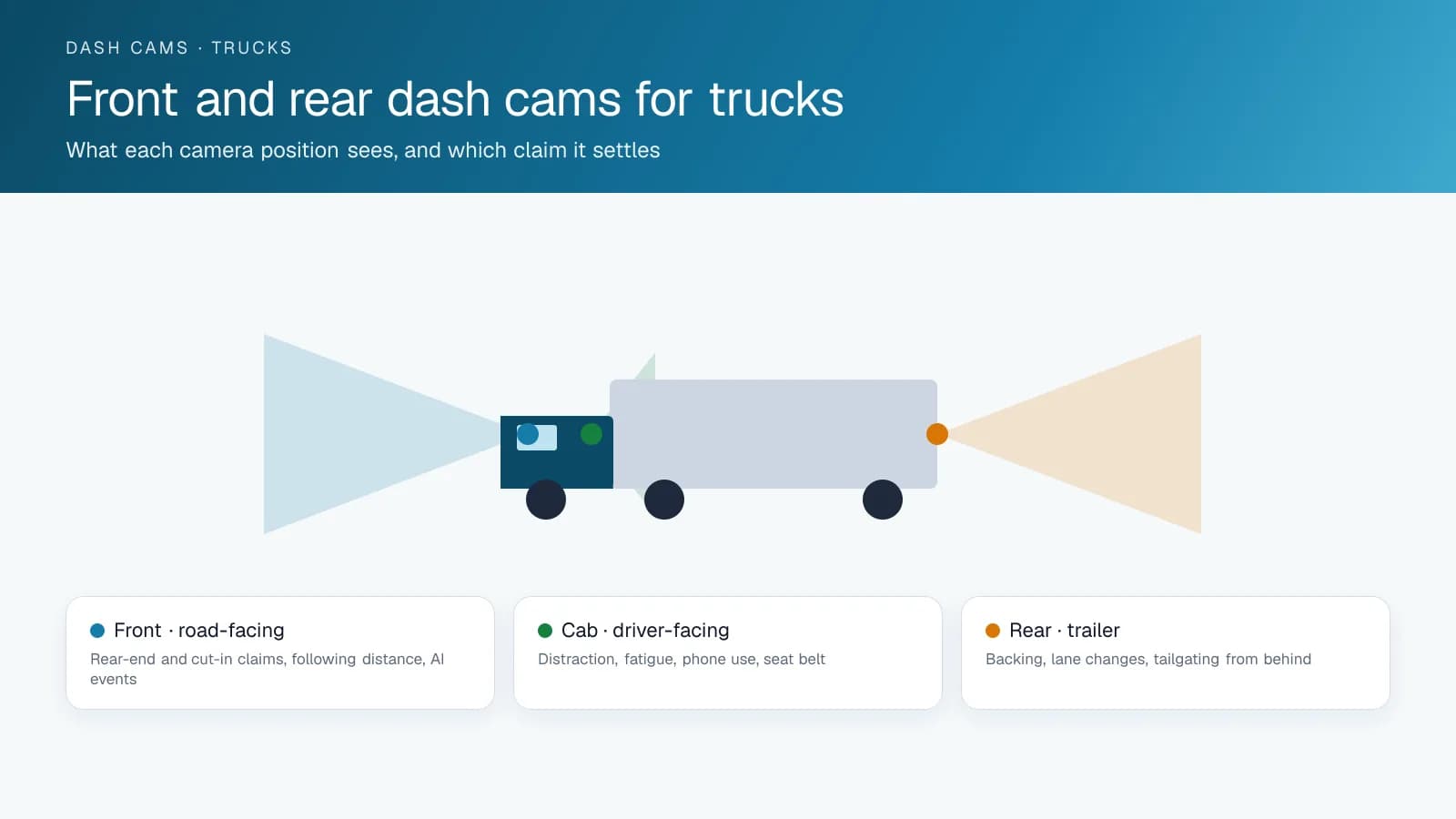
Front: What Does the Road-Facing Camera Record?
A dash cam for trucks starts with the road-facing camera at the front, then adds driver-facing, rear and sometimes side cameras. Mounted high on the windshield, the front camera records the road ahead at a wide angle, and an AI model detects close following, forward collision risk, lane departure and rolled stops. It settles the claims that cost fleets the most: the car that cut in and braked, the disputed rear-end at a light, the intersection crash. Insurers and lawyers look first at that clip, tied to the GPS tracking device's speed and location data.
Cab: What Does a Driver-Facing Camera Catch?
A driver-facing lens, usually in the same housing as the road camera, records the cab and catches what the road camera cannot: a phone in hand, eyes off the road, drowsiness, no seat belt, smoking. Drivers object to it most, and it changes behaviour most, because each event is specific and the video leaves little to argue about. Fleets keep their drivers when they set a clear policy on when footage is reviewed and use the video to defend drivers as often as to coach them. Fleets that use it for surveillance lose them.
Rear Dash Cam for Trucks: What Rear and Side Cameras Cover
On a tractor, the rear camera faces the trailer and the road behind, catching backing, lane changes and anyone tailgating the truck; on a straight truck or van it doubles as the reversing camera. Side cameras under the mirrors cover the blind spots where cyclists and pedestrians get hit and where sideswipe claims start. A multi-camera system feeds every lens into one recorder connected to the GPS tracking device, so each event is stored with the same telematics data. Tractor-trailers typically run front, cab and rear. Refuse, delivery and construction trucks add sides; vans run front and cab.
How a Truck Dash Cam System Connects and Stores Footage
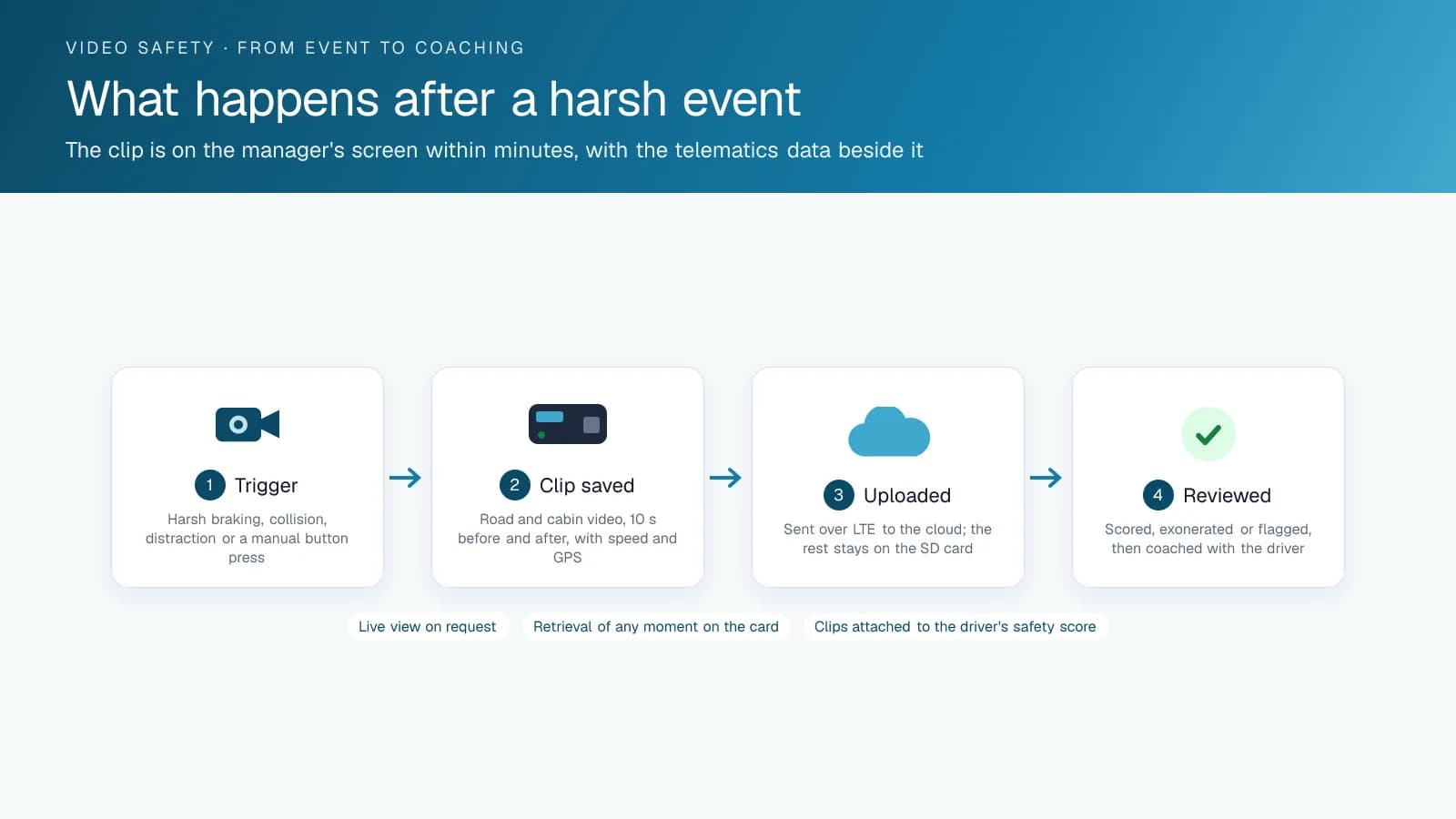
Fleet cameras connect through the telematics device or their own LTE modem. They upload event clips within seconds and keep continuous recording on a local card for days, which you can pull on request. The footage sits in the platform next to the trip, the driver and the ELD record, and that context is what turns a video file into evidence. High Point GPS installs dual and multi-camera systems for truck fleets across Canada and the United States, set up for the events your safety program coaches on.
Where Can a Dash Cam Mount on a Truck Windshield?
In the US, a dash cam on a commercial truck has to sit inside the windshield zone that FMCSA allows for vehicle safety technology. Under 49 CFR 393.60(e), such a device must be mounted not more than 8.5 inches (216 mm) below the upper edge of the area swept by the wipers, not more than 7 inches (175 mm) above the lower edge of that area, and outside the driver's sight lines to the road and to highway signs and signals.
Dash cams qualify because FMCSA's definition of vehicle safety technology names driver camera systems, forward collision warning and lane departure warning, and covers any system that contains cameras or video. Other devices, such as antennas, get a stricter rule: no more than 6 inches (152 mm) below the top of the windshield and outside the wiper sweep entirely. Check the position on every truck at installation, because cab and windshield shapes move the wiper sweep from one model to the next.
In Canada, windshield obstruction rules come from each province's highway traffic legislation, so confirm your province's rule as well before a fleet-wide install.
Which Specs Matter on a Truck Dash Cam?
Compare resolution and field of view on the road camera, night vision on the cabin camera, storage, video retention and operating temperature, and expect the spec sheet to state each one. As a reference, here are the figures Geotab publishes for the GO Focus Plus and GO Focus Pro AI dash cams, which High Point GPS installs.
Storage decides how far back you can go after an incident you hear about late. Geotab rates the GO Focus Plus 128 GB card at roughly 35 to 40 hours of dual-camera driving, so on a truck that runs long days the oldest continuous footage is overwritten within days. Event clips are uploaded and kept in the platform, which is why the card size matters most for claims that arrive after the fact.
| Spec | GO Focus Plus | GO Focus Pro |
|---|---|---|
| Road camera | 1080p, 142° diagonal field of view | 1080p, 143° diagonal field of view |
| Cabin camera | 720p with a 940 nm infrared illuminator | 1080p with a 940 nm infrared illuminator |
| Extra cameras | Rear auxiliary camera, with an IP69K external version | Up to 4 side or external rear cameras, plus 1 auxiliary rear camera |
| Storage | 128 GB card included; 512 GB and 1 TB options | Dual card slots, up to 1 TB each (2 TB in total) |
| Event video kept in MyGeotab | 365 days by default | 365 days by default |
| Operating temperature | -20 °C to +60 °C | -20 °C to +60 °C |
Where Each Truck Camera Mounts and What It Sees
Placement decides whether the footage is usable, and each lens has one right spot on a truck.
| Camera | Mount | Field of view | Watch out for |
|---|---|---|---|
| Road-facing | Top centre of the windshield, inside the wiper sweep | Lane ahead and both adjacent lanes | Sun visor and tint band blocking the lens |
| Driver-facing | Same unit or beside it, angled at the seat | Driver, phone in hand, seat belt | Passenger seat blocking the view on wide cabs |
| Rear | Above the rear doors or on the trailer rear frame | Following traffic, reversing | Trailer swaps; the camera stays with the trailer |
| Side | Below the mirrors on each side | Blind spots, cyclists, lane changes | Mirror arms vibrating the image |
| Cargo or interior | Ceiling of the box or cabin | Load shifts, passengers | Low light; choose an infrared lens |
Frequently asked questions
Do trucks need a front and rear dash cam?
A road-facing front camera is the minimum dash cam for trucks. Rear and side cameras add coverage for backing, lane changes and blind spots, which is where straight trucks, refuse trucks and delivery vehicles have most of their claims. Tractor-trailers usually add a rear camera.
What does a driver-facing camera record?
A driver-facing camera records the cab: phone use, distraction, drowsiness, seat belt use and smoking. AI detection flags each event and saves the clip, so a manager reviews a short video of what happened instead of scrolling through hours of recording.
How do truck dash cams connect?
Truck dash cams connect through the GPS tracking device or their own LTE modem. Event clips upload within seconds, and continuous footage stays on a local card so you can retrieve it on request. Each clip is stored with the trip and driver record.
How many cameras does a tractor-trailer need?
A tractor-trailer usually needs three cameras: road-facing, driver-facing and rear. The rear camera covers backing, lane changes and tailgating traffic. Vehicles that work curbside, such as refuse and delivery trucks, add side cameras to cover blind spots where cyclists get hit.
Are dash cams legal on trucks in Canada?
Yes, dash cams are legal on trucks in Canada. Road-facing cameras are allowed as long as the mount does not block the driver's view, which provincial highway traffic laws prohibit. Driver-facing cameras fall under provincial privacy rules and workplace policy, so most fleets notify their drivers and define in writing when and why footage can be reviewed.
Where can you mount a dash cam on a truck windshield in the US?
Under FMCSA rule 49 CFR 393.60(e), a dash cam counts as vehicle safety technology and must sit no more than 8.5 inches below the upper edge of the wiper sweep and no more than 7 inches above its lower edge, always outside the driver's sight lines to the road, signs and signals. Check the position on every truck at installation.
What resolution should a truck dash cam have?
Compare the road camera's resolution and field of view first, since they decide whether plates and lane markings are readable. Geotab's GO Focus Plus and GO Focus Pro both record the road in 1080p, with diagonal fields of view of 142° and 143°, and both cabin cameras use a 940 nm infrared illuminator for night driving.
Sources
Related solutions & products
Continue reading
- Dash Cams & AI Video Safety overview →
- Dash Cam With Live View for Fleets: What the Stream Shows and When to Use It →
- What Is a Dual Dash Cam With AI? How the GO Focus Plus Coaches Drivers →
- Can a GPS Tracker Record Audio or Video? What the Fleet Tracking Device Captures →
- What Is ADAS? Advanced Driver Assistance Systems in Fleet Vehicles and Dash Cams →
- More in Video Safety & Dash Cams →
Get a free quote
- Over 500 fleets
- Since 2013
- 4.9 on Google (19 reviews)
What are you looking for?
Prefer to talk?Call 1-800-613-6323[email protected]