
Industry
GPS Fleet Tracking for Home Healthcare & Nursing Fleets
GPS tracking for home healthcare fleets: visit verification for billing, mileage reimbursement from real trips, and alerts for caregivers working alone.
Updated September 21, 2026
GPS tracking for home healthcare from High Point GPS verifies each patient visit, calculates mileage reimbursement from real trips and lets a coordinator see when a caregiver working alone may need help. It is built for home care agencies, community nursing programs and private-duty providers that bill for visits they cannot see. A nurse or personal support worker drives to eight patients in a day, spends thirty minutes at each, and at the end of the week submits a mileage claim and a visit log that the agency sends to the funder. When the funder audits, the agency has to show that each visit happened, at that address, for that long. When a caregiver claims 140 kilometres for a day that should have taken 90, the coordinator has to decide whether to ask. A GPS tracking device in each agency car logs every trip and every stop, and a geofence at each patient address produces arrival and departure times that either match the visit note or do not. Mileage for reimbursement comes from the odometer, per trip, and the driver splits patient visits from personal use in the driver app. If a caregiver has not moved from a patient's address long past the scheduled visit, or has stopped somewhere unexpected after dark, the coordinator sees it and can call or send help. Route planning across a caseload cuts the driving between visits, and the driver scoring and dash cam options other fleets use apply here too. High Point GPS installs, configures and supports it with the privacy settings each agency requires.
Common challenges
- Funder audits that ask for proof a visit happened at the patient's address for the documented time, and a visit log that rests on the caregiver's word
- Mileage claims that grow every quarter with no way to check them against the actual trips
- Caregivers working alone in patients' homes after dark, and nobody knowing where they are if a visit goes wrong
- Caseloads assigned by patient instead of by geography, so caregivers cross the city twice a day
- Company cars taken home under a personal-use policy that nobody can enforce or report on
- Coordinators fielding calls about late caregivers with no better answer than an unanswered text message
How High Point GPS helps
- Visit verification from a geofence at each patient address: arrival, departure and time on site, matched to the scheduled visit
- Mileage reimbursement calculated from the odometer per trip, with business and personal trips separated in the driver app
- Lone-worker visibility for the coordinator, who is alerted within minutes when a caregiver overstays a visit or stops somewhere unexpected
- Route planning that orders a day's patients by geography and time window to cut the driving between visits
- Personal-use reporting on agency cars: after-hours and weekend trips, with distance and location, under the policy the agency sets
- Live location of every caregiver for the coordinator, with the current visit and the next one beside it
- Driver behaviour scoring and optional AI dash cams for agencies whose insurance or fleet size calls for them
- Maintenance reminders on mileage and engine hours for a fleet of small cars that are rarely at the office
How does GPS tracking verify a home care visit?
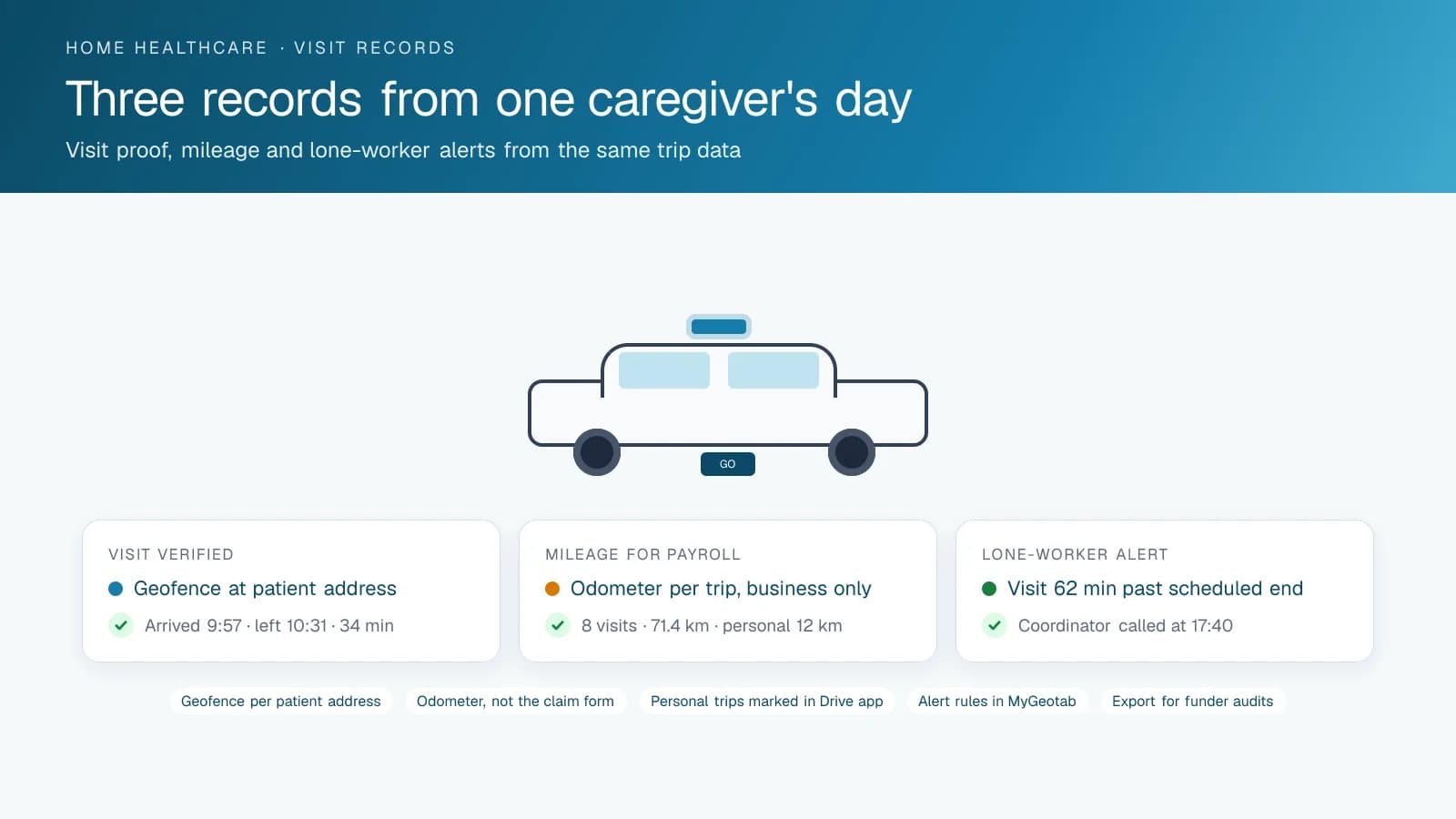
A geofence around each patient's address, set up from the agency's client list, records when the caregiver's vehicle arrived and when it left. That record is what verifies the visit, and home care funding depends on visits the agency can show actually happened. The visit note says 30 minutes of care at 10:00; the geofence record says the car was there from 9:57 to 10:31. When an auditor samples a month of visits, the agency exports the record for each one, and the sample closes without a single phone call to a caregiver.
The same record protects the caregiver. If a family member says the nurse never came on Thursday, the record shows the car at the address for 28 minutes. If a patient complains that the visit was rushed, the coordinator checks the time on site. High Point GPS sets up the geofences in bulk from the agency's patient addresses, keeps them current as the caseload changes and builds the visit report in the form the funder asks for. Where the privacy policy requires it, the report can mask patient identities, with each geofence named by a client code instead of an address.
Mileage from the odometer instead of the claim form
Mileage reimbursement is a real cost for home care agencies, and it is often paid on forms filled in from memory at the end of the week. With a GPS tracking device in the car, every trip is recorded with its distance from the odometer. Caregivers using their own vehicles can carry a small device too, or use the driver app, depending on the agency's policy. The claim becomes a report: trips between patient addresses on the days worked, totalled per pay period, exported to payroll. The coordinator approves in minutes and the numbers are the same for everyone.
For agency-owned cars taken home, the driver marks a trip as personal in the driver app, and the report separates business distance from personal distance under the agency's policy. Trips that start after hours or on a weekend show as what they are. High Point GPS builds the report and the payroll export, and sets the rate table so the reimbursement is calculated at the agency's rate for the distance recorded.
Safety for caregivers who work alone
A caregiver walks into a stranger's home several times a day, often after dark, and the office does not know what is behind the door. Tracking gives the coordinator a way to notice trouble before a phone call comes. A visit that runs an hour past its scheduled end with no message from the caregiver, a stop at an address that is not a patient's, a car that has not moved since a visit ended: each is a rule in the High Point GPS platform that alerts the coordinator, who can call and, if there is no answer, send someone or contact the police with a location.
For agencies that want more, the driver app on the caregiver's phone provides a check-in at the start and end of each visit, and an alert if the check-out is missed. Where the agency operates in rural areas, trips are stored on the device when there is no coverage and uploaded when the car is back in range, so the coordinator still sees where the caregiver went. The policy on what the office sees, and when, is written down and shared with staff before the first device is installed.
Routing the caseload and running the cars
Assigning patients by continuity of care is right; assigning them without looking at the map is expensive. Route planning in the platform takes a day's visits with their time windows and orders them to cut the driving between them, and shows the coordinator which caregivers are crossing the city twice when a swap would save both an hour. Live ETAs let the coordinator tell a patient's family when the nurse will arrive without calling the nurse. When a caregiver calls in sick at 7 a.m., the coordinator sees which colleagues are already near each of that day's patients and reassigns the visits in minutes rather than by working down a phone list.
The cars themselves are a fleet that is rarely at the office. Maintenance reminders on mileage and engine hours reach the coordinator when each car is due, and engine fault codes come in as they happen, which keeps a caregiver from being stranded between patients. Driver scoring and AI dash cams are optional for most agencies and standard for larger ones, where insurance premiums and collision claims follow the same pattern as any other fleet. High Point GPS scopes what the agency needs and leaves out what it does not.
Frequently asked questions
How does the system verify a patient visit?
A geofence at each patient address records when the caregiver's vehicle arrived and when it left, which gives the time on site. The platform matches that record to the scheduled visit and exports it for audits or billing. High Point GPS creates the geofences from your client list and keeps them current as patients change.
Can it calculate mileage reimbursement?
Yes. Each trip's distance comes from the odometer through the GPS tracking device, and the report totals business trips per caregiver per pay period. Personal trips are kept separate by the driver's own selection in the driver app. The result exports to payroll and replaces the weekly claim form filled in from memory.
What about caregivers using their own cars?
There are two options: a small GPS tracking device installed in the caregiver's own vehicle, or the driver app on their phone for check-in and trip logging. The right choice depends on your policy and the caregiver's agreement, and High Point GPS helps you set the privacy rules for each option.
How does it help keep lone caregivers safe?
Rules in the High Point GPS platform alert the coordinator when a visit runs far past its scheduled end, when a car stops at an unexpected address or when a check-out is missed. The coordinator can then call, send someone or give the police a location. In rural areas without coverage, trips are stored and uploaded later.
Can we enforce a personal-use policy on agency cars?
Yes. The report shows trips outside working hours, on weekends and beyond the service area, with distance and location, and drivers mark personal trips in the driver app. The agency sets the policy and the thresholds, and the report shows compliance without a coordinator having to review every trip by hand.
Related solutions
Related guides
- What Is Geofencing? How It Works in Fleet Tracking →
- Company Vehicle GPS Tracking Policy: Can My Employer Track Me? →
- Personal Conveyance Rules and MyGeotab Setup: Staying Compliant →
- Route Optimization Software: What It Does and When It Pays →
- GPS Fleet Tracking for Small Business: What a 3 to 20 Vehicle Fleet Needs →
- Fleet Maintenance Schedule: Engine Hours vs Calendar and Mileage →
Get a free quote
- Over 500 fleets
- Since 2013
- 4.9 on Google (19 reviews)
What are you looking for?
Prefer to talk?Call 1-800-613-6323[email protected]