
Industry
GPS Fleet Tracking for Telecom & Cable Installers
GPS tracking for telecom and cable installers proves technicians arrived inside the appointment window, logs time per job and tracks reels in each van.
Updated September 21, 2026
High Point GPS provides GPS tracking for telecom and cable installation fleets, the contractors and in-house crews that install and service lines for carriers. Dispatch sees every van and bucket truck on one live map beside the job list, and a geofence at each address records when the technician arrived and left. Your business runs on the appointment window. The carrier promises the customer a four-hour slot, the technician is expected inside it, and every missed window turns into a credit, a complaint and a call from the account manager. The same GPS tracking device records how long the truck sat at the job, how long the bucket was up through an auxiliary input on the boom circuit, and how far the technician drove between stops. Bluetooth asset tags on drop reels, meters and ladders show which van each one is in and flag the ones that did not come back at the end of the shift. When the carrier disputes an arrival time, the trip replay shows the truck's position at the minute the window opened. Subcontractor vans carry the same device on the same database: each contractor sees its own trucks and the operations office sees all of them, so per-job time reporting stays consistent across a mixed workforce. High Point GPS configures the zones, the reports and the driver ID so the whole picture is available from one High Point GPS platform login.
Common challenges
- Missed appointment windows charged back by the carrier, with no record of when the technician arrived
- Customers who say the technician never showed up, and a paper work order that cannot prove otherwise
- Drop reels, meters and ladders that leave the yard in one van and never come back in any
- Subcontractor trucks that report their own hours and job counts on their own spreadsheets
- Schedules built on guessed job times, with technicians running late by noon
- Bucket trucks driven home and used on the weekend on the company's fuel
How High Point GPS helps
- Live location of every van and bucket truck beside the day's job list, with the appointment window for each address
- Geofence arrival and departure records at each customer address, time-stamped from the truck's own position
- Time on site per job, per technician and per job type, for scheduling and for billing the carrier
- Boom-up time on bucket trucks read from the truck's own circuit through IOX-AUXM auxiliary inputs on the GPS tracking device
- Bluetooth asset tags on drop reels, meters, ladders and test sets, showing which van carries each one and when it left
- Subcontractor vans on the same database, with each contractor seeing its trucks and the operations office seeing all of them
- Technician ID with the IOX-NFCREADERA reader, so each trip and each job carries a person's name along with the truck number
- Driver scoring and AI dash cams tuned for vans on residential streets, with after-hours and personal-use reporting
How does GPS tracking prove a technician arrived inside the window?
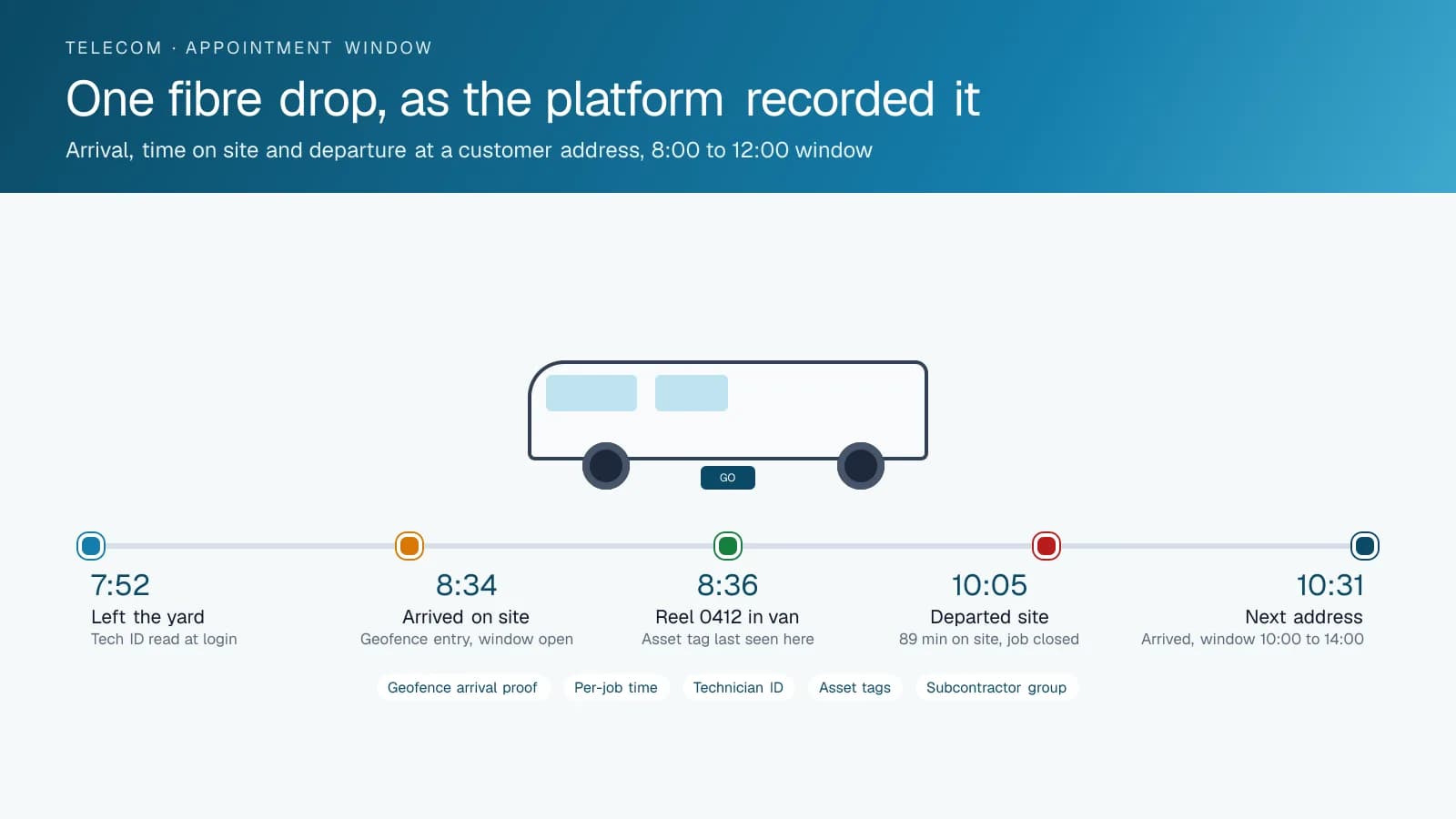
A geofence around each job address writes an arrival record the moment the van crosses it, so you can prove a technician was inside the appointment window. That matters because the carrier's service-level report lists every appointment that missed its window, and the installer pays for each one unless it can show otherwise. High Point GPS draws the geofences from the day's dispatch list. Each record carries the time, the technician logged in on the NFC reader and the van's position, and the technician types none of it. When the carrier says the technician arrived at 12:20 for an 8:00 to 12:00 slot, the trip replay shows the van pulling up at 11:41 and the technician at the door before noon.
The records also work for you on no-access visits. A customer who was not home when the technician arrived is a visit the installer can bill for, and the arrival record with the time on the driveway is the proof. Dispatchers see which vans are running behind before the window closes and can move a job to the nearest technician. At the carrier review, the operations manager brings the daily on-time report by technician and area in place of a stack of work orders.
Per-Job Time, Boom Time and the Real Schedule
Most installation schedules are built on standard job times that nobody has measured in years. With an arrival and departure record at every address, the platform reports the actual time on site for each job, and the average by job type, by technician and by neighbourhood. A new fibre drop that averages ninety minutes in one region and fifty in another points the scheduler at the plant as well as the technicians. The drive time between jobs is in the same report, which is what shows whether a technician is running late because of the jobs or because of the routing.
Bucket trucks add one more record. An IOX-AUXM module reads the boom circuit, and the trip shows when the bucket went up and for how long. Aerial work that runs long at a particular pole line is visible in the report, and the engine hours the truck logged with the boom up feed the maintenance schedule for the hydraulics. When a technician says a pole job took three hours, the record shows the bucket up for forty minutes and the truck idling for the rest.
Tools, Reels and Test Sets That Come Back
A cable van carries more value in reels, meters and test equipment than most people realize, and a drop reel left at a job or a meter taken home is rarely noticed until the next technician needs it. Bluetooth asset tags on each item report to the GPS tracking device in whichever van they are riding in, so the platform knows which reel is in which truck without anyone scanning anything. A tag that was in van 14 at the start of the shift and is not in any van at the end of it shows up on the exception report, along with the last address where it was seen.
The same tags settle the argument about who had the fusion splicer last. Every item's history shows the vans it rode in and the days it rode in them, and the platform can raise an alert when a tagged item leaves the yard in a van that is not scheduled to carry it. Battery trackers on the trailers and the reel carts extend the same visibility to equipment that is not in a van at all.
Subcontractors, Personal Use and the Driving Record
Installers add subcontractor crews when a build-out starts and shed them when it ends, and those crews arrive with their own trucks and their own way of reporting hours. High Point GPS sets up the High Point GPS platform database so each contractor's vans sit in their own group. The contractor sees its own trucks and nothing else; the operations office sees every truck and every job on the same map, with the same arrival records and the same per-job times. The weekly job count and on-time rate per contractor come from one report, and the contractor's invoice is checked against it.
Vans that go home with the technician are a convenience for the early appointment and a cost when they run errands on the weekend. The platform reports after-hours and weekend driving separately, with a personal-use rule that hides the route while still logging the distance, for fleets that allow it. Driver scoring is set for vans on residential streets: speed in school zones, hard braking, backing incidents. AI dash cams, where the fleet adds them, record the road-facing view when a mirror clips a parked car and the driver-facing view when a technician is on the phone between jobs.
Frequently asked questions
Can it prove a technician arrived inside the appointment window?
Yes. A geofence around each job address writes an arrival record with the time and the van's position when the technician pulls up, and a departure record when they leave. The trip replay shows the same visit on a map, and that pair of records is what settles a chargeback dispute with the carrier.
How does it report time per job?
The arrival and departure records at each address give the time on site for every job. The High Point GPS platform reports it per technician, per job type and per area, alongside the drive time between jobs, so the scheduler can see where the standard job times are wrong and where the routing needs work.
Can we see subcontractor trucks too?
Yes. Subcontractor vans carry the same GPS tracking device on the same database, each contractor in its own group. A contractor sees only its own trucks, while the operations office sees all of them. The on-time and per-job reports for contractors and employees come from the same records, so you can check each invoice against them.
How do the asset tags track reels and meters?
A small Bluetooth tag on each reel, meter or ladder reports to the GPS tracking device in whichever van it is riding in. The platform shows which van carries each item, its history and the last place it was seen. At the end of the shift, it flags any tagged item that did not come back to the yard.
Does it record the bucket on our aerial trucks?
Yes. An IOX-AUXM module on the GPS tracking device reads the boom circuit, and the trip record shows when the bucket went up and for how long at each job. The hours logged with the boom up also feed the maintenance schedule for the hydraulics on that truck, so service follows the work it did.
Related solutions
Related guides
- What Is Geofencing? How It Works in Fleet Tracking →
- Asset Tracker Tags vs. Powered GPS Trackers for Equipment →
- IOX Meaning: What Is an IOX Port and What Does It Do? →
- IOX-NFCREADERA: Driver ID by NFC Tap, So Every Trip Has a Name on It →
- Personal Conveyance Rules and MyGeotab Setup: Staying Compliant →
- GPS Fleet Tracking for Small Business: What a 3 to 20 Vehicle Fleet Needs →
Get a free quote
- Over 500 fleets
- Since 2013
- 4.9 on Google (19 reviews)
What are you looking for?
Prefer to talk?Call 1-800-613-6323[email protected]