
Industry
GPS Fleet Tracking for School Buses & Student Transportation
GPS tracking for school buses shows dispatch and parents where each bus is, records every stop and student boarding, and settles late-bus complaints.
Updated September 21, 2026
High Point GPS provides GPS tracking for school bus fleets run by school districts and by the contractors who bus students for them. The transportation office sees every bus on one live map, with the route it should be on, the stops it has made and the time it made each one. No fleet runs under closer watch: parents wait at the stop, the district office answers the phone, and the board asks why the buses cost what they do. The same GPS tracking device that reports position also records the door opening, the stop arm deploying and the flashing lights through its auxiliary inputs, so the stop record shows what the bus did there. A student ID reader at the door adds who boarded and where they got off. When a parent calls about a late bus, dispatch sees where it is and why. When a complaint says a bus did not stop, the trip replay settles it in minutes. Driver-behaviour reporting held to a school-bus standard, engine-hours maintenance and electronic pre-trip inspections complete the system, and a district or a contractor runs it all from one High Point GPS platform database, with a parent app on top if the district wants one.
Common challenges
- Parents calling the office to ask where the bus is, and staff with nothing better than a radio check to offer
- Late-bus and missed-stop complaints with no record of where the bus was
- No proof of which students boarded or where they got off when a child is reported missing from a bus
- Stop-arm and flashing-light use that nobody records, so a violation report rests on memory
- Paper pre-trip inspections that reach the shop after the bus is already on the road
- Substitute and contractor drivers who do not know the route and its stops the way the regular driver does
How High Point GPS helps
- Every bus on one live map for the transportation office, with the planned route and stops beside it
- Stop-arm, door and flashing-light status read from the bus's own circuits through the auxiliary inputs on the GPS tracking device
- Student boarding and alighting records from an NFC or RFID card reader at the door, tied to the stop and the time
- An optional parent app from the High Point GPS add-on library with bus location and ETA, where the district decides what is shared
- Trip replay showing the route, speed and each stop for any bus on any day, for complaint and incident review
- Driver-behaviour scoring set for school buses: speeding near schools, hard braking with students aboard, idling at the stop
- Electronic pre-trip and post-trip inspections in the driver app, with the child-check reminder at the end of the run
- Maintenance reminders on engine hours and mileage, with engine fault codes sent to the shop as they appear
How does school bus GPS tracking answer "Where is the bus?"
School bus GPS tracking puts every bus on a live map, so whoever answers the phone sees the bus, the stop it is approaching and how far behind schedule it is, without a radio call. That matters most in the office's busiest hour, the one when buses run late. The planned route and stop list sit beside the live position, so dispatch spots an off-route bus before anyone reports it. Districts that want to go further give parents the same view: a bus-tracking app from the High Point GPS add-on library shows a parent their child's bus and an arrival estimate for their stop, and the district chooses whether parents see the whole route or only the stops that concern them.
The record behind that view also answers complaints. A parent says the bus did not come; the trip replay shows the bus at the stop at 7:42, the door open for eleven seconds and the stop arm out. A neighbour says a bus was speeding on their street; the replay shows the speed on every segment. High Point GPS sets up the reports so a supervisor can pull the answer while the caller is still on the line.
Recording the Stop, the Door and the Students
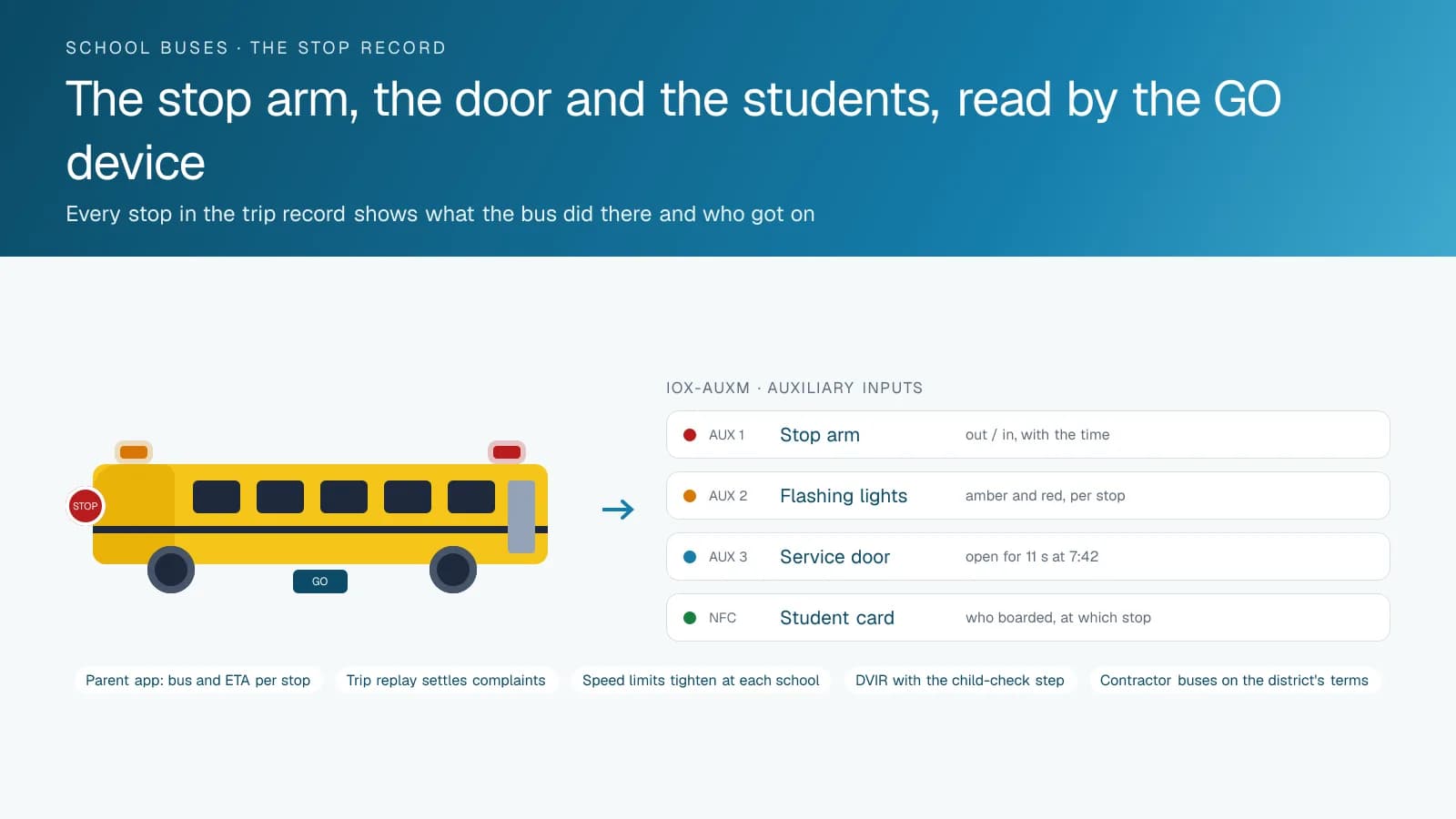
A school bus has circuits no other fleet vehicle has: the stop arm, the crossing gate, the amber and red flashing lights and the service door. An IOX-AUXM module on the GPS tracking device reads whether each is on or off, so every stop in the trip record carries the arm-out, lights-on and door-open times. That is the evidence a district needs when it reports a stop-arm violation by a passing motorist, and it is the evidence that shows the driver followed procedure when a parent says otherwise.
A card reader at the door adds the students. Each student taps a card when boarding and again when leaving, and the platform logs who was on the bus, at which stop they boarded and where they got off. When a child is reported missing after the afternoon run, the office sees in seconds whether the child boarded and where the door opened for them. The same records support ridership counts for route planning and state or provincial reporting without a driver keeping a tally sheet.
Driving Standards Written for School Buses
The rules High Point GPS configures for a school bus fleet reflect how a bus is meant to be driven. Speed thresholds tighten in school zones and around the schools the fleet serves, through geofences around each one. Hard braking and fast cornering are weighted more heavily when the student count from the card reader shows children aboard. Idling at the school loop is reported separately from idling on the road, because one is often unavoidable and the other rarely is. The driver's score reflects the driving that matters, and the coaching conversation starts from a specific trip on a specific day.
AI dash cams add the view from the cab when a district wants it. A road-facing camera records what happened in front of the bus, and a driver-facing camera with distraction and fatigue detection flags the moments a supervisor should see. Video is retrieved by trip and by event, so an incident review takes a few clips, not a day of footage, and the district sets the retention and access policy.
Inspections, Maintenance and the Contractor Question
A daily trip inspection of the bus is a legal requirement in Canada under National Safety Code Standard 13, and in the US each state sets its own school bus inspection rules. On paper, it is easy to rush. Electronic DVIR in the driver app walks the driver through the bus-specific checklist, time-stamps each item and routes a defect to the shop before the bus leaves the yard. The post-trip inspection carries the child-check step, so the record shows the driver walked the bus after the run. Maintenance reminders run on engine hours and mileage, and engine fault codes reach the shop as the bus logs them, which is how a cooling or charging problem gets fixed before it strands a bus on a route.
Districts that contract their busing put the same tracking in the contractor's buses, on the district's terms. High Point GPS sets up the platform database so the district sees its routes, the contractor sees its fleet, and the contract's on-time and safety reporting comes from the same records both parties trust. Because the database is set up around the district, a change of contractor leaves the district's routes, reports and parent app in place.
Frequently asked questions
Can parents see where the bus is?
Yes, if the district chooses to offer it. A bus-tracking app from the High Point GPS add-on library shows parents their child's bus and an arrival estimate for their stop. The district controls what parents can see, and the transportation office keeps the full live map of every bus whatever the parent app shows.
How does the system record student boarding?
An NFC or RFID card reader at the door logs each student's tap on boarding and on leaving, with the stop and the time. The platform then shows who is on which bus and where each student got off. That record answers a missing-child call within seconds and supports the district's ridership reporting.
Does it record the stop arm and flashing lights?
Yes. An IOX-AUXM module on the GPS tracking device reads the stop arm, the crossing gate, the flashing lights and the service door through the bus's own circuits. Every stop in the trip record carries those states and their times, which the district can use when it reports a stop-arm violation by a passing motorist.
Will it work with our contractor's buses?
Yes. High Point GPS sets up the platform database so the district sees its routes and reporting while the contractor manages its own fleet. The on-time and safety records both parties use come from the same data, and the district's routes, reports and parent app stay in place if the busing contract changes hands.
What does the driver have to do differently?
Drivers run the pre-trip and post-trip inspection in the driver app on a tablet or phone instead of on paper, and they log in so trips are attributed to them. Tracking, stop recording and the student card reader all work on their own, with no other input needed from the driver during the run.
Related solutions
Related guides
- School Bus Tracker: Do School Buses Have GPS, and What Can Parents See? →
- School Bus Tracker App: Can You Track a School Bus, and What Does Each Person See? →
- School Bus GPS Tracking System Price: What a District or Contractor Pays Per Bus →
- Passenger ID: Recording Every Student or Employee Boarding With a Card Tap →
- IOX Meaning: What Is an IOX Port and What Does It Do? →
- How Does a Digital DVIR Work? Inspections, Defects and Repairs →
- CVIP Inspections in Alberta and BC: Who Needs One, How Often and Where →
Get a free quote
- Over 500 fleets
- Since 2013
- 4.9 on Google (19 reviews)
What are you looking for?
Prefer to talk?Call 1-800-613-6323[email protected]