
GPS Fleet Tracking & Telematics
What Is Fleet Maintenance Software (CMMS)? Preventive Service on Real Engine Hours and Kilometres
Fleet maintenance software (a CMMS) schedules preventive service by engine hours, km or date, raises work orders and keeps the records regulators ask for.
What Does Fleet Maintenance Software Do?
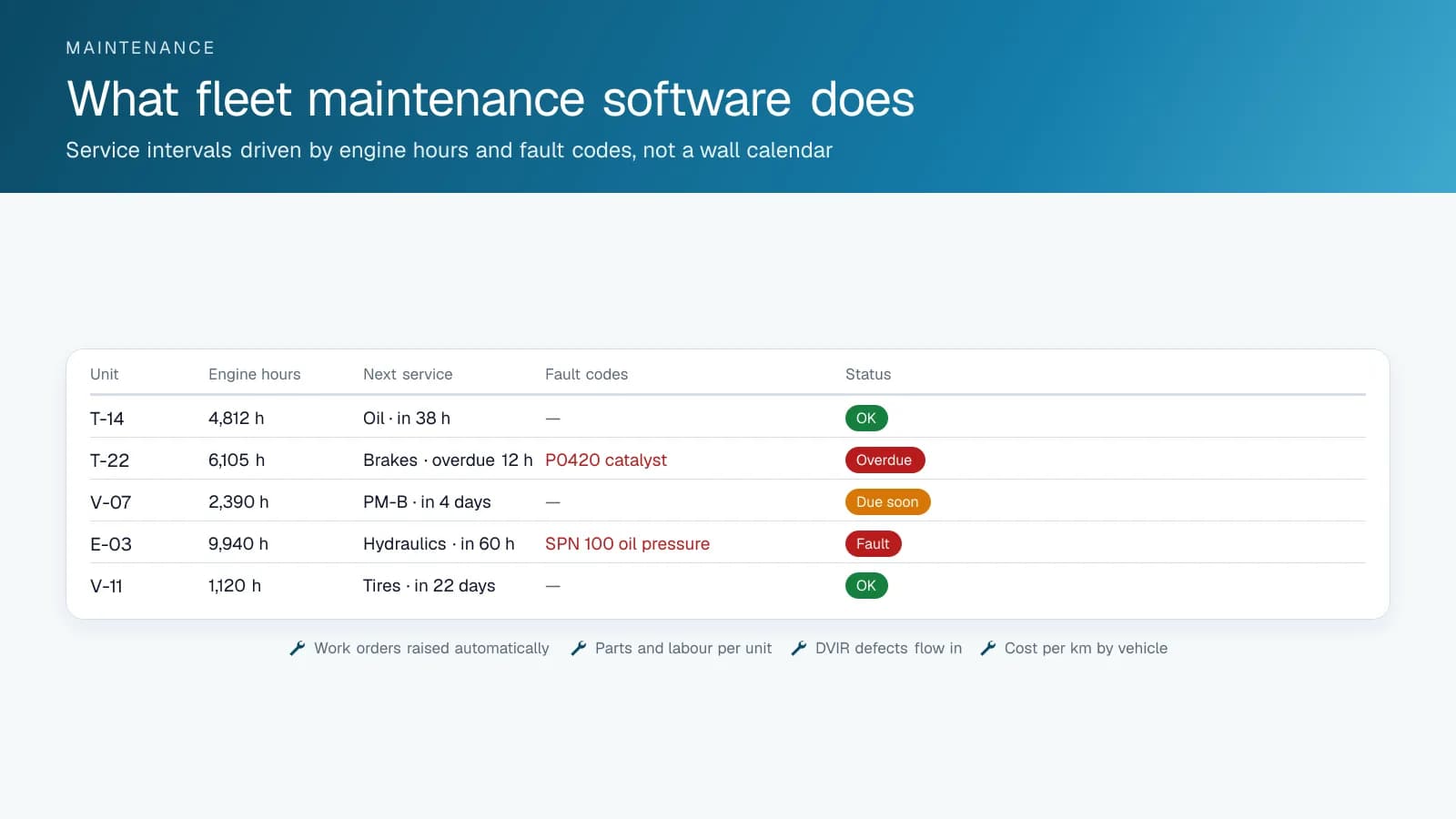
Fleet maintenance software, a CMMS (computerized maintenance management system) built for vehicles and equipment, keeps the service record for every vehicle and piece of equipment and schedules service from what each unit reports: engine hours, odometer, fault codes and inspection defects. The record shows what was done, when, by whom, at what odometer or engine-hour reading, and what it cost in parts and labour. On top of that record, the software runs the preventive maintenance schedule. Each unit has service intervals (oil at so many hours, brakes at so many kilometres, an annual inspection by date), and the software tracks each one against the unit's current reading and flags it as due, due soon or overdue. When a service comes due, it raises a work order, assigns it to the shop or a vendor, and closes the loop once the work is logged. Defects from driver inspections land in the same queue, so a DVIR that reports a cracked mirror turns into a work order instead of a paper form.
How Does Telematics Change Fleet Maintenance Software?
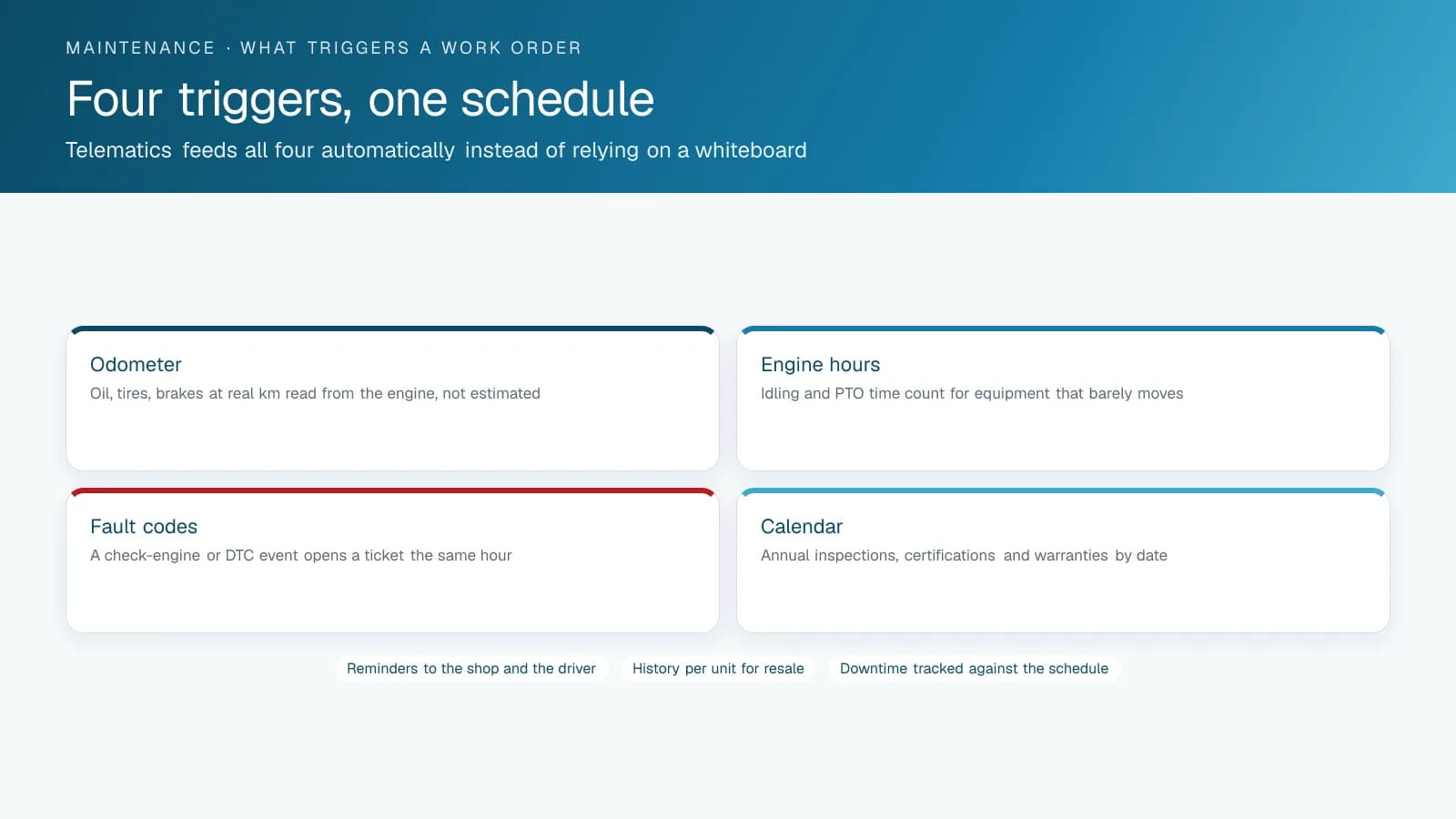
A maintenance system fed by hand runs on whatever readings someone typed in last month. Fed by telematics, it runs on the vehicle's odometer and engine hours as of this morning, and on the fault codes the engine is reporting right now. That matters most in two cases. One is equipment that barely moves: a refuse truck or a generator wears on hours, not kilometres. The other is the fault that would otherwise wait for the next scheduled visit, where a coolant temperature code at nine in the morning becomes a work order at nine-thirty instead of a tow at three. Idle time, hard use and regeneration cycles feed into the interval too, so a truck that idles half its life gets its oil changed on the hours that count.
How Is Fleet Maintenance Software Different From a Spreadsheet or Fleet Management Software?
A spreadsheet has no readings, no reminders and no work orders, and the second mechanic can't see it. Fleet maintenance software also differs from the shop management system a repair garage uses to invoice customers, though the two often connect. And it is narrower than fleet management software in general, which covers tracking, dispatch, driver behaviour and compliance. Maintenance is one module of that. In the High Point GPS platform, it consists of the maintenance reminders, fault reporting and DVIR built into the platform, plus the add-on library maintenance tools that extend them.
What Does a Fleet Get Back?
You get fewer breakdowns on the road, which is the expensive kind of repair. Service happens at the right interval, neither early because the calendar said so nor late from neglect. Cost per unit shows which vehicles to replace. And the maintenance record is ready for a DOT compliance review in the US, a National Safety Code facility audit in Canada or an insurer's inspection without anyone digging through binders. High Point GPS configures maintenance rules, fault alerts and DVIR for fleets across Canada and the United States, and connects add-on library maintenance tools where a fleet's shop needs more.
Which Maintenance Records Do Regulators Expect a Fleet to Keep?
In both the US and Quebec, a fleet must keep a maintenance file on every commercial vehicle, show it on request and keep it for set periods. In the US the rules are FMCSA's 49 CFR Part 396. In Quebec the SAAQ sets them, and an owner can replace the periodic mechanical inspection with its own preventive maintenance program (PEP) once the SAAQ recognizes it. Other provinces apply the National Safety Code through their own regulations, so check with your provincial regulator.
Fleet maintenance software helps most where these rules are strictest. A system that stores each inspection report, links each repair to the defect that triggered it and keeps records past the retention dates hands an auditor or a roadside enforcement officer the file they ask for, without a search through binders. If you keep PEP records only in electronic form, check that the software captures the mechanic's electronic signature, which the SAAQ defines as a personal identification number with an access code that only that mechanic can use.
| Requirement | United States (FMCSA) | Quebec (SAAQ) |
|---|---|---|
| Periodic inspection | At least once every 12 months; report kept 14 months | Mechanical inspection every 6 or 12 months depending on the vehicle (yearly at 4,500 kg or more), or a recognized PEP |
| Preventive service | Systematic inspection, repair and maintenance; intervals set by the carrier | Under a PEP, at least every 3 months for heavy vehicles of 4,500 kg or more (every 6 months under 20,000 km a year) |
| Maintenance records | Kept 1 year where the vehicle is housed or maintained, and 6 months after it leaves the carrier's control | Under a PEP, every service since the program began or the last 2 years, whichever is shorter, and at least 6 months after the vehicle is sold |
| Driver inspection reports | DVIR, repair certification and driver review kept 3 months | Defects from the ronde de sécurité feed the vehicle file; check the SAAQ's rules for your vehicles |
| Electronic records | DVIRs may be created and kept electronically | Allowed, with the mechanic's electronic signature on each maintenance sheet |
A Preventive Maintenance Schedule That Runs on Real Readings
Here is an example schedule for a mixed fleet, with the trigger telematics supplies for each interval. The intervals are illustrative: the manufacturer's manual and your fleet's duty cycle set the real ones.
| Service | Trigger | Source |
|---|---|---|
| Engine oil and filter, light trucks | Every 8,000 km or 6 months | Odometer from the vehicle |
| Engine oil, refuse and vocational trucks | Every 250 engine hours | Engine hours from the vehicle |
| Brake inspection | Every 20,000 km, or on harsh-braking frequency | Odometer and accelerometer events |
| Tire rotation | Every 10,000 km | Odometer |
| Annual safety inspection | By date, 30-day reminder | Calendar |
| Diesel particulate filter service | On regeneration frequency and fault codes | Engine data |
| Hydraulic service, PTO equipment | Every 500 PTO hours | PTO input on the IOX port |
| Any fault code | Immediate ticket | Diagnostic bus |
What Should You Look For in Fleet Maintenance Software?
Start with the meters. Each unit should carry its own reading in engine hours, kilometres or miles, and each service should combine a meter interval with a calendar interval, whichever comes first: oil at so many hours or once a year, so a loader that sits all winter still gets its yearly service. The software should open the work order on its own when a unit comes due, and project the next due date from how much the unit actually runs, so the shop can see next week's work today.
Then check how readings get in. A technician or driver typing them in works, but a link to the telematics you already run (engine hours, odometer and fault codes read from the vehicle) keeps the schedule current without anyone touching it. After that, look at the daily work: inspections on a phone where a failed item opens a repair, work orders that carry steps, parts, labour and photos, a parts list with reorder points, and a cost per unit that adds up parts, labour, outside repairs and fuel. That cost tells you when a unit should be replaced instead of repaired.
Last, hold the records up against the rules your fleet answers to. The table matches what 49 CFR 396.3 asks of US motor carriers, and what the SAAQ asks of Quebec owners on maintenance sheets and under a recognized preventive maintenance program (PEP), with the software feature that covers each item.
| Rule | What it asks for | What the software needs |
|---|---|---|
| 49 CFR 396.3 (US) | Systematic inspection, repair and maintenance of every vehicle the carrier controls | A preventive maintenance schedule on every unit, not only the trucks someone remembers |
| 49 CFR 396.3 (US) | Vehicle identification: company number, make, serial number and year | An asset record per unit with those fields filled in |
| 49 CFR 396.3 (US) | A means to show the nature and due date of each inspection and maintenance operation | Service intervals with a due date or due reading, visible per unit |
| 49 CFR 396.3 (US) | A record of inspections, repairs and maintenance with their date and nature, kept 1 year, and 6 months after the vehicle leaves the carrier | Closed work orders kept as the unit's history, with nothing deleted early |
| SAAQ PEP (Quebec) | Fill in and keep a maintenance sheet for each preventive maintenance, make the repairs and respect the maintenance frequency | Inspection checklists by vehicle class, failed items that open repairs, and overdue alerts per unit |
| SAAQ maintenance sheet (Quebec) | Vehicle description, odometer reading, date, each item marked compliant or not compliant, repairs needed and the signature of the person who did the work | Checklist steps for readings, pass or fail per item and a signature before the job can close |
| SAAQ maintenance sheet (Quebec) | Brake lining measurements for heavy vehicles of 7,258 kg or more | Reading fields with limits on the brake items |
FleetZap: High Point GPS's Fleet Maintenance Software
FleetZap (fleetzap.com) is the maintenance software High Point GPS builds and runs, a CMMS made for equipment fleets: highway trucks next to excavators, trailers next to generators. Preventive maintenance runs by hours, kilometres, miles or the calendar, whichever comes first, for one unit, a category or a hand-picked list, and the work order opens itself when a unit comes due. Work orders carry steps, photos, parts, labour timers and problem, cause and remedy codes, including outside repairs with the vendor's cost. Drivers and operators scan the QR label on a unit to do their pre-trip or pre-use check on a phone, and a failed item opens a repair. Parts, fuel and registration, insurance and inspection due dates sit in the same system, and the cost per unit adds them up.
GPS is optional and chosen unit by unit: FleetZap works fully by hand, with meters entered by technicians or by drivers during their checks. Where you already run telematics, FleetZap connects to your Geotab, Samsara, Motive, Azuga, Verizon Connect, Webfleet, Zonar or other account, reads engine hours, odometer, location and fault codes, and turns a fault code into a work order. Invoices sync with QuickBooks Online, the software works in English and French, and the Dispatch and Rentals modules are there to switch on only if you need them. For a PEP or a 396.3 file, FleetZap's inspections take readings with limits, photos and signatures; compare the sheet you produce with the SAAQ's list above before you rely on it in an audit.
Frequently asked questions
What is fleet maintenance software?
Fleet maintenance software keeps each vehicle's service record and tracks service intervals against real odometer and engine-hour readings. It raises work orders when service comes due or a fault code appears, pulls driver inspection defects into the same queue, and reports what each unit costs to maintain.
How is it different from fleet management software?
Maintenance software is one module of fleet management software, which also covers tracking, dispatch, driver behaviour and compliance. In the High Point GPS platform, maintenance reminders, fault reporting and DVIR are built in, and add-on library tools extend them where a fleet's shop needs more.
Why connect maintenance software to telematics?
Telematics makes service intervals run on the vehicle's real odometer and engine hours instead of readings someone typed in last month. Fault codes also become work orders the same day, instead of waiting for the next scheduled visit. That matters most for equipment that wears on hours, like refuse trucks and generators.
Does it handle driver inspections?
Yes. Defects that drivers report on a DVIR flow into the maintenance queue as work orders, and the repair is recorded against the original defect. A cracked mirror reported in the morning becomes a ticket for the shop, with no paper form to lose.
Is it worth it for a small fleet?
Often, yes. Even a small fleet pays heavily for roadside breakdowns, and service on real readings helps avoid them. A small fleet also gets service done at the right interval and a maintenance record ready for a compliance review or an insurer's inspection.
How long does a fleet have to keep maintenance records?
In the US, FMCSA requires maintenance records for 1 year where the vehicle is housed and for 6 months after it leaves the fleet, periodic inspection reports for 14 months and DVIRs for 3 months. In Quebec, PEP records cover every service since the program began or the last 2 years, whichever is shorter, plus 6 months after the vehicle is sold.
Can fleet maintenance records be kept electronically?
Yes. FMCSA allows driver vehicle inspection reports to be created and kept in electronic form. In Quebec, PEP records can be kept on a computer system as long as every maintenance sheet carries the mechanic's electronic signature, meaning a personal identification number with an access code that only that mechanic can use.
What is a CMMS for a fleet?
A CMMS, or computerized maintenance management system, is software that organizes maintenance work: the list of units, the work orders that repair them, preventive maintenance schedules, inspections, spare parts and the history and cost of everything done. A fleet CMMS adds what moving equipment needs, such as engine hours, odometers, a telematics link and units that work away from the shop.
What records does 49 CFR 396.3 require?
49 CFR 396.3 requires a US motor carrier to identify each vehicle (company number, make, serial number and year), have a means of showing the nature and due date of each inspection and maintenance operation, and record each inspection, repair and maintenance with its date and nature. The records stay where the vehicle is housed or maintained for 1 year, and for 6 months after it leaves.
Does FleetZap work with Geotab and other telematics?
Yes. FleetZap connects to an existing Geotab, Samsara, Motive, Azuga, Verizon Connect, Webfleet or Zonar account, among others, and reads engine hours, odometer, location and fault codes, which then drive preventive maintenance. Telematics stays optional: units without a tracker keep working by hand, with meter readings entered by technicians or by drivers during their checks.
Sources
- FMCSA: Vehicle Maintenance Requirements
- eCFR, 49 CFR Part 396 Inspection, Repair, and Maintenance
- SAAQ, Guide d'information d'un programme d'entretien préventif (French)
- SAAQ, Fiche d'entretien préventif, camion (French, minimum intervals)
- SAAQ, Vérification mécanique périodique obligatoire (French)
- CCMTA, National Safety Code
- SAAQ, Dossier du véhicule lourd (French, vehicle file contents and retention)
- eCFR, 49 CFR 396.3 Inspection, repair, and maintenance
- SAAQ, Programme d'entretien préventif (PEP) (French)
- SAAQ, Mandatory Mechanical Maintenance (maintenance sheet contents)
- FleetZap: fleet maintenance software
- FleetZap: what a CMMS does
- FleetZap: integrations
Related solutions & products
Related terms
Continue reading
- GPS Fleet Tracking & Management Software overview →
- Fleet Maintenance Schedule: Engine Hours vs Calendar and Mileage →
- Fleet Management KPIs: What to Track, How to Calculate Them and Where the Data Comes From →
- What Is Fleet Management? A Starter Guide for New Fleet Managers →
- Municipal Fleet Tracking: A Buyer's Guide for Cities, Counties and Public Works →
- More in GPS Fleet Tracking & Telematics →
Get a free quote
- Over 500 fleets
- Since 2013
- 4.9 on Google (19 reviews)
What are you looking for?
Prefer to talk?Call 1-800-613-6323[email protected]