
Industry
GPS Fleet Tracking for Pest Control
GPS tracking for pest control fleets proves each service stop with arrival and departure times, tightens routes and ties chemical inventory to the van.
Updated September 21, 2026
High Point GPS provides GPS tracking for pest control companies that run residential and commercial service on recurring plans. Every van appears on one live map, and each stop becomes a record with an arrival time, a time on site and a departure time. Your reputation rests on whether those recurring visits happened. A customer on a quarterly plan calls to say no one came; a property manager wants the log for every unit on the contract; a technician's day ends at 3 p.m. with twelve stops done when the schedule said sixteen. A geofence around the customer's address creates the stop record, so it does not depend on a technician remembering to tap a button. High Point GPS builds those records into a proof-of-service report the office can send with an invoice or read to a customer on the phone. The same trip data shows where routes overlap, where a technician drives forty minutes between two stops in the same suburb and which accounts could move to a denser day. Chemical inventory stays tied to the vehicle, so the office knows which van carries which products and can answer a regulator or a customer who asks what was applied. After-hours and weekend driving lands on an exceptions report, and each technician's driving is scored on speeding, hard braking and idling, with coaching that starts from a specific trip. Recurring-service scheduling ties into dispatch, and the open API carries stop records into your service software.
Common challenges
- Recurring-plan customers who say the technician never came, and only the technician's word to answer them
- Routes built by habit that send two technicians into the same neighbourhood on the same day
- Property-management contracts that require a per-unit service log, assembled by hand from paper tickets
- No record of which chemicals were in which van when a customer or a regulator asks what was applied
- Company vans used on evenings and weekends, invisible until the fuel bill arrives
- Technician driving that costs fuel, brakes and insurance claims, with no data to coach from
How High Point GPS helps
- Live position of every van beside the day's stop list, so by mid-morning the office sees who is ahead and who is behind
- A geofence around each customer address that records arrival, time on site and departure with no input from the technician
- Proof-of-service reports by customer, contract and date that go out with the invoice or answer a missed-visit call
- Route density analysis from real trip data: distance between stops, drive time per stop and accounts that belong on another day
- Chemical inventory tied to the vehicle through driver ID and vehicle assignment, so the office knows what each van carries
- After-hours, weekend and out-of-territory driving on an exceptions report, with the trip and the driver attached
- Technician driving scores for speeding, hard braking, cornering and idling, with coaching reports built from specific trips
- Recurring-service scheduling, plus stop records passed to your service software through the open API
How does GPS tracking prove a pest control visit happened?
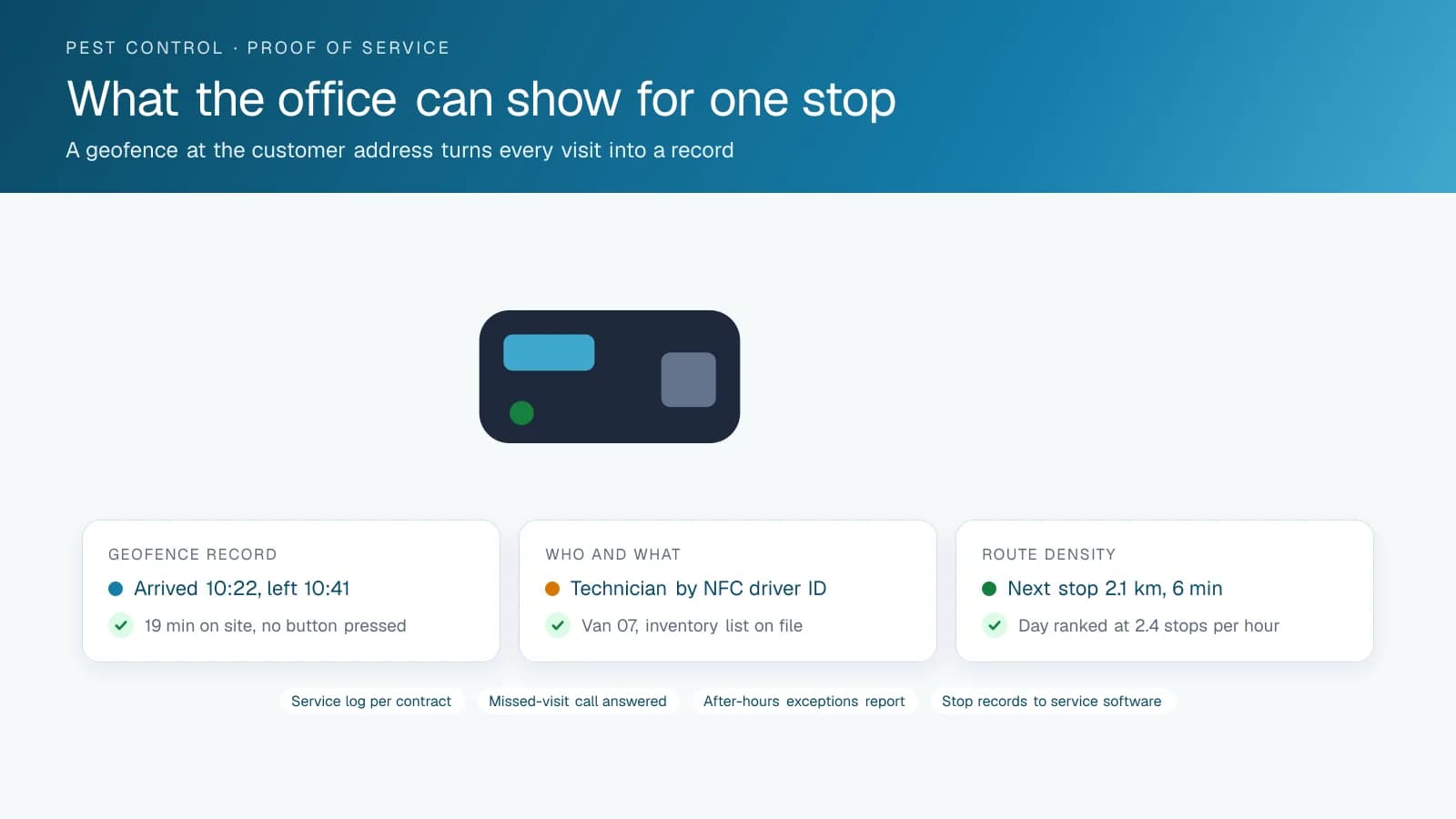
GPS tracking proves a pest control visit with a geofence around the customer's address that records when the van arrived and left, with no button for the technician to press. That matters most on the worst call an office takes: a customer on a quarterly plan saying nobody came. High Point GPS sets a geofence around every address in the account list, and the GPS tracking device records the van's arrival, the minutes it stayed and its departure, whether or not the technician closed the ticket. When the customer calls, the office sees the van at the address on the 14th from 10:22 to 10:41 and says so. If the technician did skip the stop, the office sees that too and deals with it before the customer cancels.
For commercial and property-management accounts, the same records become the contract's service log. A report by property and date lists each visit with its arrival and departure time, ready to attach to the invoice or hand over at renewal. A restaurant chain asking for proof of monthly service at forty locations gets one report in place of forty paper tickets, and the office produces it in minutes. Residential customers get a smaller version: when the office can read a visit time to a caller, most complaints end there and never turn into cancellations.
Route Density and the Forty-Minute Gap
Pest control routes accumulate over years as accounts are added wherever the salesperson signed them. The result is a technician who drives from one side of the city to the other twice a day while a colleague works the same streets. Trip data shows the real cost of that: distance between consecutive stops, drive time as a share of the day and the stops where a technician spent longer driving than working. High Point GPS builds a route density report that ranks each technician's day by stops per hour and flags the accounts that would fit better on another route or another day.
Recurring-service scheduling is where the fix happens. When the office moves an account to a different day, the dispatch view shows the new stop list on the map and the drive time it saves. Seasonal work, one-time treatments and callbacks slot into the existing routes based on where the vans already are, and a technician who finishes early is visible to the office before the next callback comes in. Over a season, the report shows whether the changes held and where the next set of accounts should move, and the branch manager reads it as a single page, not a map of pins.
What Is in the Van and Who Is Driving It
A pest control van is a rolling chemical store, and the office needs to know which products are in which vehicle. Vehicle assignment in the High Point GPS platform ties each van to its inventory list and each trip to a technician through the IOX-NFCREADERA driver ID reader. When a customer calls about a reaction after a treatment or a regulator asks what was applied at an address, the office can say which technician was there, which van they drove and what that van was stocked with. The GPS tracking device's trip record shows the visit; the assignment record shows the rest.
Company vans do not belong at the lake on a Saturday. Zone rules and time-of-day rules put after-hours, weekend and out-of-territory trips on an exceptions report with the trip replay attached. Most weeks the report is empty. Where an owner suspects a van is being used for side work, the report either confirms it or clears the technician, and either outcome is better than a suspicion. Where a technician does need the van at home between an early stop and a late one, the office sets the exception for that route and the report stops flagging it.
Technician Scoring and the Cost of a Heavy Right Foot
A pest control van carries a technician, a sprayer and a tank of product through residential streets all day. Speeding, hard braking and fast cornering cost fuel and brakes, spill product in the back and show up in the insurance renewal. High Point GPS configures driver scoring for the work: speed limits per zone, with tighter thresholds in the residential areas where most stops are, and idling reported separately at the customer's driveway and on the road. Each technician sees their own score, and the branch manager sees the ranking, with each event tied to a trip they can replay.
Maintenance reminders run on mileage and engine hours, and engine fault codes reach the office as the van logs them. A pre-trip inspection in the driver app takes the place of a paper checklist and puts a defect in front of the shop before the van leaves the yard. Fuel-card integration matches each fill to the van and the driver, which is how a fuel bill that has crept up finds its explanation. Maintenance and fuel data sit beside the driving score, and a technician whose van burns more fuel than the route explains is a technician whose trips are worth a look.
Frequently asked questions
Does the technician have to check in at each stop?
No. A geofence around each customer address records arrival, time on site and departure automatically from the GPS tracking device in the van. Technicians can still close tickets in the company's service software as usual, and the geofence record stands on its own when a customer disputes that a visit took place.
Can it produce a service log for a commercial contract?
Yes. High Point GPS builds a report by property, contract and date that lists each visit with its arrival and departure time. The office can attach it to an invoice, send it at contract renewal or pull it for a property manager who asks for the service log on a single unit.
How does it help with route density?
Trip data shows the distance and drive time between consecutive stops for every technician, every day. A route density report ranks each day by stops per hour and flags the accounts that would fit better on another route or another day. That report is where the office starts when it rebuilds the schedule.
Will it show after-hours use of the vans?
Yes. Time-of-day and zone rules put trips outside working hours, on weekends or outside the territory on an exceptions report, with the driver and the trip replay attached. The owner reviews only the exceptions and does not have to search through every trip to find a van used for side work.
Does it connect to our pest control software?
Yes, through the open High Point GPS API, which carries stop records, arrival times and vehicle position to your service or scheduling software. When the vendor has no ready integration, High Point GPS builds the connection or a custom add-in, so the office works from one system.
Related solutions
Related guides
- GPS Fleet Tracking for Small Business: What a 3 to 20 Vehicle Fleet Needs →
- What Is Geofencing? How It Works in Fleet Tracking →
- Route Optimization Software: What It Does and When It Pays →
- IOX-NFCREADERA: Driver ID by NFC Tap, So Every Trip Has a Name on It →
- Driver Safety Scorecard: How Driver Scoring Works for Fleets →
- Fleet Fuel Management: How to Reduce Fleet Fuel Costs →
Get a free quote
- Over 500 fleets
- Since 2013
- 4.9 on Google (19 reviews)
What are you looking for?
Prefer to talk?Call 1-800-613-6323[email protected]