
Industry
GPS Fleet Tracking for HVAC, Plumbing & Electrical
GPS tracking for HVAC, plumbing and electrical fleets: send the closest technician, prove time on site for the invoice, and control after-hours van use.

Updated September 21, 2026
High Point GPS provides GPS tracking for HVAC, plumbing and electrical fleets, so the dispatcher sends the closest available technician and every invoice has a time-on-site record behind it. Every van sits on one live map, and the platform connects to the field-service software you already dispatch from. A trades company sells time, and much of that time goes on driving between jobs. With the map in front of them, the dispatcher can send the nearest technician to the emergency call, give the customer an honest arrival window and fill a cancelled slot with the next job on the board. Geofences around each customer site record arrival and departure, so the time on site on the invoice comes from the record instead of the technician's memory, and a trip replay settles a disputed bill. The same GPS tracking device reports idling, speeding and after-hours use of a van that should be parked, and Bluetooth asset tags on the expensive tools and test equipment show which van each one is in. Maintenance reminders keep high-mileage vans on the road, and the office works in one system instead of two.
Common challenges
- Emergency calls going to whoever answers the radio first instead of the closest technician
- Customers given a four-hour window because the office cannot tell when the technician will arrive
- Time-on-site disputes over invoices, with only the technician's own notes as backup
- Vans driven home and used on weekends, with the fuel and wear showing up in the accounts
- Expensive tools and test equipment that go missing between vans and job sites
- Missed oil changes and brake work because nobody tracks mileage until something fails
How High Point GPS helps
- Every van on one live map, with the logged-in technician and the current job status
- Closest-technician dispatch for emergency calls, with the drive time shown before the call is assigned
- Customer-site geofences that record arrival and departure for every job and feed time on site to the invoice
- Arrival notifications to the customer, sent from the platform or from the field-service software it connects to
- After-hours and weekend use alerts, with the trip and destination on record
- Bluetooth asset tags on tools, meters and test equipment that show which van or site each one is in
- Idling, speeding and harsh-driving reports per technician, for coaching and the insurance renewal
- Maintenance reminders on mileage and engine hours, with fault codes sent to the shop as the van logs them
How does GPS tracking help dispatch the closest HVAC or plumbing technician?
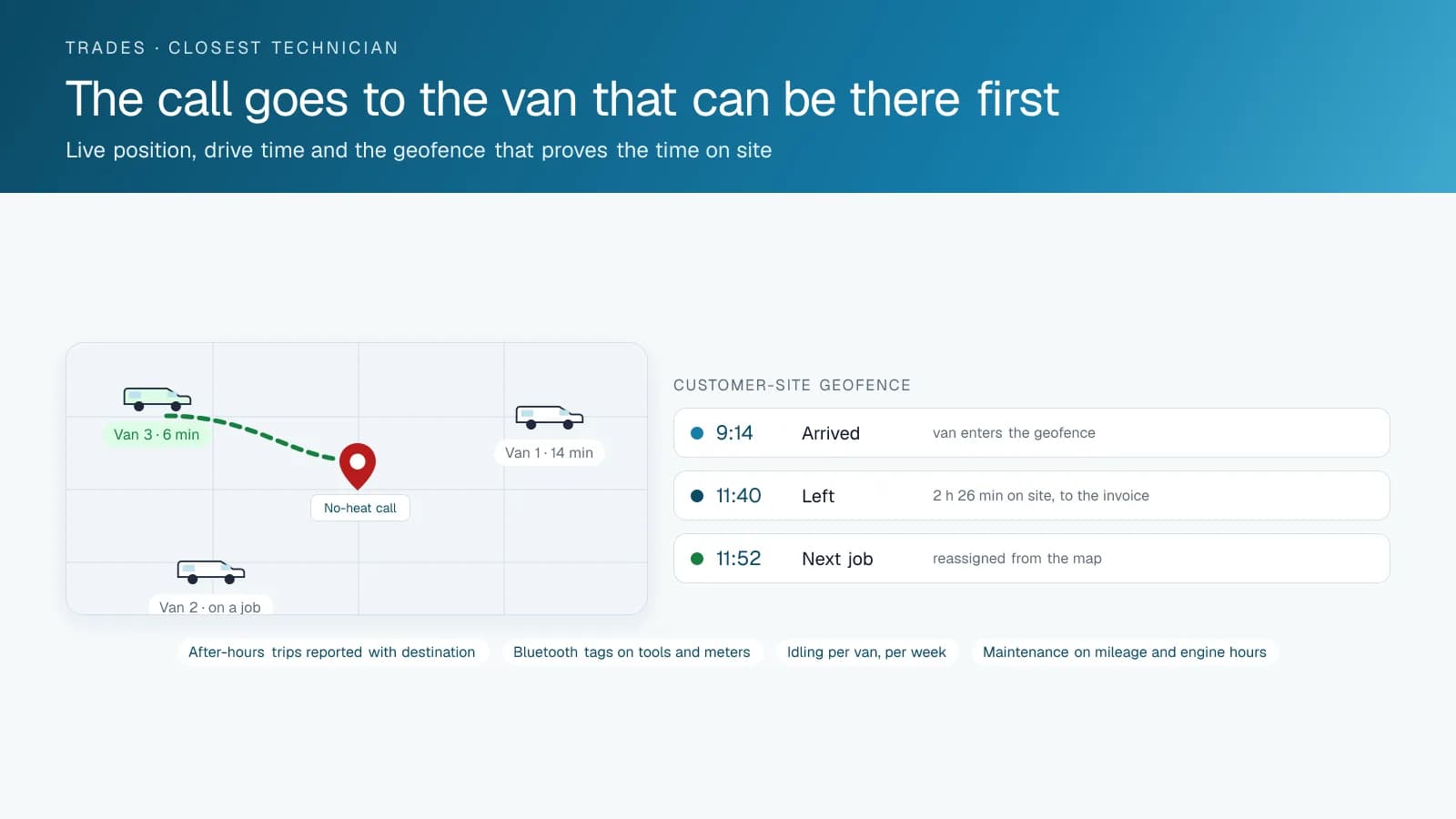
GPS tracking shows the dispatcher every van's position and job status, so an emergency call goes to the technician who can arrive first. A no-heat call in January or a flooded basement on a Saturday is won or lost on how fast someone gets there. On the live map, the dispatcher sees which technicians are on a job, which are finishing and which are driving, and assigns the call to the one who can be there soonest instead of the one who answered first. The drive time shows before the assignment, so the customer hears a real window. When a job cancels, the van's position shows which job on the board it can take next, and the technician's day gets rebuilt without a phone tree.
High Point GPS connects the tracking to the field-service software you already use, a dispatch board built for the trades or a general scheduling tool. Job status flows one way, live position flows the other, and the dispatcher stays in one screen. Companies that run on paper or a whiteboard can use the platform's own dispatch and messaging tools from day one.
Proving the Time on Site
A geofence around each customer address records the moment the van arrives and the moment it leaves. That gives the invoice a time on site that came from the record instead of from a technician filling in a timesheet at the end of the day. When a customer questions a bill, the office pulls the trip: the van arrived at 9:14, left at 11:40, and the route in between shows it did not go anywhere else. Most disputes end there.
The same records feed payroll and job costing. Drive time, time on site and the return to the shop are separated for each technician, which shows where the day actually goes and which jobs are more travel than work. Companies that bill by the hour and companies that bill by the job both use it, the first to defend the hours and the second to see which jobs are priced too low.
Vans, Fuel and After-Hours Driving
Trades vans are often taken home, which is convenient for the early call and expensive when the van becomes the family vehicle. The platform reports after-hours and weekend trips with the route and the destination, and the company sets the policy it wants: a simple report, an alert when a van moves outside working hours, or a geofence around the technician's home that only flags trips that leave it. Idling reports show the vans left running in a driveway or at a supplier, which on a fleet of vans is a fuel line item on its own.
Driving behaviour is scored per technician, with speeding, hard braking and cornering events in the record. That matters for two reasons: the company's name is on the side of the van, and the insurer asks for it. A year of clean driver reports and a dash-cam program are records a fleet can show its insurer at renewal.
Tools, Equipment and Maintenance
A trades van carries thousands of dollars of tools, gauges, pressure testers and meters, and every company has a story about the one that walked. Bluetooth asset tags on the expensive items report to the GPS tracking device in whichever van they are in, so the office sees which van has the recovery machine or the pipe threader and which job site it was last near. When a tool is left on a site, the record shows where.
The vans themselves are the fleet's biggest asset and the easiest to neglect. Maintenance reminders run on mileage and engine hours per van, and engine fault codes are sent to the shop or the dealer as the van logs them, so a charging or emissions fault is booked before it strands a technician on the highway. Electronic DVIR, if the company wants it, gives each technician a two-minute walk-around in the app instead of a form nobody fills in.
Frequently asked questions
Does it work with our field-service or dispatch software?
In most cases, yes. The platform has an open API, and High Point GPS builds the connection to the field-service or dispatch software you already use. Job status flows to the map and live position flows to the dispatch board, so the dispatcher works from one screen.
Can it prove how long a technician was on site?
Yes. A geofence around the customer's address records arrival and departure times for every visit, and the trip replay shows the route in between. That time on site goes straight to the invoice. When a customer questions the bill, the office pulls the trip record, and most disputes end there.
How do we control after-hours use of the vans?
The platform reports every trip outside the hours you set, with the route and destination, and can alert a manager when a van moves after hours. Many companies prefer a simple weekly report to live alerts. Once technicians know personal trips are recorded, most of that driving stops.
Can we track tools and equipment as well as the vans?
Yes. Bluetooth asset tags on tools and test equipment report to the GPS tracking device in whichever van they are in, so the office sees which van or job site each item is at. Larger equipment, such as a recovery machine or pipe threader, can carry its own battery-powered tracker.
Is it worth it for a fleet of five vans?
Usually. A small trades fleet loses time and money in exactly the places tracking fixes: a wrong dispatch, a disputed invoice, a van used on the weekend. High Point GPS installs a GPS tracking device in each van, sets up the alerts and reports a small office needs, and supports the fleet after installation.
Related solutions
Related guides
- GPS Fleet Tracking for HVAC, Plumbing and Electrical Contractors →
- HVAC and Plumbing Dispatch Software: What to Look For →
- GPS Fleet Tracking for Small Business: What a 3 to 20 Vehicle Fleet Needs →
- Bluetooth Asset Tracking Tags and the IOX-BT: How They Work and What to Tag →
- What Is Geofencing? How It Works in Fleet Tracking →
- Fleet Fuel Management: How to Reduce Fleet Fuel Costs →
Get a free quote
- Over 500 fleets
- Since 2013
- 4.9 on Google (19 reviews)
What are you looking for?
Prefer to talk?Call 1-800-613-6323[email protected]